What is a SAN? Ultimate storage area network guide

A storage area network (SAN) is a dedicated high-speed network or subnetwork that interconnects and presents shared pools of storage devices to multiple servers.
The availability and accessibility of storage are critical concerns for enterprise computing. Traditional direct-attached disk deployments within individual servers can be a simple and inexpensive option for many enterprise applications, but the disks -- and the vital data those disks contain -- are tied to the physical server across a dedicated interface, such as SAS. Modern enterprise computing often demands a much higher level of organization, flexibility and control. These needs drove the evolution of the storage area network (SAN).
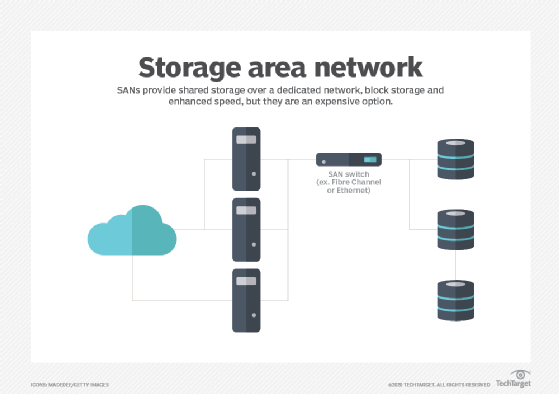
SAN technology addresses advanced enterprise storage demands by providing a separate, dedicated, highly scalable high-performance network designed to interconnect a multitude of servers to an array of storage devices. The storage can then be organized and managed as cohesive pools or tiers. A SAN enables an organization to treat storage as a single collective resource that can also be centrally replicated and protected, while additional technologies, such as data deduplication and RAID, can optimize storage capacity and vastly improve storage resilience -- compared to traditional direct-attached storage (DAS).
What storage area networks are used for
Simply stated, a SAN is a network of disks that is accessed by a network of servers. There are several popular uses for SANs in enterprise computing. A SAN is typically employed to consolidate storage. For example, it's common for a computer system, such as a server, to include one or more local storage devices. But consider a data center with hundreds of servers, each running virtual machines that can be deployed and migrated between servers as desired. If the data for one workload is stored on that local storage, the data might also need to be moved if the workload is migrated to another server or restored if the server fails. Rather than attempt to organize, track and use the physical disks located in individual servers throughout the data center, a business might choose to move storage to a dedicated storage subsystem, such as a storage array, where the storage can be collectively provisioned, managed and protected.
A SAN can also improve storage availability. Because a SAN is essentially a network fabric of interconnected computers and storage devices, a disruption in one network path can usually be overcome by enabling an alternative path through the SAN fabric. Thus, a single cable or device failure doesn't leave storage inaccessible to enterprise workloads. Also, the ability to treat storage as a collective resource can improve storage utilization by eliminating "forgotten" disks on underutilized servers. Instead, a SAN offers a central location for all storage, and enables administrators to pool and manage the storage devices together.
All of these use cases can enhance the organization's regulatory compliance, disaster recovery (DR) and business continuity (BC) postures by improving IT's ability to support enterprise workloads. But to appreciate the value of SAN technology, it's important to understand how a SAN differs from traditional DAS.
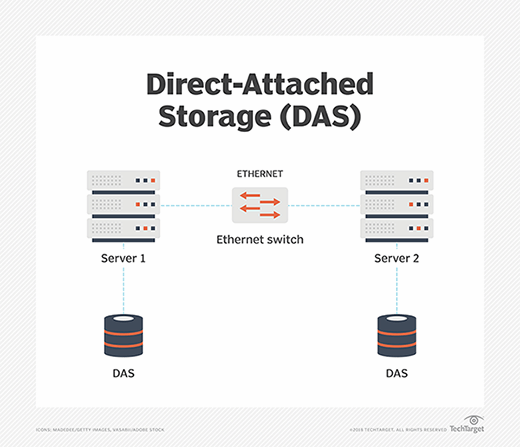
With DAS, one or more disks are directly connected to a specific computer through a dedicated storage interface, such as SATA or SAS. The disks are often used to hold applications and data intended to run on that specific server. Although the DAS devices on one server can be accessed from other servers, the communication takes place over the common IP network -- the LAN -- alongside other application traffic. Accessing and moving large quantities of data through the everyday IP network can be time-consuming, and the bandwidth demands of large data movements can affect the performance of applications on the server.
A SAN operates in a profoundly different manner. The SAN interconnects all the disks into a dedicated storage area network. That dedicated network exists separate and apart from the common LAN. This approach enables any of the servers connected to the SAN to access any of the disks attached to the SAN, effectively treating storage as a single collective resource. None of the SAN storage data needs to pass across the LAN -- mitigating LAN bandwidth needs and preserving LAN performance. Because the SAN is a separate dedicated network, the network can be designed to emphasize performance and resilience, which are beneficial to enterprise applications.
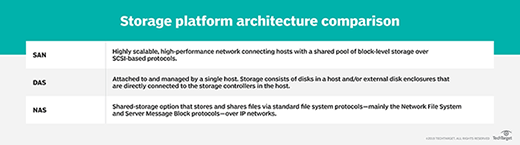
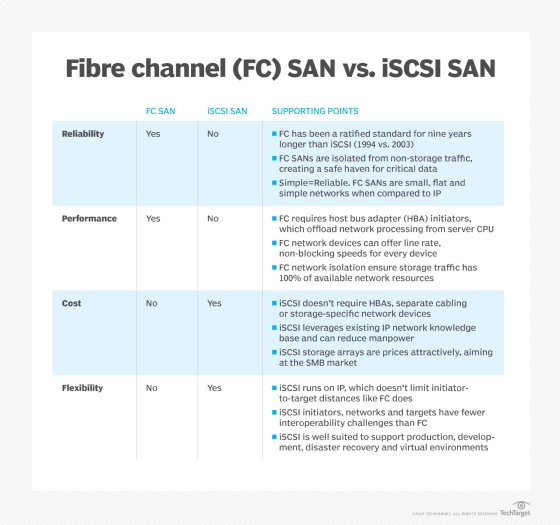
A SAN can support a huge number of storage devices, and storage arrays -- specially designed storage subsystems -- that support a SAN can scale to hold hundreds or even thousands of disks. Similarly, any server with a suitable SAN interface can access the SAN and its vast storage potential, and a SAN can support many servers. There are two principal types of networking technologies and interfaces employed for SANs: Fibre Channel and iSCSI.
- Fibre Channel. FC is a high-speed network noted for its high throughput and low latency, offering data rates up to 128 Gbps across metropolitan area distances -- up to about 6 miles or 10 km -- when optical fiber cabling and interfaces are used. This kind of dedicated network potentially enables block level storage to be consolidated in one location, while servers can be distributed across campus buildings or a city. Traditional copper cabling and corresponding FC interfaces can also be used when storage and servers are in the same place and distances don't exceed 100 feet (10 meters). More recently, FC naming and throughput designations have changed to Gigabit FC and the latest iterations of the interface promise 128 and 256 GFC respectively. As a network interface, FC supports several topologies, including point-to-point, arbitrated loop and switched fabric, like modern Ethernet. FC is implemented by deploying FC host bus adapters (HBAs) in each server, storage or FC network switches or other network devices. Each HBA includes one or more ports where data is exchanged. Ports can be virtual or physical, and physical ports are interconnected through cables allowing HBAs and switches to form a network fabric.
- ISCSI. The iSCSI is another type of network intended to connect computing with shared storage. It can run at speeds up to 100 Gbps but provides several simplifications for data center operators. Where FC offers a unique and highly specialized network design, iSCSI merges traditional SCSI block data and command packets with commonplace Ethernet and TCP/IP networking technology. This enables iSCSI storage networks to use the same cabling, network adapters, switches and other network components used in any Ethernet network; in many cases, iSCSI can operate on the same Ethernet LAN -- without a separate LAN -- and can exchange data across the LAN, WAN and even the internet. Each server's operating system sees the iSCSI data access as simply another locally connected SCSI disk. ISCSI operates using the concepts of initiators and targets. An initiator is typically a server that is participating in the iSCSI SAN and sends SCSI commands over an IP network. Initiators can be software-based, such as an operating system, or hardware-based, such as a storage array. A target is often a storage resource -- such as a dedicated, network-connected hard-disk storage device -- but can also be another computer.
How a SAN works
A SAN is essentially a network that is intended to connect servers with storage. The goal of any SAN is to take storage out of individual servers and locate the storage collectively where storage resources can be centrally managed and protected. Such centralization can be performed physically, such as by placing disks into a dedicated storage subsystem like a storage array. But centralization can also be increasingly handled logically through software -- such as VMware vSAN -- which relies on virtualization to find and pool available storage.
By connecting the collective storage to servers through a separate network -- apart from the traditional LAN -- storage traffic performance can be optimized and accelerated because the storage traffic no longer needs to compete for LAN bandwidth needed by servers and their workloads. Thus, enterprise workloads can potentially get faster access to astonishing volumes of storage. A SAN is generally perceived as a series of three distinct layers: a host layer, a fabric layer and a storage layer. Each layer has its own components and characteristics.
- Host layer. The host layer represents the servers that are attached to the SAN. In most cases, the hosts -- servers -- are running enterprise workloads, such as databases, that require access to storage. Hosts typically employ traditional LAN -- Ethernet -- components to enable the server and its workload to communicate with other servers as well as users. However, SAN hosts also incorporate a separate network adapter that is dedicated to SAN access. The network adapter used for most FC SANs is called a host bus adapter (HBA). As with most network adapters, the FC HBA employs firmware to operate the HBA's hardware, as well as a device driver that interfaces the HBA to the server's operating system. This configuration allows the workload to communicate storage commands and data through the operating system to the SAN and its storage resources. FC is one of the most popular and powerful SAN technologies available, but other broadly accepted SAN technologies include InfiniBand along with iSCSI. Each technology poses its own array of costs and tradeoffs, so the organization must carefully consider its workload and storage needs when selecting a SAN technology. Ultimately, the host, fabric and storage layers must share the same SAN technology.
- Fabric layer. The fabric layer represents the cabling and network devices that comprise the network fabric that interconnects the SAN hosts and SAN storage. SAN networking devices within the fabric layer can include SAN switches, gateways, routers and protocol bridges. Cabling and the corresponding ports of SAN fabric devices can employ optical fiber connections -- for long range network communication -- or traditional copper-based cables for shore-range local network communication. The difference between a network and a fabric is redundancy: the availability of multiple alternate pathways from hosts to storage across the fabric. When a SAN fabric is constructed, multiple connections are generally implemented to provide multiple paths. If one path is damaged or disrupted, SAN communication will use an alternative path.
- Storage layer. The storage layer is comprised of the various storage devices collected into various storage pools, tiers or types. Storage typically involves traditional magnetic HDDs but can also include SSDs along with optical media devices, such as CD and DVD drives, and tape drives. Most storage devices within a SAN are organized into physical RAID groups that can be employed to increase storage capacity, improve storage device reliability or both. Logical storage entities, such as RAID groups or even disk partitions, are each assigned a unique LUN that serves the same basic purpose as a disk drive letter, such as C or D. Thus, any SAN host can potentially access any SAN LUN across the SAN fabric. By organizing storage resources and designating storage entities in such a manner, an organization can permit which host can access specific LUNs, enabling the business to exert granular control over the organization's storage assets. There are two basic methods for controlling SAN permissions: LUN masking and zoning. Masking is essentially a list of the LUNs that are unavailable to or shouldn't be accessed by a SAN host. By comparison, zoning controls host access to LUNs by configuring the fabric itself, limiting host access to storage LUNs that are in an approved -- allowed -- SAN zone.
A SAN also employs a series of protocols enabling software to communicate or prepare data for storage. The most common protocol is the Fibre Channel Protocol (FCP), which maps SCSI commands over FC technology. The iSCSI SANs will employ an iSCSI protocol that maps SCSI commands over TCP/IP. But there are other protocol combinations, such as ATA over Ethernet, which maps ATA storage commands over Ethernet, as well as Fibre Channel over Ethernet (FCoE) and other lesser-used protocols -- including iFCP, which maps FCP over IP, and iSCSI Extensions for RDMA , which maps iSCSI over InfiniBand. SAN technologies will often support multiple protocols, helping to ensure that all layers, operating systems and applications are able to communicate effectively.
Setting up the storage area network
To integrate all components of the SAN, an enterprise first must meet the vendor's hardware and software compatibility requirements:
- host bus adapters (firmware version, driver version and patch list);
- switch (firmware); and
- storage (firmware, host personality firmware and patch list).
Then, to set up the SAN, you need to do the following:
- Assemble and cable together all the hardware components and install the corresponding software.
- Check the versions.
- Set up the HBA.
- Set up the storage array.
- Change any configuration settings that might be required.
- Test the integration.
- Test all the operational processes for the SAN environment, including normal production processing, failure mode testing and backup.
- Establish a performance baseline for every component as well as for the entire SAN.
- Document the SAN installation and operational procedures.
SAN fabric architecture and operation
The core of a SAN is its fabric: the scalable, high-performance network that interconnects hosts -- servers -- and storage devices or subsystems. The design of the fabric is directly responsible for the SAN's reliability and complexity. At its simplest, an FC SAN can simply attach HBA ports on servers directly to corresponding ports on SAN storage arrays, often using optical cables for top speed and support for networking over greater physical distances.
But such simple connectivity schemes belay the true power of a SAN. In actual practice, the SAN fabric is designed to enhance storage reliability and availability by eliminating single points of failure. A central strategy in creating a SAN is to employ a minimum of two connections between any SAN elements. The goal is to ensure that at least one working network path is always available between SAN hosts and SAN storage.
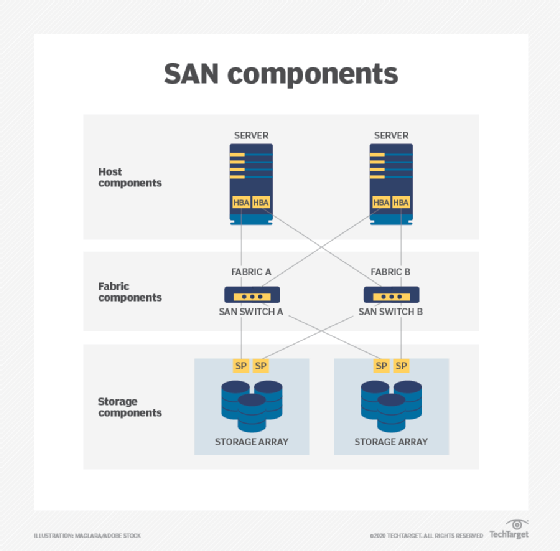
Consider a simple example in the image above where two SAN hosts must communicate with two SAN storage subsystems. Each host employs a separate HBA -- not a multiport HBA because the HBA device itself is a single point of failure. The port from each HBA is connected to a port on a different SAN switch, such as Fibre Channel switch. Similarly, multiple ports on the SAN switch connect to different storage target devices or systems. This is a simple redundant fabric; remove any one connection in the diagram, and both servers can still communicate with both storage systems to preserve storage access for the workloads on both servers.
Consider the basic behavior of a SAN and its fabric. A host server requires access to SAN storage; the host will internally create a request to access the storage device. The traditional SCSI commands used for storage access are encapsulated into packets for the network -- in this case FC packets -- and the packets are structured according to the rules of the FC protocol. The packets are delivered to the host's HBA where the packets are placed onto the network's optical or copper cables. The HBA transmits the request packet(s) to the SAN where the request will arrive at the SAN switch(es). One of the switches will receive the request and send it along to the corresponding storage device. In a storage array, the storage processor will receive the request and interact with storage devices within the array to accommodate the host's request.
Understanding SAN switches
The SAN switch is the focal point of any SAN. As with most network switches, the SAN switch receives a data packet, determines the source and destination of the packet and then forwards that packet to the intended destination device. Ultimately, the SAN fabric topology is defined by number of switches, the type of switches -- such as backbone switches, or modular or edge switches -- and the way in which the switches are interconnected. Smaller SANs might use modular switches with 16, 24 or even 32 ports, while larger SANs might use backbone switches with 64 or 128 ports. SAN switches can be combined to create large and complex SAN fabrics that connect thousands of servers and storage devices.
A fabric alone isn't enough to ensure storage resilience. In actual practice, the storage systems must include an assortment of internal technologies, including RAID -- disk groupings for more capacity and resilience -- with robust error handling and self-healing capabilities. The storage system will typically add more technologies for efficient storage utilization, including thin provisioning, snapshots or storage cloning, data deduplication and data compression. Although a well-designed SAN fabric allows any host to reach any storage device, isolation techniques -- such as zoning and LUN masking -- can be used to restrict host access to some LUNs for better storage performance and security across the SAN.
Alternative SAN approaches
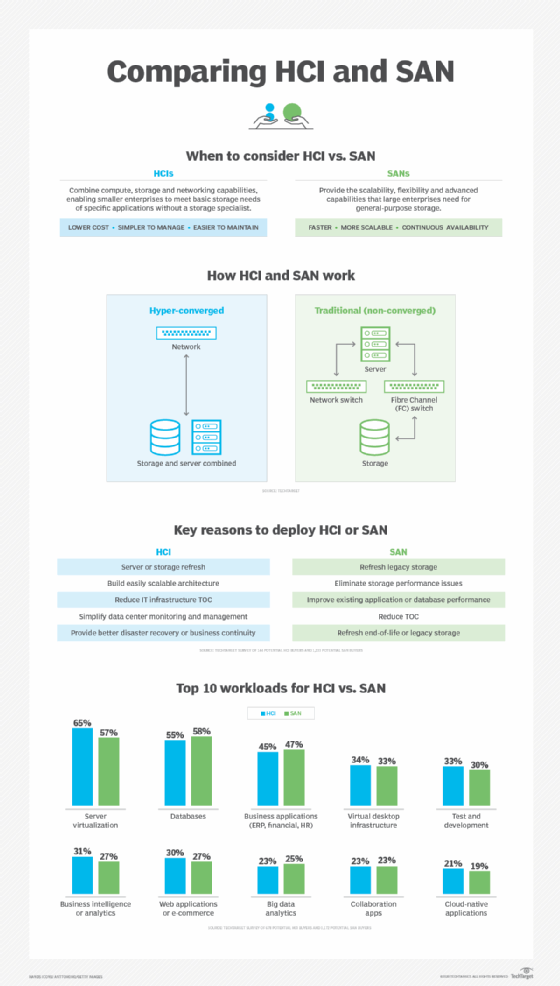
Although SAN technology has been available for decades, there are several enhancements and dedicated improvements reshaping SAN design and deployment. These alternatives include virtual SAN, unified SAN, converged SAN and hyper-converged infrastructure (HCI).
- Virtual SAN. Virtualization technology was a natural fit for the SAN, encompassing both storage and storage network resources to add flexibility and scalability to the underlying physical SAN. A virtual SAN -- denoted with a capital V in VSAN -- is a form of isolation, reminiscent of traditional SAN zoning, which essentially uses virtualization to create one or more logical partitions or segments within the physical SAN. Traditional VSANs can employ such isolation to manage SAN network traffic, enhance performance and improve security. Thus, VSAN isolation can prevent potential problems on one segment of the SAN from affecting other SAN segments, and the segments can be changed logically as needed without the need to touch any physical SAN components. VMware offers virtual SAN technology -- denoted with a small v in vSAN -- which builds on basic VSAN approaches to provide advanced features including storage pooling or tiering -- detecting and organizing storage across hosts -- along with non-disruptive data migration -- moving storage from one platform to another without downtime for the applications relying on that data. VMware vSAN can also accommodate features such as information lifecycle management, enabling vSAN to automatically move data from one storage performance tier to another depending on how the data is accessed. For example, frequently accessed data can be placed on a high-performance storage tier and then be moved to a lower tier as the data becomes less frequently accessed, and finally relegated to an archival storage tier as the data falls into disuse.
- Unified SAN. A SAN is noted for its support of block storage, which is typical for enterprise applications. But file, object and other types of storage would traditionally demand a separate storage system, such as network-attached storage (NAS). A SAN that supports unified storage is capable of supporting multiple approaches -- such as file, block and object-based storage -- within the same storage subsystem. Unified storage provides such capabilities by handling multiple protocols, including file-based SMB and NFS, as well as block-based, such as FC and iSCSI. By using a single storage platform for block and file storage, users can take advantage of powerful features that are usually reserved for traditional block-based SANs, such as storage snapshots, data replication, storage tiering, data encryption, data compression and data deduplication. However, different storage protocols place varied demands on the storage system, sometimes resulting in variable storage performance. For example, file-based data access can take longer and be more random than block-based data access. The variable demands of unified storage systems can be undesirable for some enterprise class applications and might still benefit from the dedicated performance characteristics of block-based SAN.
- Converged SAN. One common disadvantage to a traditional FC SAN is the cost and complexity of a separate network dedicated to storage. ISCSI is one means of overcoming the cost of a SAN by using common Ethernet networking components rather than FC components. FCoE supports a converged SAN that can run FC communication directly over Ethernet network components -- converging both common IP and FC storage protocols onto a single low-cost network. FCoE works by encapsulating FC frames within Ethernet frames to route and transport FC data across an Ethernet network. However, FCoE relies on end-to-end support in network devices, which has been difficult to achieve on a broad basis, making the choice of vendor limited. In addition, FCoE changes the way that networks are implemented and managed -- especially in authentication and security for corporate data -- and organizations have been reticent to make such changes to traditional policies and processes.
- Hyper-converged infrastructure. The data center use of HCI has grown dramatically in recent years. HCI combines compute and storage resources into pre-packaged modules, allowing modules -- also called nodes -- to be added as needed and managed through a single common utility. HCI employs virtualization, which abstracts and pools all the compute and storage resources. IT administrators then provision virtual machines and storage from the available resource pools. The fundamental goal of HCI is to simplify hardware deployment and management while allowing fast scalability. HCI 2.0 disaggregates storage from compute resources -- essentially providing storage and compute in their own nodes -- so compute and storage can be scaled separately, but the underlying goals are the same. HCI isn't a SAN, but it can be used in place of SANs or even exist alongside traditional enterprise SANs depending on the demands of prevailing enterprise workloads.
SAN benefits
Whether traditional or virtual, a SAN offers several compelling benefits that are vital for enterprise-class workloads.
- High performance. The typical SAN uses a separate network fabric that is dedicated to storage tasks. The fabric is traditionally FC for top performance, though iSCSI and converged networks are also available.
- High scalability. The SAN can support extremely large deployments encompassing thousands of SAN host servers and storage devices or even storage systems. New hosts and storage can be added as required to build out the SAN to meet the organization's specific requirements.
- High availability. A traditional SAN is based on the idea of a network fabric, which -- ideally -- interconnects everything to everything else. This means a full-featured SAN deployment has no single point of failure between a host and a storage device, and communication across the fabric can always find an alternative path to maintain storage availability to the workload.
- Advanced management features. A SAN will support an array of useful enterprise-class storage features, including data encryption, data deduplication, storage replication and self-healing technologies intended to maximize storage capacity, security and data resilience. Features are almost universally centralized and can easily be applied to all the storage resources on the SAN.
SAN disadvantages
But despite the benefits, SANs are hardly perfect, and there is an assortment of potential disadvantages for IT leaders to consider before deploying or upgrading a SAN.
- Complexity. Although more convergence options, such as FCoE and unified options, exist for SANs today, traditional SANs present the added complexity of a second network -- complete with costly, dedicated HBAs on the host servers, switches and cabling within a complex and redundant fabric and storage processor ports at the storage arrays. Such networks must be designed and monitored with care, but the complexity is increasingly troublesome for IT organizations with fewer staff and smaller budgets.
- Scale. Considering the cost, a SAN is generally effective only in larger and more complex environments where there are many servers and significant storage. It's certainly possible to implement a SAN on a small scale, but the cost and complexity are difficult to justify. Smaller deployments can often achieve satisfactory results using an iSCSI SAN, a converged SAN over a single common network -- such as FCoE -- or an HCI deployment, which is adept at pooling and provisioning resources.
- Management. With the idea of complexity focused on hardware, there is also significant challenge in SAN management. Configuring features, such as LUN mapping or zoning, can be problematic for busy organizations. Setting up RAID and other self-healing technologies as well as corresponding logging and reporting -- not to mention security -- can be time-consuming but unavoidable to maintain the organization's compliance, DR and BC postures.
SAN vs. NAS
Network-attached storage (NAS) is an alternative means of storing and accessing data that relies on file-based protocol, such as SMB and NFS -- as opposed to the block-based protocols such as FC and iSCSI used in SANs. There are other differences between a SAN and NAS. Where SAN uses a network to connect servers and storage, a NAS relies on a dedicated file server located between servers and storage.
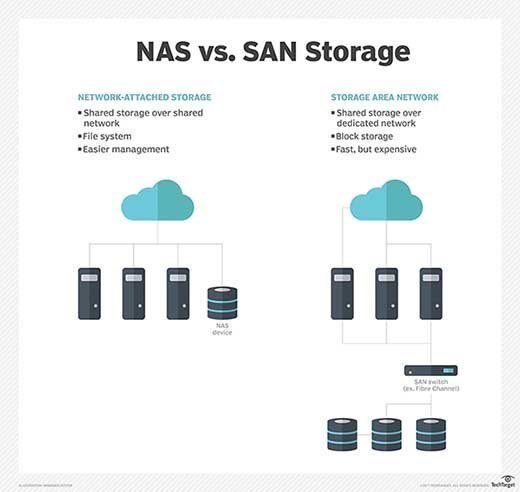
Although both approaches store data, the choice of system will depend on the type of data being handled. A SAN is the preferred choice for block-based data storage, which usually applies well to structured data -- such as storage for enterprise-class relational database applications. By comparison, a NAS -- with its file-based approach -- is better suited to unstructured data -- such as document files, emails, images, videos and other common types of files.
As with a SAN, a NAS consolidates storage in one place and can support data management and protection tasks, such as data archiving and backup. Yet a NAS uses a common network and commands far lower costs and complexity than SANs. However, SANs shine in raw performance and scalability, able to deliver top performance to the most demanding enterprise applications.
SAN and NAS are not mutually exclusive. It is possible for a SAN and NAS to co-exist in the same data center where both block- and file-based data storage is required. Both SAN and NAS deployments can be upgraded to boost performance, streamline management, combat shadow IT and address storage capacity limitations. In some cases, separate storage systems might be replaced with a unified storage system, or the SAN network might be simplified using an iSCSI SAN.
Major vendors and products
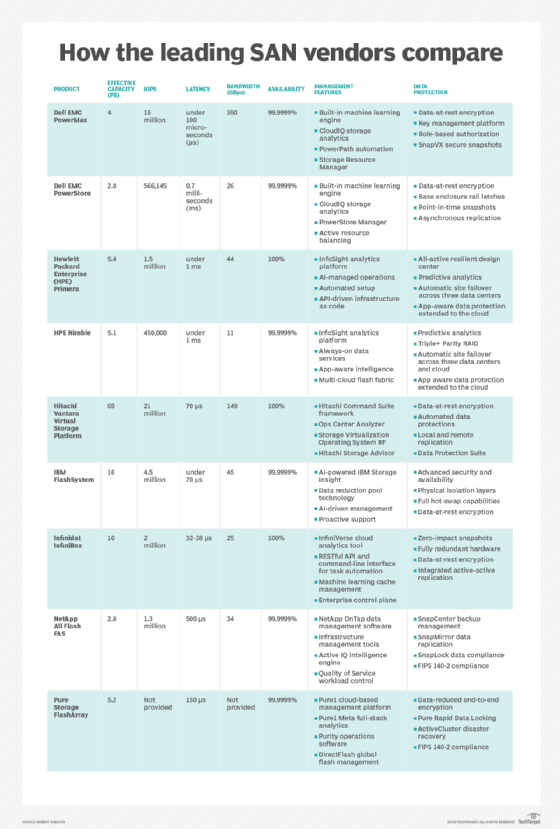
There is no shortage of vendors and products to support enterprise SAN deployments. When planning a SAN, architects will typically consider the hosts (servers), network (fabric), components and storage subsystems.
Hosts. Any host can operate on the SAN, but every host server requires a suitable network interface to access the fabric. Enterprise-class servers can be purchased with multi-port FC HBAs already installed -- a common tactic for technology refresh projects. If the servers don't already incorporate an HBA, an HBA can be added as a server upgrade project. However, adding an HBA as an aftermarket upgrade will require an available PCIe slot on the server's motherboard. IT staff must survey each target server and ensure that a suitable upgrade slot is physically available before purchasing and proceeding with the upgrades. In addition, such upgrades will require the server to be powered off, so IT staff must schedule server downtime and plan for such disruptive upgrades.
HBA cards are commonly manufactured based on core communications chips from technology leaders, including Agilent, ATTO, Broadcom, Brocade and QLogic. The actual HBAs are manufactured and sold through many technology vendors and procurement channels.
Network. The SAN fabric itself is composed of optical or copper cabling as well as networking components, such as network switches. Like HBAs, suitable cabling is readily available through common technology vendors and procurement channels. Both edge and director switches can be found based on technologies used by major chip and technology manufacturers. Examples include the following:
- ATTO Technology 8308, 8316 and 8324 switches;
- Brocade G-series switches and DCX-series directors;
- Cisco MDS-series switches, Nexus 5672UP and MDS-series directors;
- Juniper QFabric QFX-series switches; and
- QLogic SANbox 5xxx-series switches and SANbox 9xxx directors.
Storage. Storage arrays get attention in the SAN because storage is the entire point of SAN technology, and storage subsystems possess many of the functions -- deduplication, replication and so on -- that make SANs so attractive to the enterprise. Here's a sampling of major storage array vendors:
- Dell EMC offers several important product lines, including Isilon NAS storage, EMC Unity hybrid-flash storage arrays for block and file storage, SC series arrays and the VMAX storage products.
- Hitachi Data Systems offers the Hitachi NAS Platform and G Series arrays.
- Hewlett Packard Enterprise product lines include entry-level HPE StoreEasy Storage NAS systems and flash-enabled MSA Storage, as well as HPE 3PAR StoreServ midrange arrays.
- Huawei offers all-flash OceanStor Dorado V3 arrays and OceanStor 18000 V5 hybrid-flash storage systems.
- IBM has both disk and flash storage arrays, including the DS family, XIV family and Scale Out Network Attached Storage system, as well as numerous variations of its FlashSystem family.
- NetApp offers low-latency NVMe-over-Fabrics support to its all-flash arrays and offers hybrid cloud data tiering support in its OnTap storage software.
Other notable SAN storage vendors include Fujitsu, Lenovo, Oracle and Western Digital. Newer SAN vendors focusing on all-flash storage include Kaminario, Pure Storage, IntelliFlash -- previously Tegile -- and Violin Systems.
When it comes to storage, don't overlook the potential value of SAN as a service. The idea is similar in principle to any cloud or SaaS offering, which is sold to customers as a managed service. A provider builds and administers a SAN and then proceeds to sell capacity on that SAN to outside customers. The provider is responsible for building and maintaining the SAN -- and its features such as replication -- and customers can access one or more LUNs created for them on the provider's SAN, usually for a recurring monthly fee. SAN services are often sold in conjunction with other managed data services.
SAN technology standards
Several industry groups have developed standards related to SAN technology, including the Storage Networking Industry Association, which promotes the Storage Management Initiative Specification. SMI-S, as the standard is known, is intended to facilitate the management of storage devices from multiple vendors in storage area networks.
The Fibre Channel Industry Association also promotes standards related to SAN, including the Fibre Channel Physical Interface standard, supporting deployments of 64 GFC and Gen 7 solutions for the SAN market, the fastest industry standard networking protocol that enables storage area networks of up to 128 GFC.
SAN management
A SAN poses serious management challenges. The physical network can be complex and requires constant oversight. In addition, the logical network configuration -- such as LUN masking, zoning and SAN-specific functions, such as replication and deduplication -- can change and demand regular attention. To keep the SAN at peak performance, SAN administrators should consider several management best practices.
Some of the most meaningful practices will use SAN monitoring and reporting. Administrators should take the time to review metrics or key performance indicators (KPIs) in several areas of the SAN:
- any KPIs related to specific storage array subsystems, such as the read/write throughput for every array;
- any KPIs related to the SAN fabric, or network, such as low or no buffer credits at a SAN switch or orphaned ports as zoning changes are implemented over time;
- any KPIs related to host server I/O or workload performance, such as I/O throughput, for every virtual machine accessing the SAN; and
- any KPIs related to SAN/LUN capacity -- look for capacity trends or shortages.
By implementing a regular review process and taking advantage of alerts and reporting features within the SAN, an administrator can ensure a clear view of the SAN's health and take proactive measures to keep the SAN operating properly.
In addition, SAN management can benefit from features and functionality designed to automate the SAN or mitigate storage disruptions. As examples, SANs that allow the use of policies for tasks such as provisioning and data protection can help administrators avoid oversights and mistakes that could waste storage or jeopardize security. Similarly, using features such as native replication can help protect valuable data while maintaining constant access to that data.
Remote SAN management is a growing requirement for SAN administration. This enables SANs to be built outside of the main data center in remote locations or a single SAN administrator to support one or more SANs from anywhere in the world. Remote SAN management demands a reliable network connection between the management tool -- the administrator -- and the SAN being managed. The remote tool should be able to convey comprehensive SAN health details, such as the KPIs mentioned above, support provisioning and be able to launch diagnostics to help locate and eliminate potential SAN problems. Common remote SAN tools include SolarWinds Storage Resource Monitor, IntelliMagic Vision for SAN and EG Innovations Infrastructure Monitoring.