Serial ATA (Serial Advanced Technology Attachment or SATA)

What is Serial ATA?
Serial ATA (Serial Advanced Technology Attachment or SATA) is a command and transport protocol that defines how data is transferred between a computer's motherboard and mass storage devices, such as hard disk drives (HDDs), optical drives and solid-state drives (SSDs). As its name implies, SATA is based on serial signaling technology, where data is transferred as a sequence of individual bits.
SATA refers to the communication protocol itself and the industry standards adhered to by the OEMs that produce SATA-compatible cables, connectors and drives.
The Serial ATA International Organization (SATA-IO) oversees the development of the technical specification. SATA specifies a transfer format and a wiring arrangement. It succeeded Parallel ATA (PATA) as the communications interface for most new computer systems. Those systems also usually support serial-attached SCSI (SAS) and non-volatile memory express (NVMe) communication protocols.
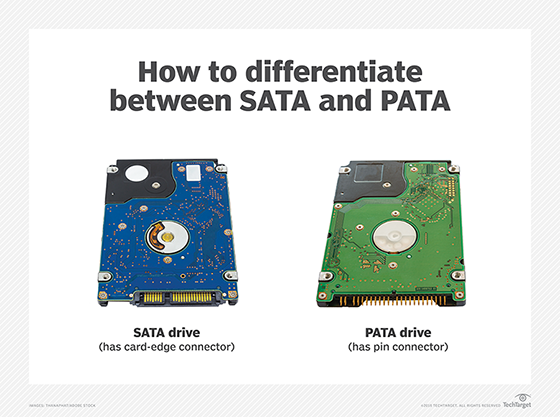
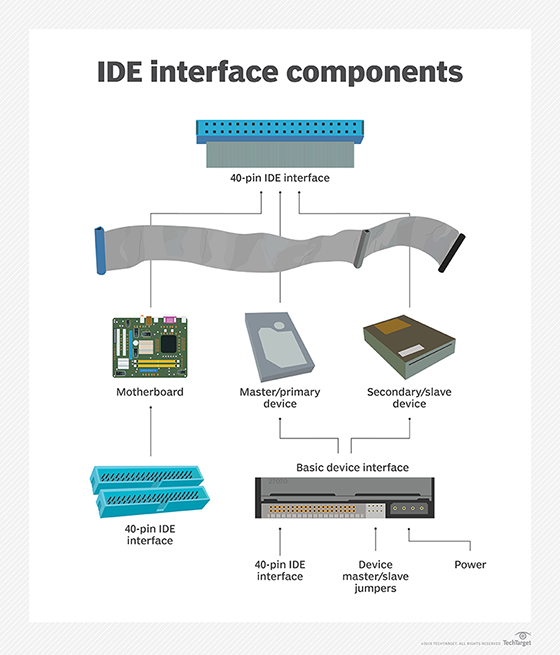
SATA is a serial version of the Integrated Drive Electronics (IDE) specification for PATA hard drives that use parallel signaling. SATA cables are thinner, more flexible and less massive than the ribbon cables required for conventional PATA hard drives.
Serial ATA features
Serial ATA HDDs and SSDs connect to a computer's motherboard via SATA controller hardware, which also manages data flow. When SATA is in IDE mode, the hard drive can be recognized as a PATA device. This setup improves compatibility with older hardware, but performance suffers.
Setting a SATA controller to Advanced Host Controller Interface (AHCI) offers better performance than the IDE mode. AHCI supports external interfaces and hot swapping of drives. The RAID mode supports both AHCI functions and RAID data protection features.
Depending on the computer system, users may need to install device-specific driver software to enable SATA SSDs to communicate with the device's motherboard. IDE-based HDDs do not require driver software.
SATA standards and revisions
The nonprofit SATA-IO industry consortium authors the technical specifications governing Serial ATA device interfaces. The consortium revises SATA standards to reflect increased data transfer rates. These revisions include the following changes:
- SATA Revision 1. These devices were widely used in personal desktop and office computers, configured from PATA drives daisy chained together in a primary/secondary configuration. SATA Revision 1 devices reached a top transfer rate of 1.5 Gbps.
- SATA Revision 2. These devices doubled the transfer speed to 3.2 Gbps with the inclusion of port multipliers, port selectors and improved queue depth.
- SATA Revision 3. These interfaces supported drive transfer rates up to 6 Gbps. Revision 3 drives are backward-compatible with SATA Revision 1 and Revision 2 devices, though with lower transfer speeds.
- SATA Revision 3.1. This intermediate revision added final design requirements for SATA Universal Storage Module for consumer-based portable storage applications.
- SATA Revision 3.2. This update added the SATA Express specification. It supports the simultaneous use of SATA ports and PCI Express (PCIe) lanes.
- SATA Revision 3.3. This revision addressed the use of shingled magnetic recording
- SATA Revision 3.5. This change promoted greater integration and interoperability with PCIe flash and other I/O protocols.
SATA-IO said it has no plans for SATA 4.0 interoperability. It would require significant engineering to support bandwidth higher than the current top end rate of 6 Gbps, the group said.
SATA vs. PATA
When comparing SATA and PATA, a serial connection requires fewer wires and results in a clearer signal than a parallel connection. This makes serial signals suitable for transmitting data over long distances.
A parallel signal is synchronous and requires a wider data bus. Multiple bits are sent simultaneously across different wires that are housed in the same cable. A clocking signal synchronizes the timing between the different channels. As a result, parallel transmission is better suited to shorter distances to avoid signal interference. The multiple wires that parallelism needs also makes it slightly more costly than serial transmission.
SATA offers several advantages compared with the IDE-based PATA standard developed in the 1980s. These advantages include the following:
- Full-duplex performance. Most notably, PATA is a half-duplex transmission, making it unable to simultaneously receive and transmit data. This contrasts with SATA's full-duplex performance.
PATA drives deliver data bits simultaneously across a single ribbon cable that's 40-pin wide. The SATA standard defines a SATA cable with two pairs of differential wires, three ground pins and a separate power connector. One pair of wires transfers data and one pair receives data. Capping each end of the SATA conductors is an 8-millimeter wafer connector.
- No resource contention. SATA drives contain an independent computer host bus to eliminate resource contention.
- Faster throughput. SATA transfers data one bit at a time between a drive and its host, using a seven-pin data cable and 15-pin drive power connector cable. The SATA cable results in a higher signaling rate, which corresponds to faster data throughput.
- Design flexibility. The SATA cables also offer flexible design in the physical layout of a system. The cables extend up to 39 inches, more than twice the length of the 18-inch ribbon cables required for conventional PATA hard drives. That gives system designers more leeway on where a drive can be mounted in a chassis. The narrow width of SATA cables also increases air flow within computers.
- Additional features. Older SATA drives are equipped with jumpers to enable additional features. A jumper is a rectangular plastic connector that creates a circuit when slid across two pins. The circuit activates and deactivates certain preprogrammed settings in a computer's BIOS or Unified Extensible Firmware Interface, such as regulating CPU speed, signal voltage and troubleshooting.
The jumper technology is a holdover from IDE-based disk drives. They are seldom needed with computers made after 2002. One exception is using jumpers to slow down newer drives, enabling them to more efficiently use earlier versions of the SATA hardware interface. There is a risk in this, however, as incorrect jumper settings will hinder device detection as drives are added or swapped out.
Using fewer conductors reduces the risk of crosstalk and electromagnetic interference with SATA. The signal voltage is much lower as well: 250 millivolts for SATA vs. 5 volts for PATA.
SATA vs. SAS
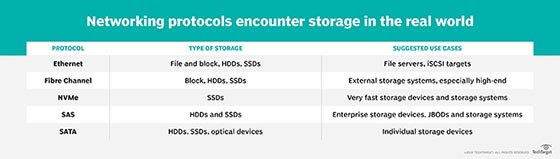
Serial-attached SCSI or SAS and SATA are both technologies that use thin cables to serially transmit data from a computer's motherboard to and from storage. However, there are some key differences between the two technologies, including the following:
Basic design. SATA connectors have four wires in one cable. SAS connectors also have four wires, but they separate the wires into two cables where each conductor pair can send and receive data. Because of this difference, SATA can only connect a motherboard to a storage device. SAS, on the other hand, can connect the motherboard to a storage drive and another device.
Read and write speeds. SATA 3.0 writes data to storage at a theoretical limit up to 6 Gbps, but it reads data at a slower pace when pulling it out of storage for applications. SAS reads and writes data continuously at roughly the same rate of 6 Gbps.
Where used. Because SATA reads data more slowly than it writes it and because it supports high capacities, SATA drives are widely used for file storage of data that is not frequently accessed. SAS drives are a good option for low-density storage workloads. Enterprises typically use SAS for large-scale storage, particularly to support direct-attached storage or hard drive controllers for enterprise server farms.
Mean time between failure (MTBF). SAS HDDs have a higher MTBF rate that makes them more suitable than SATA drives for server-based storage. The MTBF of SAS SSDs ranges from 1.2 million to 1.6 million hours, while SATA HDDs carry an MTBF ranging from 700,000 to 1.2 million hours.
Cost. SAS drives are typically more expensive than SATA drives.
SATA, mSATA and NVMe SSDs
SATA was initially developed for electromechanical drives in which an actuator arm writes data to and reads data from sectors on a rotating spindled disk. The SATA standard was later modified to support nonmechanical SSDs based on flash storage.
Flash is much faster than disk storage, but the slower SATA interface that was originally designed for HDDs continued to limit SSD speeds. The more recent NVMe flash interface enables a computer to read and write data to SSD storage at a faster rate than SATA and SAS SSDs.
NVMe enables host software to communicate directly with storage subsystems. That eliminates the need for a bus interface to route data traffic back and forth. NVMe defines the host controller interface and storage protocol for flash devices optimized for PCIe, a serial expansion bus that enables computers to attach to peripheral devices. PCIe-based NVMe SSDs are available in a standard form factor and as dual-inline memory modules that are inserted in motherboard slots.
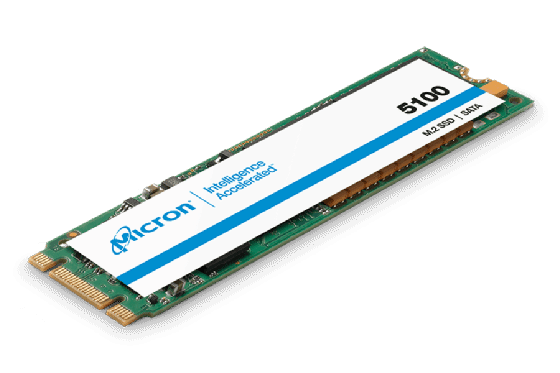
Thin mSATA and M.2 SATA devices were developed to provide board-level flash storage. In 2009, SATA-IO unveiled the mSATA specification for small form-factor SSDs. The "m" originally stood for mini, but that designation is no longer relevant and the specification is referred to as mSATA.
An mSATA device is a flash drive based on the SATA-IO specification. It is used in laptops and other portable computing devices. The mSATA spec maps SATA signals to an internally mounted PCIe card in a computer's motherboard, using an mSATA connector. MSATA drives are designed without an outer shell to fit inside small host devices. Their performance is roughly equivalent to traditional SATA SSDs.
Depending on the manufacturer, some computer systems allow both mSATA and PCIe SSDs to be inserted in the memory slot. The pins and slots used by the two protocols are identical, but the standards are not natively compatible. System administrators must configure the drives to run either in mSATA or PCIe mode.
The M.2 SSD form factor emerged as storage for ultrathin computing devices; it is generally considered to be an eventual replacement for mSATA. An mSATA device supports any iteration of SATA but is not compatible with the M.2 connector. Conversely, an M.2 SSD supports SATA, USB 3.0 and PCIe 3.0.
External SATA (eSATA)
When first conceived, SATA was intended as an internal mechanism to improve the performance of storage in consumer PCs. The need to extend that performance outside the chassis led to development of the External Serial Advanced Technology Attachment (eSATA).
SATA-IO developed eSATA as a variation of the SATA specification, using the same pins and protocol to ensure consistent performance. This allowed SATA storage devices to be connected externally to the computer's motherboard. The process uses a rugged power connector and two meters of shielded cables to transfer data between external devices and internal storage. SATA-IO claims eSATA transfers data up to six times faster than the USB 2.0 or IEEE 1394 interface.
A single eSATA port could be attached to an external SATA chassis to expand storage and build a RAID array. Video editing, audio production and data backup are some common use cases for eSATA drives. However, eSATA has limits. Many older SATA controllers and drives do not support the hot-swap capability that the external interface needs.
Learn more about latest trends in enterprise SSDs, the role of high-performance devices and the evolution from SATA to NVMe.