Fibre Channel vs. iSCSI: What are the differences?
Discover how Fibre Channel and iSCSI compare when it comes to meeting SAN performance, ease of use, manageability, total package and TCO requirements.
When iSCSI-based storage arrays first appeared in 2003, the technology was touted as a low-cost, few-frills alternative to Fibre Channel, the reigning king of the block storage hill. But that distinction quickly faded as leading data storage vendors joined the upstart array purveyors and added iSCSI storage to their product offerings. It wasn't long before the either-or arguments were replaced with considerations about which form of block storage would be the best fit for particular apps and environments.
Today, these two SAN technologies are rarely positioned as competitors. Major server and storage vendors don't necessarily see it as Fibre Channel vs. iSCSI; most popular SAN arrays support both FC and Ethernet instead of being exclusively relegated to an FC SAN or iSCSI SAN category. Unified storage systems and new protocols based on NVMe have blurred the distinctions even more.
Both iSCSI and FC technologies solve the same technical problem of networking block storage. The differences between the two configurations are in the details. There are four areas to consider when picking a SAN technology:
- performance and reliability
- complexity and ease of use
- manageability
- total storage SAN solution and TCO
Here, we look beyond the Fibre Channel vs. iSCSI debate and delve into how each technology works and how they compare in the four areas outlined above.
Fibre Channel explained
The FC protocol is a high-speed networking technology. It typically has throughput speeds of 8 Gbps, 16 Gbps, 32 Gbps and 64 Gbps but can go up to 128 Gbps by combining four 32 Gbps lanes or even up to 256 Gbps by yoking four 64 Gbps lanes. Today the nomenclature is more familiarly expressed using "GFC" instead of "Gbps" and a generation number, such as 32GFC (Gen 6) and 64GFC (Gen 7). FC was originally designed for use in SANs as a more reliable, scalable and lower-latency protocol than SCSI. In contemporary data centers, its use is driven by the increasing data volumes businesses generate through the use of analytics, AI and machine learning technologies, as well as the growing use of SSDs and NVMe-oF to improve application and network performance.
FC is mainly used to connect servers with shared storage and to provide connectivity between storage controllers and array drives. It's often used to transmit data among data centers, servers, storage and switches. Point-to-point, switched and loop interfaces deliver lossless, in-order, raw block data. FC networks are designed to interoperate with SCSI, IP and other protocols.
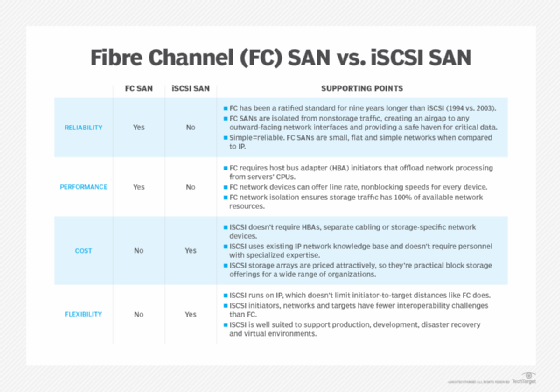
Because of its high level of reliability, FC is preferred for mission-critical workloads on high-capacity SANs. However, FC requires specialized host bus adapters (HBAs) and switches, as well as extensive technical knowledge and skills to deploy the technology. In addition, businesses generally need two networks when using an FC SAN: the FC network for storage traffic and an Ethernet network to link clients and servers and for other communications and bandwidth.
ISCSI explained
ISCSI is an Ethernet-based protocol designed to transport SCSI packets over a TCP/IP network. Because it uses standard Ethernet network interface cards (NICs) and switches, network admins don't need to buy the specialized network adapters and network cards that add to the expense and complexity of FC SAN technology. ISCSI can run over an existing Ethernet network, making it less expensive and easier to deploy than FC.
Both iSCSI and FC technologies solve the same technical problem of networking block storage. The differences between the two configurations are in the details.
An iSCSI network can run at speeds up to 400 Gbps based on grouping multiple 50 Gbps lanes together. It transports block-level data between servers and storage arrays or other storage devices. The protocol encapsulates SCSI commands, assembles the data in packets for the TCP/IP layer and sends packets over the network using a point-to-point connection. Once at their destination, the packets are disassembled, and the storage appears to the OS as if it's a locally connected SCSI device.
Key differences between Fibre Channel and iSCSI
Over the years, some of the feature gaps between FC and iSCSI SANs have narrowed, and the two technologies have largely been positioned based on specific characteristics and how those characteristics can be applied to specific application roles. Still, the four criteria outlined here are still pertinent when making a block storage purchasing decision.
1. Performance and reliability
Fibre Channel is a Layer 2 switching technology or cut through, with the protocol handled entirely in hardware. The iSCSI protocol -- SCSI mapped to TCP/IP -- running on Ethernet is a Layer 3 switching technology with the protocol handled in software, hardware or some combination of the two.
FC is often touted as the high-performance, more reliable SAN technology. Early in iSCSI development, that was true, but that's not the case anymore as the performance disparity has narrowed considerably.
Today, performance bottlenecks are far more likely to be the result of the target storage -- interface, controller queue depth, controller clustering, number of drives, drive type, etc. -- the physical server or the SAN fabric oversubscription rate, which is the relationship between the number of server initiators and the number of storage target ports, than the SAN technology itself.
Still, all things being equal, FC should be marginally better in IOPS because of lower latency and throughput because of lower overhead. But comparing vendors' performance specs can be confusing, so potential SAN customers should consider performance numbers carefully to ensure the same configurations and conditions were applied to both the FC and iSCSI candidate systems.
2. Complexity and ease of use
Because the iSCSI SAN is based on the well-known TCP/IP and Ethernet, the ubiquity of those techs means it is far simpler to deploy and less complex to maintain than FC for most data center admins. The learning curve and expertise requirement for FC are measurably higher. FC tends to be significantly more manually intensive vs. iSCSI, which has a lot more built-in automation. As a result, FC technology usually requires more training, a greater knowledge base and, ultimately, higher costs with both. And, with the surge of popularity of iSCSI block storage, FC expertise has become a bit more difficult to retain or acquire.
3. Manageability
When it comes to managing FC or iSCSI, iSCSI SANs are far easier to implement, operate and manage than FC. ISCSI uses the vast capabilities of TCP/IP and Ethernet and is much less expensive as it runs on familiar Ethernet components, like NICs and switches. Most moves and changes are performed online and aren't disruptive to applications.
Although FC has come a long way in manageability, the majority of moves and changes likely disrupt applications. Any configuration changes must be scheduled and performed offline. The alternative is to live with the application disruptions and, in some cases, deal with potential data loss.
Again, personnel with FC management skills are considerably less available than those who are adept at managing iSCSI's Ethernet environment.
4. Total storage SAN solution and TCO
When considering the total SAN approach in the Fibre Channel vs. iSCSI discussion, the assessment must involve the complete end-to-end package, including the storage system, the storage software (snapshot, mirroring, thin provisioning, etc.) and the types of drives (solid-state flash vs. HDDs).
When assessing TCO, you should include the acquisition, installation, professional services (if any), additions and upgrades, management, operational, maintenance, subscription, power, cooling and real estate costs. These costs apply to the storage system, SAN and storage software. Some of those considerations might be the same for both types of SANs, such as physical factors, like footprint and HVAC, while other costs might vary significantly.
Because of its Ethernet pedigree, iSCSI is usually cheaper and easier to implement than FC SANs, although FC vendors have reduced the costs of their products in recent years. But FC SANs still have a considerably higher TCO than their iSCSI equivalents. The adapters, switches -- especially data center class switches called directors -- and software all have considerably higher TCO than their iSCSI equivalents.
Newer storage techs might affect Fibre Channel vs. iSCSI decisions
Over the past decade or so, numerous technological developments in networked storage have injected some new criteria into the decision-making process of choosing between FC and iSCSI block storage systems. Variations on both popular protocols have emerged that might add a bit of confusion to the selection process -- or possibly make one of the options a clearer choice. Once again, the true deciding factors are the applications the array supports and the current data and storage networking infrastructure. Here are a few of the variations on FC and iSCSI that might be among the considerations when making your block storage purchase.
Unified storage combines block and file protocols
For more than a decade, most storage system vendors have included unified -- or multiprotocol -- storage arrays in their networked storage product portfolios. The concept behind unified storage is simple, yet extremely appealing for certain environments: Provide file and block storage in a single box, offering NFS and SMB on the file side and FC or iSCSI for block.
The file part of the array uses Ethernet as its transport, and the block storage might also use Ethernet or, in offerings from some vendors, FC via add-in interface hardware. For organizations that lack an installed FC network infrastructure, opting for iSCSI block storage in a unified array is likely to be the most cost-effective route.
How does FCoE compare?
FC over Ethernet (FCoE) is yet another variation for block storage that pairs the storage-specific performance and reliability of FC with easy-to-maintain and inexpensive Ethernet networking.
FCoE encapsulates FC frames into Ethernet frames so they can be transported along an Ethernet network. This arrangement eliminates the need for expensive FC networking gear, such as HBAs and FC switches, as servers can attach to the FC array using their familiar Ethernet interfaces. Advanced Ethernet techniques, such as jumbo framing, can improve network performance so that data moves at speeds close to or even faster than those available with native FC.
NVMe-oF ups FC performance for flash storage
NVMe is an internal connectivity protocol developed specifically to handle the high performance of SSD storage compared to that of spinning disks. NVMe-oF is an implementation of NVMe that extends the high-speed protocol across an FC fabric, providing a high-performance interconnect that can more fully take advantage of SSD read and write speeds.
FC has been a favored block storage networking protocol for all-flash arrays because of its performance and reliability, and NVMe-oF builds on the high throughput and low latency of FC. NVMe-oF can also run atop an InfiniBand or Ethernet network, and a variation of the protocol can take advantage of remote direct memory access, which enables the fast exchange of data through a direct connection that doesn't rely on processor or cache resources.
Data and processing still set the bottom line for block storage
Making the best decision between Fibre Channel vs. iSCSI -- or among their variations -- still depends on your environment and expectations. It's important to consider all the possible configurations to choose the technology that best meets your requirements for performance, ease of use, manageability, total package and TCO.