What is network-attached storage (NAS)? A complete guide
What is network-attached storage (NAS)?
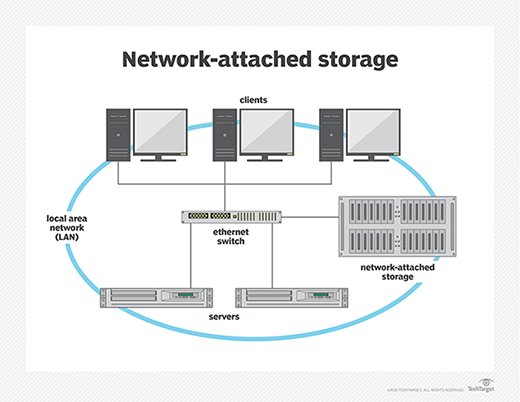
Network-attached storage (NAS) is dedicated file storage that enables multiple users and heterogeneous client devices to retrieve data from centralized disk capacity. Users on a local area network (LAN) access the shared storage via a standard Ethernet connection.
NAS devices typically don't have a keyboard or display and are configured and managed with a browser-based utility. Each NAS resides on the LAN as an independent network node, defined by its own unique IP address.
NAS stands out for its ease of access, high capacity and low cost. The devices consolidate storage in one place and support a cloud tier and tasks, such as archiving and backup.
Network-attached storage and storage area networks (SANs) are the two main types of networked storage. NAS handles unstructured data, such as audio, video, websites, text files and Microsoft Office documents. SANs are designed primarily for block storage inside databases, also known as structured data, as well as block storage for enterprise applications.
What is network-attached storage used for?
The purpose of network-attached storage is to enable users to collaborate and share data more effectively. It is useful to distributed teams that need remote access or work in different time zones. NAS connects to a wireless router, making it easy for distributed workers to access files from any desktop or mobile device with a network connection. Organizations commonly deploy a NAS environment as a storage filer or the foundation for a personal or private cloud.
Some NAS products are designed for use in large enterprises. Others are for home offices or small businesses. Devices usually contain at least two drive bays, although single-bay systems are available for noncritical data. Enterprise NAS gear is designed with more high-end data features to aid storage management and usually comes with at least four drive bays.
Prior to NAS, enterprises had to configure and manage hundreds or even thousands of file servers. To expand storage capacity, NAS appliances are outfitted with more or larger disks; this is known as scale-up NAS. Appliances are also clustered together for scale-out storage.
In addition, most NAS vendors partner with cloud storage providers to give customers the flexibility of redundant backup.
Although collaboration is a virtue of network-attached storage, it can also be problematic. Network-attached storage relies on hard disk drives (HDDs) to serve data. I/O contention can occur when too many users overwhelm the system with requests at the same time. Newer systems use faster solid-state drives (SSDs) or flash storage, either as a tier alongside HDDs or in all-flash configurations.
NAS use cases and examples
The type of HDD selected for a NAS device will depend on the applications to be used. Sharing Microsoft Excel spreadsheets or Word documents with co-workers is a routine task, as is performing periodic data backup. Conversely, using NAS to handle large volumes of streaming media files requires larger capacity disks, more memory and more powerful network processing.
At home, people use a NAS system to store and serve multimedia files and to automate backups. Home users rely on network-attached storage to do the following:
- manage smart TV storage;
- manage security systems and security updates;
- manage consumer-based IoT components;
- create a media streaming service;
- manage torrent files;
- host a personal cloud server; and
- create, test and develop a personal website.
In the enterprise, NAS is used in the following ways:
- as a backup target, using a NAS array, for archiving and disaster recovery;
- for testing and developing web-based and server-side web applications;
- for hosting messaging applications;
- for hosting server-based, open source applications, such as customer relationship management, human resource management and enterprise resource planning applications; and
- for serving email, multimedia files, databases and print jobs.
Take this example of how enterprises use the technology: When a company imports many images every day, it cannot stream this data to the cloud because of latency. Instead, it uses an enterprise-class NAS to store the images and cloud caching to maintain connections to the images stored on premises.
Higher-end NAS products have enough disks to support redundant arrays of independent disks, or RAID, which is a storage configuration that turns multiple hard disks into one logical unit to boost performance, high availability and redundancy.
NAS components and how they work
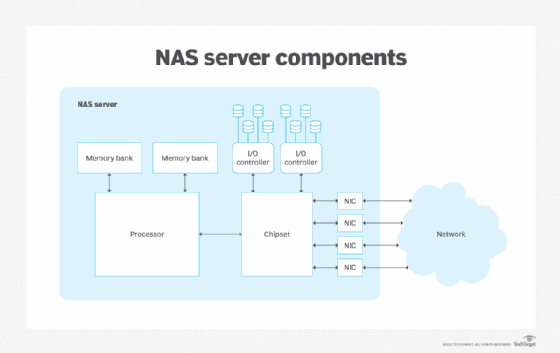
A NAS device is fundamentally a dedicated storage server -- a specialized computer designed and intended to support storage through network access. Regardless of the size and scale of the network-attached storage, every NAS device is typically composed of four major components:
- CPU. The heart of every NAS is a computer that includes the central processing unit (CPU) and memory. The CPU is responsible for running the NAS OS, reading and writing data against storage, handling user access and even integrating with cloud storage if so designed. Where typical computers or servers use a general-purpose CPU, a dedicated device such as NAS might use a specialized CPU designed for high performance and low power consumption in NAS use cases.
- Network interface. Small NAS devices designed for desktop or single-user use might allow for direct computer connections, such as USB or limited wireless (Wi-Fi) connectivity. But any business NAS intended for data sharing and file serving will demand a physical network connection, such as a cabled Ethernet interface, giving the NAS a unique IP address. This is often considered part of the NAS hardware suite, along with the CPU.
- Storage. Every NAS must provide physical storage, which is typically in the form of disk drives. The drives might include traditional magnetic HDDs, SSDs or other non-volatile memory devices, often supporting a mix of different storage devices. The NAS might support logical storage organization for redundancy and performance, such as mirroring and other RAID implementations -- but it's the CPU, not the disks, that handle such logical organization.
- OS. Just as with a conventional computer, the OS organizes and manages the NAS hardware and makes storage available to clients, including users and other applications. Simple NAS devices might not highlight a specific OS, but more sophisticated NAS systems might employ a discrete OS such as Netgear ReadyNAS, QNAP QTS, Zyxel FW or TrueNAS Core, among others.
Top considerations for choosing NAS
Although the storage goals of NAS might seem straightforward, selecting a NAS device can be deceptively complex. Price considerations aside, enterprise NAS users should consider an array of factors in product selection, including the following:
- Capacity. How much storage can the NAS provide? There are two major issues: the number of disks and the logical organization of those disks. As one simple example, if the NAS can hold two 4 TB disks, the capacity of the NAS can be 8 TB. But if those disks are configured as RAID 1 -- mirroring -- those two disks simply copy each other; so, the total usable capacity would only be 4 TB, but the storage would be redundant.
- Form factor. Where will the NAS be installed? The two principal form factors are rackmount and tower (standalone). An enterprise NAS can use a 2U or 4U rackmount form factor for installation into an existing data center rack. A tower or self-contained NAS can be a good choice for deployment in smaller department data closets or even on desktops.
- Performance. How many users will the NAS support? It takes a finite amount of network and internal computing power to handle a storage request from the network and then translate that request into actual read/write storage tasks within the NAS. A busy NAS will demand higher levels of performance and internal caching to provide greater storage I/O and efficiently support more simultaneous users. Otherwise, users will need to wait longer (lag) for the NAS to service their storage request.
- Connectivity. How will the NAS connect to users and applications? Most NAS equipment includes one or more traditional Ethernet ports for cabled network connectivity. High-capacity network connectivity is essential for busy NAS devices in enterprise data centers. NAS designed for smaller, less-demanding environments can get by with Wi-Fi connectivity, while small NAS devices for end-users might supply a USB port for direct PC connectivity.
- Reliability. How can the NAS handle problems? Reliability has three major layers: the reliability of the NAS itself, the reliability of the disks installed within the NAS and the reliability of the data stored on the disks. At the NAS level, the equipment itself should be designed to provide long, continuous service at the peak expected performance level. Disk reliability depends on the disks installed in the NAS; high-quality SAS disks can offer excellent error-correction and enormous mean time between failure figures, but all disk choices should include a replacement plan. Finally, the NAS handles RAID, replication and other means of maintaining data integrity within the device, but those features must be enabled and configured.
- Security. How is data protected on the NAS? Look for NAS equipment that provides native data encryption and strong network access controls to ensure that only authorized users and applications can access storage.
- Usability and features. How easily can the NAS be set up and deployed? Look for NAS equipment that is easy to deploy and configure, and consider the features and functionality included with the NAS OS/software, such as data snapshots, data backups, data replication, automatic data tiering and RAID.
Why is choosing the right NAS important?
Any network-attached storage deployment is an investment of capital and time, and the storage offered by NAS will be a valuable resource for users -- whether at home, within a small business or across an enterprise. Consequently, a NAS investment demands careful evaluation of each consideration above before making a purchase decision. Choosing the wrong network-attached storage can result in undesirable outcomes, such as the following:
- Inadequate storage capacity. Although a NAS setup can typically receive additional storage devices to increase its capacity, it's important for business users to predict utilization and capacity requirements across the NAS lifecycle to ensure the necessary capacity will be available. Too much capacity results in wasted capital, while too little capacity without expansion will require additional NAS purchases.
- Inadequate performance. NAS must serve multiple client systems, including users and other applications, across a network. The NAS must be able to handle network traffic and support the internal I/O needed to read/write data to storage in response to network demands. Inadequate performance might result in unacceptable application lag and reduced user experience.
- Inadequate resilience. Simple NAS is little more than storing data on a remote disk, but businesses that rely on data availability -- and must guard against data loss due to factors like disk failure -- must select and implement resilience features, such as RAID. A NAS deployment that lacks these features, or where those features aren't implemented, might put the business at risk in terms of both revenue and compliance.
- Inadequate security. Every business requires data security, so NAS subsystems must include adequate access control as well as additional security capabilities, such as native data encryption, to meet business and compliance needs. NAS that lacks or fails to implement these features might expose the business to additional risk.
NAS product categories
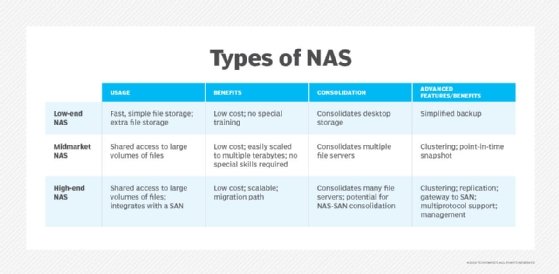
NAS devices are grouped in three categories based on the number of drives, drive support, drive capacity and scalability.
High end or enterprise
The high end of the market is driven by organizations that need to store and share vast quantities of file data, including virtual machine (VM) images. Enterprise NAS devices can scale to provide petabytes of storage, serve thousands of client systems and provide rapid access and clustering capabilities. The clustering concept addresses drawbacks associated with traditional NAS.
For example, one device allocated to an organization's primary storage space creates a potential single point of failure. Spreading mission-critical applications and file data across multiple boxes and adhering to scheduled backups decreases the risk. Redundancy is typically accomplished through some form of duplication -- copying data onto more than one storage device or storage subsystem.
Clustered NAS systems also reduce NAS sprawl. A distributed file system runs concurrently on multiple NAS devices. This approach provides access to all files in the cluster, regardless of the physical node on which it resides.
Midmarket
The NAS midmarket accommodates businesses with hundreds of client systems that require several hundred terabytes of data. These devices cannot be clustered, however, which can lead to file system silos if multiple NAS devices are required.
Low end or desktop
The NAS low end is aimed at home users and small businesses that require local shared storage for just a few client systems up to several terabytes. This market is shifting toward a cloud NAS service model, with products such as Buurst's SoftNAS Cloud NAS and software-defined storage (SDS) from legacy storage vendors.
NAS deployments for business
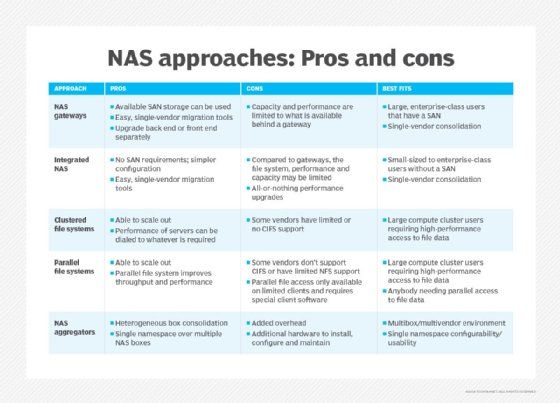
The chart below describes five different ways NAS can be deployed and lists the pros and cons for each approach. Each deployment can easily be managed by a single network manager.
The different deployment approaches include these options:
- NAS gateways. These are best for large, enterprise-class users who have a SAN.
- Integrated NAS. This approach works well for users of all sizes without a SAN.
- Clustered file systems. Large compute cluster users who need high-performance access to file data find these clustered file systems optimal for their needs.
- Parallel file systems. These also work well for large compute cluster users requiring high-performance file data access, or any organization needing parallel access to file data.
- NAS aggregators. These are ideal for multibox and multivendor environments.
NAS file-sharing protocols
The baseline functionality of network-attached storage devices has broadened to support virtualization. High-end NAS products might also support data deduplication, flash storage, multiprotocol access and data replication.
Some NAS devices run a standard operating system, such as Microsoft Windows, while others run a vendor's proprietary OS. IP is the most common data transport protocol, but some midmarket NAS products might support additional protocols, such as the following:
- Network File System
- Internetwork Packet Exchange
- NetBIOS Extended User Interface
- Server Message Block (SMB)
- Common Internet File System (CIFS)
Additionally, high-end NAS devices might support Gigabit Ethernet for even faster data transfer across the network.
Some larger enterprises are switching to object storage for capacity reasons. However, NAS devices are expected to continue to be useful for small and medium-sized businesses.
Scale-up and scale-out NAS vs. object storage
Scale up and scale out are two versions of NAS. Object storage is an alternative to NAS for handling unstructured data.
Scale-up NAS
In a network-attached storage deployment, the NAS head is the hardware that performs the control functions. It provides access to back-end storage through an internet connection. This configuration is known as scale-up architecture. A two-controller system expands capacity with the addition of drive shelves, depending on the scalability of the controllers.
Scale-out NAS
With scale-out systems, the storage administrator installs larger heads and more hard disks to boost storage capacity. Scaling out provides the flexibility to adapt to an organization's business needs. Enterprise scale-out systems can store billions of files without the performance tradeoff of doing metadata searches.
Object storage
Some industry experts speculate that object storage will overtake scale-out NAS. However, it's possible the two technologies will continue to function side by side. Both scale-out and object storage methodologies deal with scale, but in different ways.
NAS files are centrally managed via the Portable Operating System Interface (POSIX). It provides data security and ensures multiple applications can share a scale-out device without fear that one application will overwrite a file being accessed by other users.
Object storage is a new method for easily scalable storage in web-scale environments. It is useful for unstructured data that is not easily compressible, particularly large video files.
Object storage does not use POSIX or any file system. Instead, all the objects are presented in a flat address space. Bits of metadata are added to describe each object, enabling quick identification within a flat address namespace.
NAS vs. DAS
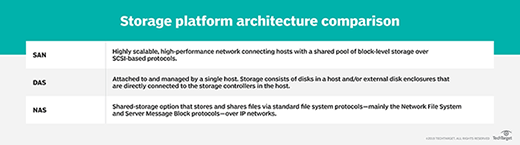
Direct-attached storage (DAS) refers to a dedicated server or storage device that is not connected to a network. A computer's internal HDD is the simplest example of DAS. To access DAS files, the user or computer must have access to the physical storage.
DAS has better performance than NAS, especially for compute-intensive software programs. This is due to dedicated disk access while avoiding the latency of network traffic. In its barest form, DAS might be nothing more than the drives that go in a server.
With DAS, the storage on each device must be separately managed, adding a layer of complexity. Unlike NAS, DAS does not lend itself well to shared storage by multiple users.
NAS vs. SAN
What are the differences between SAN and NAS? A SAN organizes storage resources on an independent, high-performance network. Network-attached storage handles I/O requests for individual files, whereas a SAN manages I/O requests for contiguous blocks of data.
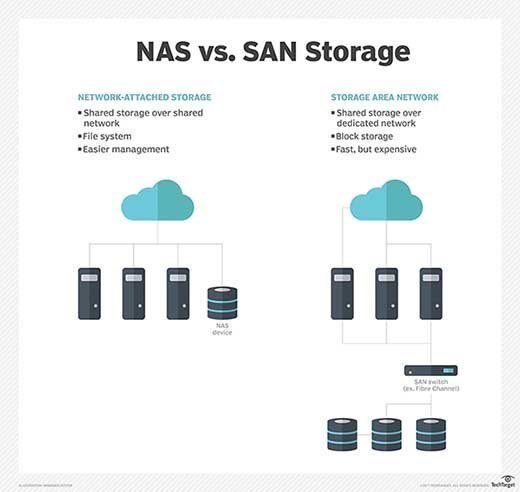
NAS traffic moves across TCP/IP, such as Ethernet. SAN, on the other hand, routes network traffic over the Fibre Channel (FC) protocol designed specifically for storage networks. SANs can also use the Ethernet-based iSCSI protocol instead of FC.
Although NAS can be a single device, SAN provides full block-level access to a server's disk volumes. Put another way, a client OS will view NAS as a file system, while a SAN appears to the disk as the client OS.
SAN/NAS convergence
Until recently, technological barriers have kept the file and block storage worlds separate. Each has had its own management domain and its own strengths and weaknesses. The prevailing view of storage managers was that block storage is "first class" and file storage is "economy class." Giving rise to this notion was a prevalence of business-critical databases housed on SANs.
With the emergence of unified storage, vendors sought to improve large-scale file storage with SAN/NAS convergence. This consolidates block- and file-based data on one storage array. Convergence supports SAN block I/O and NAS file I/O in the same set of switches.
But the promise of SAN/NAS convergence goes far beyond a simple matter of storage approach. Designers have long recognized that SAN and NAS are complementary rather than competing storage technologies, and combining SAN and NAS into a single storage system can benefit users in a range of way, including the following:
- eliminating islands -- and complexity -- of separate SAN or NAS storage;
- improved storage scalability and a common management platform for both SAN and NAS;
- improved file-level access and virtualization for SAN;
- supporting optimizations for mixed file and block data; and
- mitigating the costs of separate SAN/NAS storage and management.
The concept of hyper-convergence first appeared in 2014, pioneered by market leaders Nutanix and SimpliVity Corp., now part of Hewlett Packard Enterprise (HPE). Hyper-converged infrastructure (HCI) bundles the computing, network, SDS and virtualization resources on a single appliance.
HCI systems pool tiers of different storage media and present it to a hypervisor as a NAS mount point. They do this even though the underlying shared resource is block-based storage. However, a drawback of HCI is that only the most basic file services are provided. That means a data center might still need to implement a separate network with attached file storage.
Converged infrastructure (CI) packages servers, networking, storage and virtualization resources on hardware that the vendor has already integrated and validated. Unlike HCI, which consolidates devices in one chassis, CI employs separate devices. This gives customers greater flexibility in building their storage architecture. Organizations looking to simplify storage management might opt for CI or HCI systems to replace a NAS or SAN environment.
Today's convergence and HCI offerings not only combine SAN and NAS storage, but also consolidate computing (servers) and networking gear into the same gear suite -- optimizing entire data center deployment and build-out opportunities.
NAS and file storage vendors
Despite the growth in flash storage, network-attached storage systems still primarily rely on spinning media. The list of vendors is extensive, with most offering more than one configuration to help customers balance capacity and performance.
NAS systems come either fully populated with disks or as a diskless chassis where customers add HDDs from their preferred vendor. Drive vendors Seagate Technology, Western Digital and others work with NAS providers to develop and qualify media.
Vendors of NAS appliances or scalable file storage include the following:
- Accusys Storage Ltd. Accusys supplies scalable shared flash with Peripheral Component Interconnect Express-based ExaSAN. Accusys Gamma and T-Share devices are Thunderbolt 3-designed devices with built-in RAID.
- Arcserve Inc. The data and ransomware protection provider acquired StorageCraft's NAS technology for enterprise environments.
- Asustor. A subsidiary of Taiwanese computer electronics giant Asus, Asustor offers NAS models for personal and business use.
- Buffalo Americas Inc. Offerings include the TeraStation desktop and rackmount NAS appliances. Buffalo's LinkStation NAS devices are targeted at small business and individuals.
- Buurst Inc. The vendor's SoftNAS Cloud NAS software-only product enables customers to scale data migration to Amazon Web Services, Microsoft Azure and VMware vSphere.
- Cloudian. HyperFile by Cloudian is a scale-out NAS system for scalable enterprise file services on premises.
- Ctera Networks. The software company's Edge X Series offers a cloud storage gateway and NAS appliance.
- Ciphertex Data Security. Ciphertex SecureNAS CX is a line of secure storage appliances.
- DataDirect Networks. DDN specializes in storage systems for high-performance computing, including the ExaScaler arrays engineered for high parallelization.
- DataOn Storage. The vendor certified its scale-out file server to enable tunable, shared clustered storage to Windows Server 2019.
- Dell EMC. PowerScale -- replacing EMC Isilon -- is a scale-out NAS that provides the flexibility of a software-defined architecture with accelerated hardware.
- Drobo. 5N NAS is the vendor's low-end complement to the Drobo B810i and B1200i iSCSI midrange arrays.
- Excelero Inc. Excelero jumped in the market in 2017 with NVMesh Server SAN software, which sits between block drives and logical file systems. It writes data directly to non-volatile memory express devices using its patented Remote Direct Drive Access.
- Fujitsu. Celvin NAS servers are suited for backup, cloud, file sharing and SAN integration cases.
- Hitachi Vantara. The Hitachi NAS Platform combines Hitachi's Virtual Storage Platform arrays and Storage Virtualization Operating System and is geared to large VMware environments.
- HPE. 3PAR StoreServ from HPE is a flash storage NAS system.
- Huawei. Scalable File Service (SFS) is a NAS service on Huawei Cloud with scalable high-performance file storage.
- IBM. Spectrum NAS combines IBM Spectrum SDS with storage hardware. Spectrum NAS runs on x86 servers. IBM Spectrum Scale handles file storage for high-performance computing. Spectrum Scale is SDS based on IBM's General Parallel File System.
- Infinidat. The vendor's petabyte-scale InfiniBox unified NAS and SAN array predominantly with disk. It uses a B-tree architecture that caches data and metadata on SSDs, enabling reads directly on the nodes.
- IXSystems Inc. IXSystems designs consumer-oriented TrueNAS for enterprises.
- Microsoft Azure. Microsoft's FXT Edge Filer, with a file system designed for object storage, offers cloud-integrated hybrid storage that works with an organization's NAS and Azure Blob Storage.
- NetApp Inc. With its Fabric-Attached Storage and All Flash FAS, NetApp helped pioneer the use of an extensible file system.
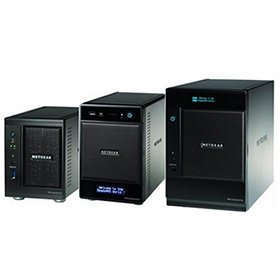
- Netgear. ReadyNAS by Netgear is available in desktop and rackmount models as storage for hybrid and private clouds.
- Nexenta Systems Inc. NexentaStor is SDS that also supports FC and NAS. The software runs on bare metal, VMware hosts or inside VMs on hyper-converged hardware.
- Nexsan. Unity, the vendor's durability-focused arrays, handles SAN and NAS protocols -- enabling hybrid media to support mixed workloads, especially in rugged physical locations.
- Oracle. The Sun Storage 7000 Unified Storage Systems are enterprise-class storage systems for efficiency, scalability and ease-of-use with integrated tools.
- Panasas. The ActiveStor parallel hybrid scale-out system runs the Panasas PanFS file system.
- Pure Storage. The vendor positions its all-flash FlashBlade as a highly scalable platform for big data analytics.
- Quanta Cloud Technology. QCT offers MESOS CB220 NAS appliances.
- QNAP Systems Inc. QNAP has an extensive NAS portfolio that spans small and midsize businesses, as well as midrange and high-end enterprises. It also has products for home users.
- Quantum Corp. The company launched its Xcellis scale-out NAS to compete with Dell EMC Isilon and NetApp FAS. Xcellis uses the Quantum StorNext scalable file system.
- Qumulo Inc. Qumulo Core file storage was developed by several of the creators of the Dell EMC Isilon technology. The Core OS runs on Qumulo C-series and P-series branded arrays, as well as commodity servers.
- Rackspace Technology. Enterprise services include dedicated NAS based on the NetApp OnTap OS for managed block- and file-level storage.
- Seagate. The BlackArmor NAS 220 enterprise arrays scale from 1 TB to 6 TB, with smaller BlackArmor models topping out at 2 TB. Seagate Personal Cloud NAS targets the consumer market with capacity up to 5 TB.
- Spectra Logic Corp. The storage company introduced BlackPearl NAS ranging from 48 TB to 420 TB of optional hybrid flash in a 4U rack.
- Synology Inc. Offerings include NAS devices for business and personal uses, such as DiskStation NAS as well as the company's FS, XS, J, Plus and Value Series devices.
- TerraMaster. The vendor offers a series of business-capable multidrive systems, including the F5-422 and T6-423.
- Thecus Technology Corp. Thecus markets a range of NAS appliances.
- Verbatim Corp. A subsidiary of Mitsubishi Chemical Corp., Verbatim offers PowerBay NAS, which supports four hot-swappable HDD cartridges that can be configured for various RAID levels.
- WekaIO. The vendor's VM-deployed NAS software gets installed on flash-enabled x86 servers, using its parallel file system to scale to trillions of files.
- Western Digital Corp. My Cloud NAS comes in various models with branded HelioSeal helium HDDs. Portable, rugged NAS also is available through Western Digital's G-Technology subsidiary.
- Zadara Storage. Cloud NAS provides scalable file storage as a service with the software-defined Zadara Virtual Private Storage Array.
Cloud-based file storage
In addition to NAS devices, some data centers augment or replace physical NAS with cloud-based file storage. Amazon Elastic File System is the scalable storage in Amazon Elastic Compute Cloud. Similarly, Microsoft's Azure Files service furnishes managed file shares based on SMB and CIFS that local and cloud-based deployments can use.
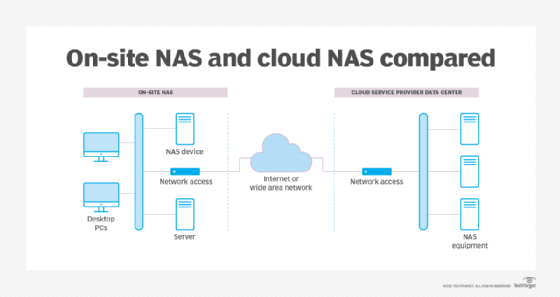
Ideally, cloud-based file storage enables a user or business to store and access data from cloud storage with the same ease and convenience as a local NAS device in the data center or desktop. Cloud file storage has many varied use cases, including web serving, content management, data analytics, data backups and archiving, streaming content and software development. Simultaneously, the cloud provider must support key storage attributes including high availability, good performance, high security, comprehensive management and modest cost. The following are some common cloud file storage options:
- Barracuda Cloud Backup
- Dropbox
- Google Drive
- IDrive
- Microsoft OneDrive
Not as common now, NAS gateways formerly enabled files to access externally attached storage, either connecting to a high-performance area network over FC or simply a bunch of disks in attached servers. NAS gateways are still in use but less frequently; customers are more likely to use a cloud storage gateway, object storage or scale-out NAS.
A cloud gateway sits at the edge of a company's data center network, shuttling applications between local storage and the public cloud. Nasuni Corp. created the cloud-native UniFS file system software, bundled on Dell PowerEdge servers or available as a virtual storage appliance.
Nasuni rival Panzura provides a similar service with its Panzura CloudFS file system and Freedom Filer cache appliances.
Learn more about five key benefits of cloud storage: scalability, flexibility, multi-tenancy, simpler data migration and lower-cost disaster recovery.
What's the future of network-attached storage?
Two central themes for future NAS development include diversification and automation.
Diversification. Although the concepts of SAN/NAS convergence offer a compelling glimpse into one possible storage future, businesses can be leery of one-size-fits-all platforms. NAS use cases are diversifying, and the needs of each specific use case must be carefully evaluated. Some NAS offerings are well suited for backups and archives but might not possess the performance, scale and reliability attributes needed for hosting virtualized environments, data analytics, AI/ML computing and demanding databases. As the variety of NAS products grows, it's important for IT and business leaders to select the NAS platform that best meets the needs of the task at hand.
Automation. The diversification of NAS and file storage also carries enormous management challenges to data integrity and data quality. Data has to be on the right platform -- or in the proper pool -- such as NVMe-based NAS for top performance, disk-based NAS for capacity or cloud NAS for convenience. This need is driving the use of automation to put the right data in the right NAS locations and ensure that all of the data is complete, intact and secure -- while reducing the need for human intervention.
Still, NAS is expected to coexist with SAN and object storage subsystems well into the future to meet a wide array of technical and business needs.