New technologies make venerable tape storage tech a smart choice for off-site backups and data archiving. Explore pros and cons, as well as how the pandemic affects tape use.
Tape technology, regarded by many storage professionals as legacy hardware, is mounting a surprising comeback.
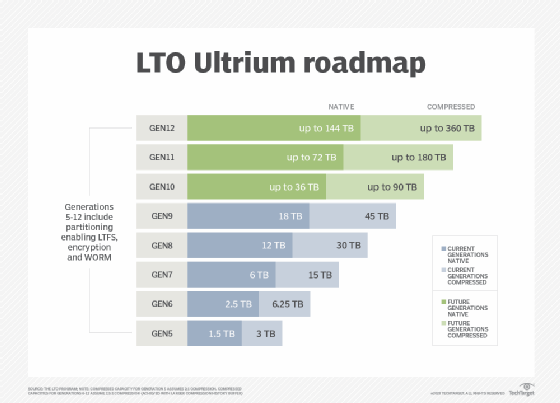
While hardly anyone expects tape-based backup to become the dominant approach it once was, state-of-the-art tape systems now provide a native storage capacity of 12 TB with LTO-8, and even higher with the upcoming LTO-9 -- better than hard disk storage and often faster than the cloud.
"With each new generation of LTO tape technology, the capacity per tape -- native or compressed -- and the native transfer speed have almost doubled," said Cindy LaChapelle, principal consultant at technology research and advisory firm ISG.
Secure and cost-efficient
The latest tape drives provide a secure and cost-efficient storage infrastructure for a backup or archive platform, said Mark Hill, program director of tape development at IBM.
"With malware concerns on the rise, tape provides a great air-gap solution, which means you can easily pull a tape cartridge offline and simply store it on a shelf, creating a physical barrier or 'air gap' between hackers and your data," Hill said.
When you use tape-based backup and physically remove it from the network, you sever the connection and protect it from cyberattacks such as ransomware, said Diana Salazar, product marketing manager at Quantum. Encryption is a key feature in LTO technology.
"Tapes can be configured as WORM [write-once, read-many], with only a minimal additional cost per tape, to ensure data once written cannot be tampered with or modified," LaChapelle added.
Using a high-capacity tape drive is a good strategy if your data protection plan requires maintaining data for compliance and auditing, said Girish Dadge, director of product management, at Sungard Availability Services. "With recent virus and malware threats, tapes have also become the cheapest way to protect data on a WORM-capable media and store it at an off-site location," he said.
Tape-based technology can also help organizations keep a lid on data center costs, such as power and cooling. "If the data no longer needs to be retrieved after 30 days, for example, then it makes sense to store on tape to reduce those soft costs," Salazar suggested.
Long-term benefits
Technically complex hard drives can lose data or completely fail after being left unattended on a shelf for years. Tape cartridges, meanwhile, are designed for long-term storage. Tape-based backup is also highly flexible.
"If a massive restore is required due to disaster recovery or some other reason, additional tape drives can be added in order to read more tape cartridges in parallel," Hill said.
Tape technology rarely fails, and most tape problems are related to human errors, LaChapelle said. "The newest tape technologies have a better bit error rate than disk, indicating that they can transfer more data than disk before encountering a permanent error," she said.
Tape storage in the COVID-19 era
In a pandemic, tape backup automation is necessary to assure rapid data backups and recoveries.
"Tape-based solutions can potentially require manual intervention -- tape packing, shipping and manual reentry into automated libraries," LaChapelle noted.
With recent virus and malware threats, tapes have become the cheapest way to protect data on a WORM-capable media and store it at an off-site location.
Girish DadgeDirector of product management, Sungard Availability Services
If the data is stored on tapes at a facility like Iron Mountain, which stockpiles media inside secure vaults, this could create a potential drawback to using tape as the primary backup and recovery platform during a pandemic. Without tape-based backup automation, when an organization needs to recover data because of a major event or disaster, it will have to request the tapes from the off-site storage location.
"This may require packaging and shipping the tapes to the secondary location," LaChapelle said. Then the IT team must reenter the tapes into the automated tape library for reading and recovery. "Conversely, if the tapes are already in an automated library located at an alternate off-site disaster location, then no manual intervention is required because no actual physical handling or packaging of the tapes is needed, which would eliminate the potential drawback of a tape-based solution."
Other considerations
Although tape is an excellent choice for off-site backup and storage, many organizations hedge their bets by supplementing the approach with another storage technology. "A combination of tape and hard/spinning disks should be used to achieve an optimum backup design," Dadge said.
On the downside, keeping pace with tape drive innovation can be a headache. As tape drive technology evolves, format compatibility occasionally falls by the wayside. As a result, simply being able to read data from older tapes can become a challenge, forcing organizations into retrieving and rewriting data just to keep current with available hardware.
"LTO-8 cannot read LTO-6 tapes due to a media incompatibility," said Adrian Moir, senior consultant for product management at Quest Software. "LTO-8 doesn't support the use of magnetic particle tapes -- only barium ferrite media."
Still, more IT professionals are discovering the hard way that the cloud is not as cost-effective a backup technology as they once thought.
"While the cost per gigabyte on a monthly basis is attractive, the cost to retrieve data from the cloud is something you'll need to factor in," Salazar said. "Unfortunately, retrieval costs are not [usually] factored into the cost model and it ends up being an unpleasant surprise to many."