iSCSI (Internet Small Computer System Interface)
ISCSI is a transport layer protocol that describes how Small Computer System Interface (SCSI) packets should be transported over a TCP/IP network.
ISCSI, which stands for Internet Small Computer System Interface, works on top of the Transport Control Protocol (TCP) and allows the SCSI command to be sent end-to-end over local-area networks (LANs), wide-area networks (WANs) or the internet. IBM developed iSCSI as a proof of concept in 1998 and presented the first draft of the iSCSI standard to the Internet Engineering Task Force (IETF) in 2000. The protocol was ratified in 2003.
ISCSI makes it possible to set up a shared-storage network where multiple servers and clients can access central storage resources as if the storage was a locally connected device.
SCSI -- without the "i" prefix -- is a data access protocol that's been around since the early 1980s. It was developed by then-hard disk manufacturer Shugart Associates.
How iSCSI works
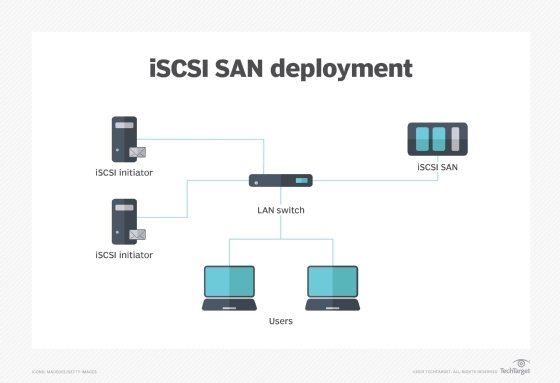
ISCSI works by transporting block-level data between an iSCSI initiator on a server and an iSCSI target on a storage device. The iSCSI protocol encapsulates SCSI commands and assembles the data in packets for the TCP/IP layer. Packets are sent over the network using a point-to-point connection. Upon arrival, the iSCSI protocol disassembles the packets, separating the SCSI commands so the operating system (OS) will see the storage as if it was a locally connected SCSI device that can be formatted as usual. Today, some of iSCSI's popularity in small to midsize businesses (SMBs) has to do with the way server virtualization makes use of storage pools. In a virtualized environment, the storage pool is accessible to all the hosts within the cluster and the cluster nodes communicate with the storage pool over the network through the use of the iSCSI protocol. There are a number of iSCSI devices that enable this type of communication between client servers and storage systems.
Components of iSCSI
Components of iSCSI include:
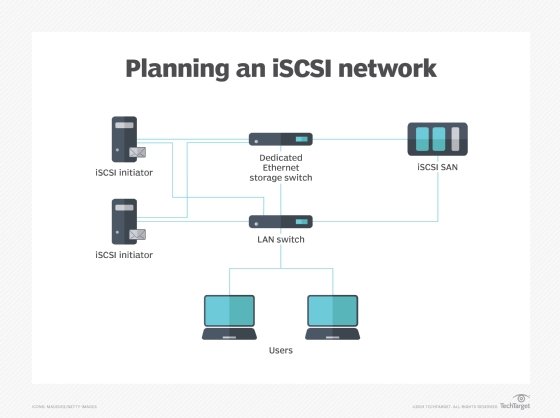
iSCSI initiator. An iSCSI initiator is a piece of software or hardware that is installed in a server to send data to and from an iSCSI-based storage array or iSCSI target.
When a software initiator is used, standard Ethernet components such as network interface cards (NICs) can be used to create the storage network. But using a software initiator along with NICs leaves virtually all of the processing burden on the servers' CPUs which will likely have an impact on the servers' performance handling other tasks.
An iSCSI host bus adapter is similar to a Fibre Channel (FC) HBA. It offloads much of the processing from the host system's processor, improving performance of the server and the storage network. The improvement performance, however, comes at a cost as iSCSI HBAs typically cost three or four times as much as a standard Ethernet NIC. A similar, but somewhat less expensive, alternative is an iSCSI offload engine -- or iSOE -- which, as its name suggests, offloads some of the process from the host.
iSCSI target. In the iSCSI configuration, the storage system is the "target." The target is essentially a server that hosts the storage resources and allows access to the storage via one or more NICs, HBAs or iSOEs.
iSCSI vs Fibre Channel
Initially, iSCSI storage systems were positioned as alternatives to the more expensive, yet higher performing Fibre Channel-based storage arrays that handled the bulk of block storage tasks in enterprise data centers. FC arrays use a protocol for reading and writing data to storage devices that was devised specifically for storage tasks, so it typically offers the highest performance for block storage access -- the type of access generally preferred for database applications with high transaction rates that require speedy I/Os and low latencies.
Configuring iSCSI storage is a similar process to setting up FC storage, with the creation of logical unit numbers (LUNs) the basis of the process.
iSCSI benefits
Because it uses standard Ethernet, iSCSI does not require expensive and sometimes complex switches and cards that are needed to run Fibre Channel networks. That makes it cheaper to adopt and easier to manage. Even if iSCSI HBAs or iSOEs are used instead of standard Ethernet NICs, the component costs of an iSCSI storage implementation will still be cheaper than that of an FC-based storage system.
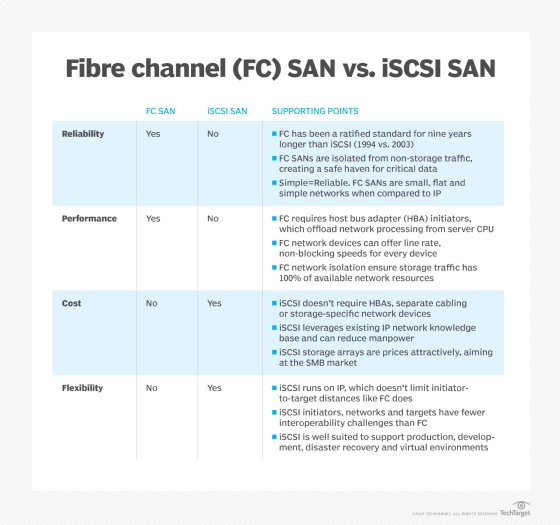
An FC storage-area network (SAN) transmits data without dropping packets and has traditionally supported higher bandwidths, but the FC technology is expensive and requires a specialized skill base to install and configure properly. An iSCSI SAN, on the other hand, could be implemented with ordinary Ethernet network interface cards and switches and run on an existing network. Instead of learning, building and managing two networks -- an Ethernet LAN for user communication and an FC SAN for storage -- an organization could use its existing knowledge and infrastructure for both LANs and SANs.
iSCSI performance
Many iSCSI implementations are based on a 1 gigabit per second Ethernet (GbE) infrastructure, but for all but the smallest environments, 10 GbE should be considered the base configuration for performance that rivals that of a Fibre Channel storage network.
Multipathing is a technique that allows a storage administrator to set up several paths between client servers and storage resources. Performance is enhanced with multipathing because bandwidth can be throttled among the paths to balance loads, thus making access to storage more efficient. Multipathing also provides fault tolerance to improve the reliability of the iSCSI storage system.
Jumbo frames -- another Ethernet protocol enhancement -- allow iSCSI storage systems to ship larger amounts of data than allowable with standard Ethernet frame sizes. Moving bigger chunks of data at a time also yields performance improvements.
Data center bridging (DCB) is another technical development that makes Ethernet-based storage more reliable while enhancing performance. DCB is set of standards sanctioned by the Institute of Electrical and Electronics Engineers (IEEE) that help mitigate dropped frames and make it possible to allocate bandwidth so that performance-hungry applications don't have to contend with less voracious apps.
iSCSI limitations
The main limitation of iSCSI storage networks is related to its performance compared to FC-based storage environments. When iSCSI was first rolled out, the performance gap between the two technologies was profound, but the availability of 10 GbE iSCSI and other tech implementations such as multipathing and data center bridging have helped to close the performance gap.
Today, iSCSI storage performs as well as -- or nearly as well as -- similarly configured FC systems. And with 100 GbE connectivity for iSCSI on the near horizon, iSCSI storage will likely keep pace with -- or possibly outrun -- FC systems running at 32 GBps and 64 GBps.
iSCSI market success
Because of concerns about performance and compatibility with other storage networks, iSCSI SANs took several years to catch on as mainstream alternatives to Fibre Channel. Start-up vendors EqualLogic Corp. and LeftHand Networks Inc. finally achieved enough success with their iSCSI storage arrays that larger vendors acquired them. In 2008, Dell Inc. bought EqualLogic for $1.4 billion and Hewlett-Packard Co. paid $360 million for LeftHand.
In its early days, iSCSI was often considered a lower cost alternative to FC for disaster recovery systems and other secondary storage applications.
Fibre Channel is still a popular storage protocol particularly for hybrid solid state-hard disk drive and all flash environments, but all major storage vendors now feature iSCSI SAN arrays, with some also offering storage platforms that support both FC and iSCSI. Systems that run FC and iSCSI are known as unified or multiprotocol storage, and they often also support network-attached systems for file storage.
Ethernet alternatives to iSCSI
ISCSI is the most popular approach to storage data transmission over Internet Protocol (IP) networks, but there are alternatives, such as the following:
- Fibre Channel over IP (FCIP), also known as Fibre Channel tunneling, moves data between SANs over IP networks to facilitate data sharing over a geographically distributed enterprise.
- Internet Fibre Channel Protocol (iFCP) is an alternative to FCIP that merges SCSI and FC networks into the internet.
- Fibre Channel over Ethernet (FCoE) became an official standard in 2009. Pushed by Cisco Systems Inc. and other networking vendors, it was developed to make Ethernet more suitable for transporting data packets to reduce the need for Fibre Channel. But while it is used in top-of-rack switches with Cisco servers, FCoE is rarely used in SAN switching.
- ATA over Ethernet (AoE) is another Ethernet SAN protocol that has been sold commercially, mainly by Coraid Inc. AoE translates the Advanced Technology Attachment (ATA) storage protocol directly to Ethernet networking rather than building on a high-level protocol, as iSCSI does with TCP/IP.
iSCSI security
The primary security risk to iSCSI SANs is that an attacker can sniff transmitted storage data. Storage administrators can take steps to lock down their iSCSI SAN, such as using access control lists (ACLs) to limit user privileges to particular information in the SAN. Challenge-Handshake Authentication Protocol (CHAP) and other authentication protocols secure management interfaces and encryption for data in motion and data at rest.
Also, because of its Ethernet pedigree, some companies will use their outward facing Ethernet data networks for iSCSI storage as well. This is not a recommended practice, however, as it may expose the storage infrastructure to internet-borne viruses, malware and ransomware. The iSCSI supporting network should be isolated from external access if possible.