
Getty Images/iStockphoto
Comparing RAID levels: 0, 1, 5, 6, 10 and 50 explained
RAID protects data and improves storage performance and availability, but it can be confusing. Read about the different levels of RAID, the pros and cons, and where they work best.
RAID is a common method for protecting application data on HDDs and solid-state storage, with different types of RAID balancing the level of protection and performance against the cost. The greater the performance or the level of protection, the higher the cost.
An array's RAID level defines the level of performance or protection that the RAID array provides. Previously, RAID had only a few levels. As data storage has evolved, however, the number of RAID levels has increased.
RAID is a way of grouping individual physical drives together to form a RAID set. The RAID set represents all the physical drives as a single logical disk. The logical disk is called a logical unit number, or LUN.
Improvements to RAID performance and availability have caused RAID to remain a viable option, even as newer, alternative technologies have become available. Erasure coding and SSDs have presented reliable -- if more expensive -- alternatives, and as storage capacity increases, the chance of RAID array errors increases, too. Still, storage vendors continue to support RAID levels in their storage arrays.
To fully understand RAID and its benefits, it's important to break down the different RAID levels and understand what each level does best:
- RAID 0: Disk striping.
- RAID 1: Disk mirroring.
- RAID 1+0: Disk mirroring and striping.
- RAID 2: Striping and Hamming code parity.
- RAID 3: Parity disk.
- RAID 4: Parity disk and block-level striping.
- RAID 5: Disk striping with parity.
- RAID 5+0: Disk striping and distributed parity.
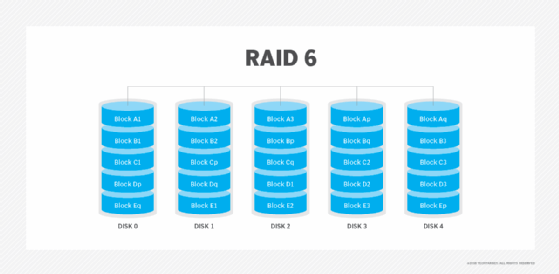
- RAID 6: Disk striping with double parity.
- Adaptive RAID: Option to use RAID 3 or RAID 5.
- RAID 7: Nonstandard with caching.
In spite of so many RAID levels, only some of them are in common use. RAID 0, 1, 1+0, 5, 5+0 and 6 are popular choices.
RAID levels explained
RAID levels can be broken into three categories: standard, nonstandard and nested. Standard levels of RAID are made up of the basic types of RAID numbered 0 through 6. A nonstandard RAID level is set to the standards of a particular company or open source project. Nonstandard RAID includes RAID 7, adaptive RAID, RAID-S and Linux md RAID 10. Nested RAID refers to combinations of RAID levels, such as RAID 10 (RAID 1+0) and RAID 50 (RAID 5+0).
The RAID level you use should depend on your performance and redundancy requirements. As far as the standard RAID levels go, RAID 0 is the fastest, RAID 1 is the most reliable and RAID 5 is a good combination of both. The best RAID for your organization may depend on the level of data redundancy you're looking for, length of your retention period, number of disks you're working with and importance you place on data protection versus performance optimization.
Below is a description of the RAID levels most used in storage arrays. Not all storage array vendors support every RAID type, so check with your vendors for the types of RAID that are available with their data storage.
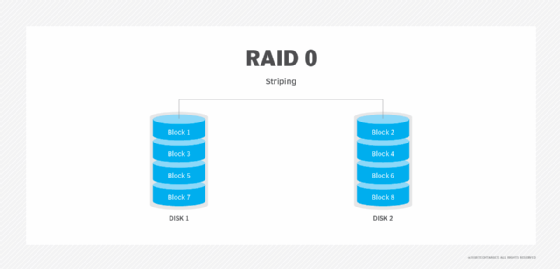
RAID 0: Disk striping
RAID 0 is simple disk striping. All the data is spread out in chunks across all of the SSDs or HDDs in the RAID set. RAID 0 offers great performance because users spread the load of storing data onto more physical drives. RAID 0 doesn't make use of disk parity, which is a way to make sure data has successfully been written when it is moved from one drive to another. Because RAID 0 doesn't make use of parity, it doesn't have data redundancy or fault tolerance.
Advantages. Performance is RAID 0's key advantage. Striping data across multiple disks provides more bandwidth than a single disk drive, multiplying the number of IOPS available for data reads/writes. RAID 0 is easy to implement and has the lowest overhead cost of all the RAID types because it uses disk space only to store data. No storage space is lost to overhead or data redundancy. It is widely supported.
Disadvantages. RAID 0 has the worst data protection of all RAID levels. Because RAID 0 doesn't have parity, when a disk fails, the entire RAID set fails. Admins need to replace the failed disk, reconstruct the RAID set and restore the data from backup.
Best use. RAID 0's lack of redundancy means it should be used for data storage for non-mission-critical applications. It is well suited to applications where data is read and written at high speeds.
RAID 1: Disk mirroring
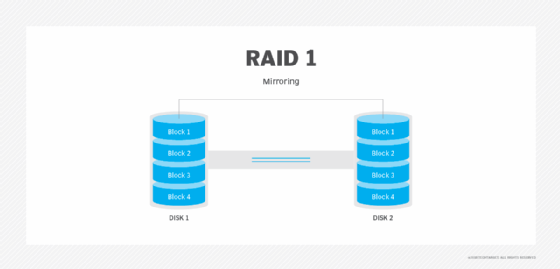
RAID 1 uses disk mirroring, which means all of the data is written to two separate physical disks. The disks are essentially mirror images of one another. If a single disk fails, data can be retrieved from the other disk. RAID 1 requires a minimum of two disk drives, although most storage vendors allow users to create larger mirror sets.
Advantages. RAID 1 is a good choice for users who need entry-level data protection and for whom a single disk provides an adequate level of performance. If the RAID set's primary disk fails, the set provides instantaneous failover by enabling the mirror disk to take over for the failed disk.
Disadvantages. Write speeds can be slower because data must be written to two disks, although some storage controllers eliminate this bottleneck. Another downside of RAID 1 is that it takes twice as much space to store data since data is written to two disks instead of just one.
Best use. RAID 1 works well for users who need single disk performance and entry-level high availability. RAID 1 is often a way of protecting a server's OS since it provides a secondary copy of the server's boot disk.
RAID 10: Disk mirroring and striping
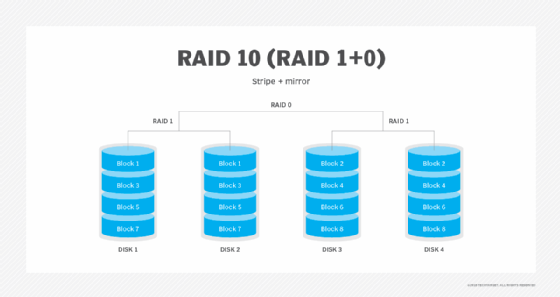
RAID 10, which is also called RAID 1+0, is a nested RAID level that combines disk mirroring and striping. The data is normally mirrored first and then striped. Mirroring striped sets accomplishes the same task, but it is less fault-tolerant than striping mirror sets. RAID 10 requires a minimum of four physical disks.
Advantages. RAID 10 benefits from the performance capabilities provided through its use of RAID 0. Data is spread across two or more drives, and multiple read/write heads on the drives can access portions of the data simultaneously, resulting in faster processing. Because it uses RAID 1, RAID 10 data is fully protected. If a disk within the set fails or becomes unavailable, the mirror copy can take over.
Disadvantages. If you lose a drive in a stripe set, you must access data from the other stripe set, which can diminish performance during a failover. Additionally, RAID 10 requires a minimum of four disks, making it more expensive than some other RAID levels. Like RAID 1, half of the array's total capacity is lost to redundancy.
Best use. RAID 10's redundancy and high performance make it a good choice for operations that require minimal downtime. It is also optimal for I/O-intensive applications, such as email, web servers, databases and applications that need high disk performance.
RAID 2: Striping and Hamming code parity
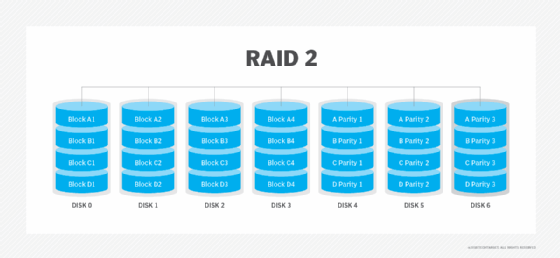
RAID 2 striped data at the bit level and used Hamming code to provide parity and detect errors. Parity provided a checksum of the data written to disks. Parity information was written along with the original data. The server accessing the data on a hardware-based RAID set never knew when one of the drives in the RAID set had gone bad. When that happened, the controller used the parity information stored on the surviving disks in the RAID set to recreate the data that was lost.
Advantages. Data protection was a key advantage of RAID 2. The parity provided by the Hamming code delivered data redundancy and fault tolerance.
Disadvantages. RAID 2 was more complex than other RAID levels. It also was more costly than some other levels because it required an additional disk drive.
Best use. Hamming codes are already used in the error correction code in hard drives, so RAID 2 is no longer in use.
RAID 3: Parity disk
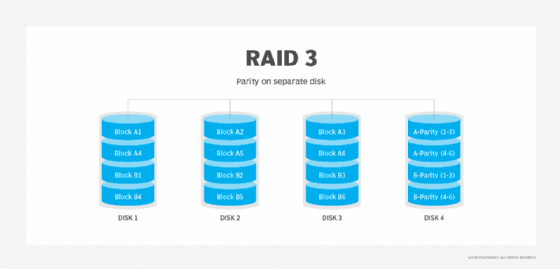
RAID 3 uses a parity disk to store the parity information generated by a RAID controller on a separate disk from the actual data disks instead of striping it with the data, as in RAID 5. RAID 3 requires a minimum of three physical disks.
Advantages. RAID 3 provides high throughput, which makes it a good choice for transferring large amounts of data in bulk.
Disadvantages. RAID 3 requires an extra drive for parity. With the parity data stored on a separate disk, RAID 3 performs poorly when there are a lot of small requests for data, as with a database application. Additionally, the parity disk can become a single point of failure.
Best use. RAID 3 performs well with applications that require one long, sequential data transfer, such as video servers.
RAID 4: Parity disk and block-level striping
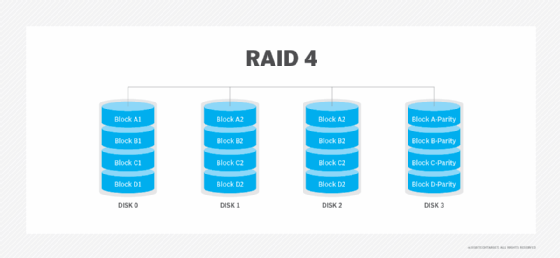
RAID 4 uses a dedicated parity disk along with block-level striping across disks to protect data. With RAID 4, the number of bits on multiple disks is added together, and the total is kept on the separate parity disk. Those stored bits are used to help with data recovery when a drive fails.
Advantages. Striping enables data to be read from any disk. RAID 4 is good for sequential data access.
Disadvantages. The use of a dedicated parity disk can cause performance bottlenecks for write operations because all writes must go to the dedicated disk.
Best use. With alternatives such as RAID 5 now available, RAID 4 isn't used much.
RAID 5: Disk striping with parity
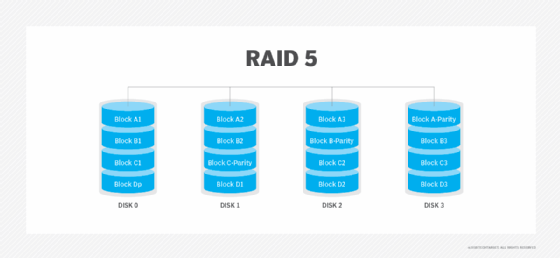
RAID 5 uses disk striping with parity. Like other RAID levels that use striping, the data is spread across all disks in the RAID set. The parity information needed to reconstruct the data in case of disk failure is also spread diagonally across disks in the RAID set. RAID 5 is one of the most used RAID levels because it achieves a good balance between performance and availability. RAID 5 requires at least three physical disks.
Advantages. The combined use of data striping and parity prevents any single disk from becoming a bottleneck. RAID 5 provides good read performance that is nearly on par with RAID 0. With parity data spread across all the drives in the RAID set, a RAID 5 array can continue to function even if a disk within the array set fails. When a failure occurs, most RAID 5 implementations enable hot swapping of the failed disk.
Disadvantages. Write performance on RAID 5 drives is slower than read performance because of the parity data calculation. This RAID level suffers from longer rebuild times and potential data loss if a second drive fails during a rebuild. RAID 5 also requires a more sophisticated controller than other RAID levels.
Best use. RAID 5 is a good option for application and file servers with a limited number of drives.
RAID 50: Disk striping and distributed parity
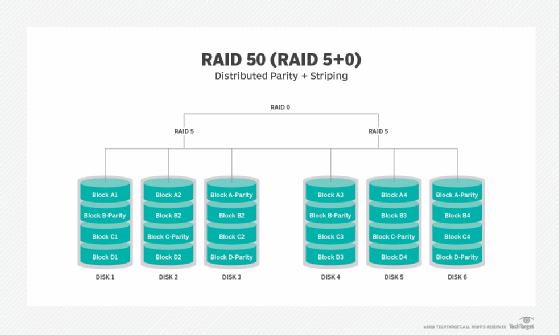
RAID 50, also known as RAID 5+0, is another nested RAID level that combines striping and distributed parity to get the advantages of both. RAID 50 has a six-disk minimum requirement.
Advantages. RAID 50's data protection features are a step above RAID 5. Whereas RAID 5 can only withstand the failure of a single disk, RAID 50 can withstand multiple disk failures, as long as those failures do not occur in the same array. In the event of a single drive failure, performance isn't degraded as much as with RAID 5 because only one of the RAID 5 arrays is affected.
Disadvantages. RAID 50's six-disk minimum requirement makes it potentially more expensive than other RAID types. It also needs a more sophisticated controller and synchronized disks.
Best use. RAID 50 is good for applications that require high reliability.
RAID 6: Disk striping with double parity
RAID 6 increases reliability over RAID 5 by spreading parity data across multiple disks and enabling I/O operations to overlap to improve performance. RAID 6 uses two parity stripes, which enable two disk failures within the RAID set before data is lost. RAID 6 enables data recovery during simultaneous drive failures, which is more common with larger capacity drives with longer rebuild times. RAID 6 requires at least four drives.
Advantages. The dual parity provided with RAID 6 protects against data loss if a second drive fails. The percentage of usable data storage capacity increases as disks are added to a RAID 6 array. Beyond the minimum of four disks, RAID 6 uses less storage capacity than RAID levels that use mirroring.
Disadvantages. RAID 6 has lower performance than RAID 5. Performance can take a significant hit if two drives need to be rebuilt at the same time. RAID 6 can be more expensive because it requires two extra disks for parity. RAID 6 requires a specialized controller. RAID controller coprocessors are often used with RAID 6 to do parity calculations and improve write performance.
Best use. RAID 6 is a good option for long-term data retention. It is often used for large-capacity drives deployed for archiving or disk-based backup. With more data protection capabilities than RAID 5, RAID 6 is also a good choice for mission-critical applications.
Adaptive RAID: Option to use RAID 3 or RAID 5
Adaptive RAID lets the RAID controller figure out how to store parity on the disks. It chooses between RAID 3 and RAID 5 depending on which RAID set type performs better with the type of data being written to the disks.
RAID 7: Nonstandard with caching
RAID 7 is a nonstandard RAID level -- based on RAID 3 and RAID 4 -- that adds caching and requires proprietary hardware. This RAID level is owned and trademarked by the now-defunct Storage Computer Corp.
Brien Posey is a 15-time Microsoft MVP with two decades of IT experience. He has served as a lead network engineer for the U.S. Department of Defense and as a network administrator for some of the largest insurance companies in America.