RAID 50 combines striping with distributed parity for reduced data loss and better performance. Is RAID 50 the right configuration for your organization?
Much as the name implies, RAID, or redundant array of independent disks, uses redundancy to reliably protect and store data on hard disks and SSDs. There are numerous RAID options out there, and the most common is RAID 5. If you're looking to get more out of your RAID 5, however, you might consider RAID 50.
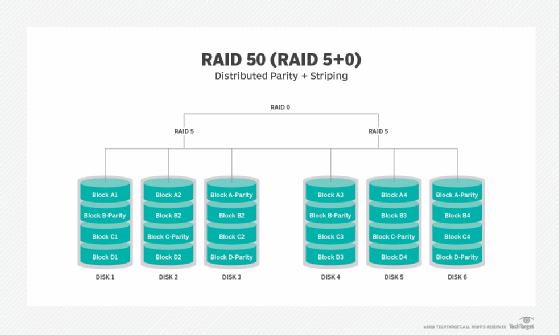
RAID 50, or 5+0, is a nested RAID level. Nested RAID combines two basic RAID techniques to reap the benefits of both. All nested RAID levels include RAID 0, or disk striping. Striping spreads data across multiple drives, enabling reads and writes to take place more quickly. On its own, RAID 0 does not have parity.
By combining the striping of RAID 0 with the evenly distributed parity of RAID 5, RAID 50 gives RAID 0 the parity it needs to have redundancy and fault tolerance. It stripes data across at least two RAID 5 disk arrays and requires a minimum of six disks.
Advantages and disadvantages of RAID 50
The easy way to think of RAID 50 is as RAID 5 with an extra pair of suspenders. RAID 50 offers increased write performance and better data protection than RAID 5 in the event of a disk failure. RAID 50 is capable of faster rebuilds, a necessity at a time when downtime is considered unacceptable.
While performance inevitably degrades in the event of a disk failure, it doesn't degrade as much as it would in a RAID 5 array because a single failure only affects one of the arrays, leaving the other fully functional. In fact, RAID 50 can sustain up to four hard drive failures if each failed disk is in a different RAID 5 array.
The easy way to think of RAID 50 is as RAID 5 with an extra pair of suspenders.
RAID 50 is best used for applications that need high reliability and that need to handle high request rates and high data transfer with lower cost of disks than a RAID 10 (1+0, mirrored and striped) array. However, since it takes a minimum of six disks to set up a RAID 50 array, cost isn't completely eliminated as a factor.
One of the disadvantages of RAID 50 is that, like RAID 5, it needs a sophisticated controller. For maximum throughput, a RAID 50 array should have synchronized disks. Unfortunately, this limits disk choices, because not all disks can be synchronized.
Disk space and performance
RAID 50 has less useable disk space than RAID 5, due to allocating one disk per array for parity. However, it still has more useable space than other RAID levels, particularly those that use mirroring.
With a minimum requirement of six disks, RAID 50 can be a costly option, but that additional disk space justifies the expense by protecting your data. It is not infallible, and multiple disk failures in the underlying RAID 5 arrays in the configuration is bad news. One of the benefits of RAID 5, however, is that a RAID 5 array can withstand a single failure, so the odds of both arrays within the 50 configuration being put out of commission at the same time is unlikely.
Unlike RAID 5, RAID 0 does not offer additional data protection, so it is something to consider when deciding on 5 or 50. The addition of RAID 0 to RAID 5 does not play into RAID 50's fault tolerance, but it does give it a performance boost.
Performance is one of the major benefits of RAID 50 and where it pulls ahead of RAID 5. Read and write performance in a RAID 50 configuration is aided by the addition of RAID 0's disk striping, multiplying the bandwidth of individual disks and increasing speed. RAID 50 is better suited to dealing with random I/O than other high-performing RAID levels, an area where high-performing alternatives like RAID 10 struggle.
Because there are multiple RAID levels that have good performance, such as RAID 10 and RAID 6, it will often come down to a tradeoff based on your organization's needs. Is performance more important, or data protection? Is capacity a concern, or cost savings? To work out which RAID configuration is right for you, it helps to take a look at your requirements and priorities.
Comparing RAID levels and configurations
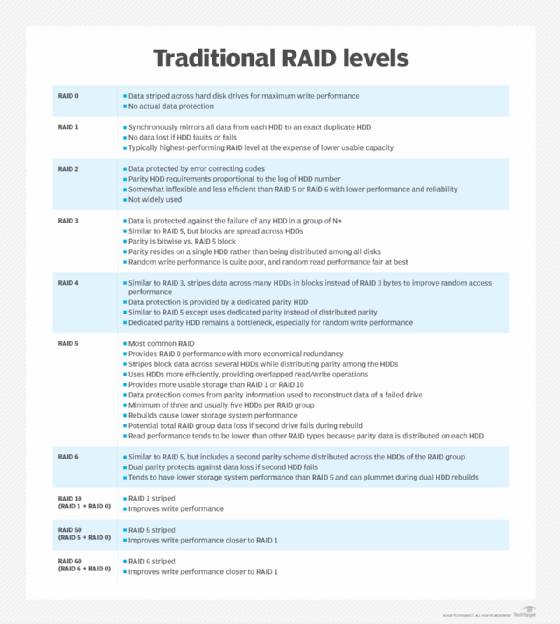
RAID 50 gets the best of both worlds from 5 and 0, but those are far from the only RAID configurations out there. While RAID 5 is the most commonly used, there are a number of other traditional and nested RAID levels you might want to consider before landing on RAID 50.
RAID levels have been added as technology evolves, so some levels are more advanced than others. For example, while RAID 50 and 5 offer block-level disk striping across multiple drives, RAID 4 does not. This results in a bottleneck in high-traffic situations and makes it an unfavorable alternative. As a result, RAID 4 is not used nearly as much despite offering comparable data protection. RAID 2 is rarely used as well, with many of its shortcomings remedied by RAID 3.
RAID 10 is another nested RAID level, combining the striping of RAID 0 with the mirroring of RAID 1. RAID 10 is able to stripe data across multiple mirrored pairs, which means it can tolerate failure of one disk in a pair. However, if both mirrored pairs fail, you will experience data loss.
RAID levels explained
While the mirroring provides more fault tolerance than RAID 50, it also takes up a lot more space. Since everything is doubled, you're only actually getting 50% of the raw capacity of your drives for new data. The choice between RAID 50 and RAID 10 will likely come down to cost, capacity utilization and your data protection needs.
RAID 6, or double-parity RAID, is a standard RAID level that offers reliable long-term data retention and is good for archiving. Because it uses two parity stripes, RAID 6 can withstand two disk failures before data loss, making it one of the most fault-tolerant levels available. Double-parity costs RAID 6 some of its useable capacity, though not as much as RAID 10. While it is an excellent option if you're looking to have maximum data protection, it lacks the performance of RAID 50.