firmware

What is firmware?
Firmware is programming that's written to a hardware device's non-volatile memory. Non-volatile memory is a form of static random access memory where the content is saved when a hardware device is turned off or loses its external power source.
Firmware is installed directly onto a piece of hardware during manufacturing. It is used to run user programs on the device and can be thought of as the software that enables hardware to run.
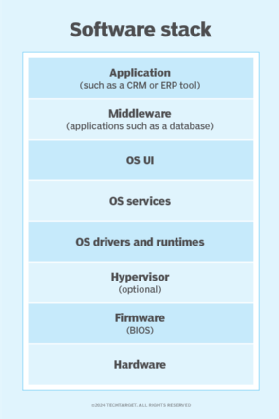
Hardware makers use embedded firmware to control the functions of various hardware devices and systems, much like a computer's operating system (OS) controls the function of software applications. Firmware may be written into read-only memory (ROM), erasable programmable read-only memory (EPROM) or flash memory.
American computer scientist Ascher Opler is said to have coined the phrase firmware in a 1967 issue of the publication Datamation. He used the term to describe a type of microprogram in between hardware and software.
Today, embedded firmware exists in everything from smartphones to internet of things (IoT) devices. It is often included in devices not traditionally thought of as having computer control.
Why are firmware updates important and how do they work?
Firmware updates are often issued to fix bugs, prevent firmware hacks, roll out new features, improve security or interact with new media. Firmware updates consist of code that tells the hardware how to behave in a new or modified way.
Some examples of firmware updates include the following:
- A CD disc writer gains the ability to burn a new type of disk.
- A router gets an update that improves its performance and stability.
- A motherboard manufacturer releases a BIOS update that enables the motherboard to support new processors. BIOS is motherboard firmware.
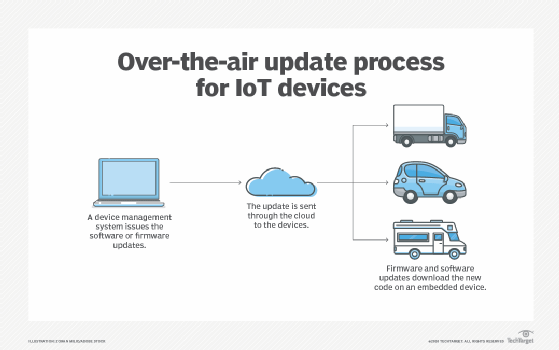
Some internet-connected devices regularly check for new firmware and automatically download and install it. Other device manufacturers require the user to visit the manufacturer's website to download and install firmware updates manually. Manufacturers release updates on a regular basis.
The frequency of firmware updates will vary depending on the device. The firmware in a smart light bulb may not need frequent updates. However, the firmware on a smart thermostat may need to be updated periodically to remain compatible with smartphone OS updates. Smartphones commonly automate firmware upgrades alongside software updates so the phone remains functional and users don't have to manually update firmware versions to coincide with software updates. The process of remotely updating firmware by downloading upgrades from the service provider is sometimes referred to as firmware over the air.
Many electronic devices also require that the device remains powered on while updating firmware so that the update doesn't get corrupted. Corrupting a device's firmware can damage some devices or cause them to malfunction.
Types of firmware
There are many types of technology-specific firmware, but all firmware can generally be sorted into three categories based on the level of hardware integration.
- Low-level firmware. Low-level firmware is considered an intrinsic part of a device's hardware. It is often stored on non-volatile, read-only chips like ROM and therefore cannot be rewritten or updated. Devices containing low-level firmware have one-time programmable memory.
- High-level firmware. High level firmware does allow updates and is generally more complex than low-level firmware. In a computer, high-level firmware resides on flash memory chips.
- Subsystem firmware. Subsystem firmware often comes as part of an embedded system. It is comparable to high-level firmware in that it can be updated and is more complex than low-level firmware. One example is a server's power subsystem, which is a piece of server hardware that functions semi-independently from the server.
Applications of firmware
Firmware is found in a range of computing equipment, including complex devices and those typically not considered computing devices. Some real-world applications of firmware include the following:
- Personal computer. The firmware of a personal computer -- either BIOS or unified extensible firmware interface -- comes embedded on a small memory chip on the computer's motherboard. A computer's peripherals, such as graphics and video cards, also contain firmware.
- Storage devices. USB drives, hard drives and other portable storage devices contain basic firmware that enable them to function with a computer.
- Mobile devices. Mobile phones, tablets, laptops and other mobile devices all contain firmware that let the hardware work with various software.
- Automotive. Automobiles contain many embedded systems, sensors and small computers that contain firmware that enables them to perform their designated tasks.
- Home appliances. Dishwashers and washing machines are among the appliances that contain firmware. The firmware helps the machine communicate with the computer used to configure the machine's settings and control its operation.
- Smart cards. Smart cards have instructions embedded in a chip that provides the card's basic functionality, as well as authentication and encryption.
The difference between firmware and software
Although some consider firmware a type of software, there is a distinction between the two technologies.
Firmware
Firmware is software that provides basic machine instructions that allow the hardware to function and communicate with other software running on a device. Firmware provides low-level control for a device's hardware. For this reason, it is sometimes called "software for hardware." Another distinguishing feature is that firmware is not generally designed to be user friendly.
Software
Software is designed for users to interact with to accomplish specific tasks. It sits above the firmware, abstracted from the hardware, and uses the firmware to communicate with the underlying hardware. Software is more complex and not as bound to the underlying hardware.
Examples of software include computer programs such as OSes. Applications for word processing, video conferencing and listening to music are also examples of software. A software program can usually be changed out without replacing a hardware component, whereas firmware often can't.
Firmware that is embedded in flash memory chips can be updated more easily than firmware written to ROM or EPROM. As flash memory plays a bigger role in the enterprise, admins must learn about the types of flash and their use cases.