parity

In computers, parity (from the Latin paritas, meaning equal or equivalent) is a technique that checks whether data has been lost or written over when it is moved from one place in storage to another or when it is transmitted between computers.
How parity works
Because data transmission is not an entirely error-free process, data is not always received in the same way as it was transmitted. A parity bit adds checksums into data that enable the target device to determine whether the data was received correctly.
An additional binary digit, the parity bit, is added to a group of bits that are moved together. This bit, sometimes referred to as a check bit, is used only to identify whether the moved bits arrived successfully.
Even parity bit vs. odd parity bit
There are two kinds of parity bits:
- In even parity, the number of bits with a value of one are counted. If that number is odd, the parity bit value is set to one to make the total number of ones in the set (including the parity bit) an even number. If the number of bits with a value of one is even, the parity bit value is set to zero, so that the total number of ones in the set (including the parity bit) remains an even number.
- In odd parity, if the number of bits with a value of one is an even number, the parity bit value is set to one to make the total number of ones in the set (including the parity bit) an odd number. If the number of bits with a value of one is odd, the parity bit value is set to zero, so that the total number of ones in the set (including the parity bit) remains an odd number.
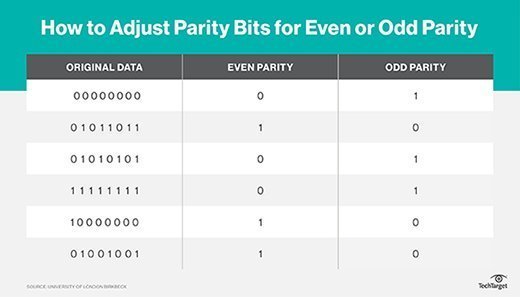
At the receiving end, each group of incoming bits is checked to see if the group totals to an even or odd number. If a transmission error occurs, the transmission is retried or the system halts and an error message is sent to the user.
Parity error detection
The above description explains how parity checking works within a computer. Specifically, the peripheral component interconnect bus and the I/O bus controller use the odd parity method of error checking. Parity bit checking is not an infallible error-checking method since it's possible that two bits could be in error in a transmission, offsetting each other. For transmissions within a personal computer, this possibility is considered extremely remote. In some large computer systems where data integrity is seen as extremely important, three bits are allocated for parity checking.
Parity checking is also used in communication between Modems. Here, parity checking can be selected to be even (a successful transmission forms an even number) or odd. Users may also select no parity, meaning the modems will not transmit or check a parity bit. When no parity is selected (or defaulted), it's assumed there are other forms of checking that will detect any errors in transmission. No parity also usually means the parity bit can be used for data, speeding up transmission. In modem-to-modem communication, the type of parity is coordinated by the sending and receiving modems before the transmission takes place.
Parity checking vs. error-correction code
At the 64-bit word level, parity checking and error-correction code (ECC) require the same number of extra bits. While parity checking just detects an error -- it does not have correction capabilities -- ECC technology allows errors to not only be detected, but corrected. This means a system can continue to work without data being corrupted. In general, ECC offers greater reliability to any computing or telecommunications system without adding much cost.
Parity and RAID
The concept of parity is also used in redundant array of independent disks (RAID) protection. RAID devices use enhanced forms of parity checking such as vertical and horizontal parity. Some RAID groups -- such as RAID 4 or RAID 5 -- have one or more disk drives that contain parity information that allows them to rebuild data if a drive failure occurs. For example, double-parity RAID (also known as RAID 6), stripes data across a set of at least four drives at a block level, like RAID 5, but then writes a second set of parity data across all the drives.
This approach guards against data loss in up to two failed drives. Drawbacks to double-parity RAID include the use of a complex controller, the cost of two extra drives for implementation and slower write transactions due to the extra parity set.
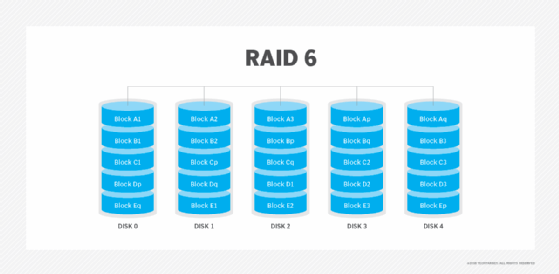
When data is written to a RAID group, it will always have the correct parity, as it will have gone through various error-checking algorithms. That way, if a drive in the RAID group fails, the system uses the information on the remaining disks along with the parity information to rebuild the data on the failed drive to a spare drive.
How does this happen? If the RAID group is using even parity, it can figure out what was on the failed drive by adding up the bits on the remaining drives. If the data on the remaining drives adds up to an odd number, the information on the failed drive must have been a one to maintain even parity. If the data on the remaining drives adds up to an even number, the data on the failed drive must have been a zero.