What is data backup? An in-depth guide

Data backup is the process of copying data in an IT system to another location so it can be recovered if the original data is lost. A backup process aims to preserve data in case of equipment failure, cyberattack, natural disaster or other data loss events. As such, data backup is an important part of an enterprise's data protection strategy, which also typically includes a business continuity and disaster recovery (BCDR) plan.
The scope of data backup has broadened over the years and now encompasses data maintained in the cloud as well as in on-premises systems. Backup also covers a wider range of use cases. For example, the COVID-19 pandemic led to a massive increase in employees working from home, elevating remote data protection as a backup task. In some cases, it also created new backup responsibilities for general IT administrators.
Backup technologies are also evolving, with artificial intelligence (AI) becoming a key influence. TechTarget's Enterprise Strategy Group research and advisory division has cited the transition of traditional backup offerings into what it calls the "data intelligence market," in which products incorporate automation, AI and machine learning.
While data backup changes, it endures as a necessity for organizations facing a host of potential disruptions. TechTarget's data backup guide discusses the importance of backup, outlines the benefits and challenges of providing this layer of data protection and provides an overview of different backup approaches, technologies and vendors. It also describes how to create and implement a data backup plan and includes a planning template. Throughout the guide, hyperlinks point to related articles that cover those topics in more depth.
Why are data backups important?
Data is a critical corporate asset: It's analyzed to understand customers, maintained for regulatory compliance purposes and monetized to create new revenue streams, to note a few uses. The increasingly high-stakes nature of data makes backups an important IT infrastructure component. They provide a way to restore files, whether the issue is inadvertent deletion, a ransomware outbreak or a data center outage.
The objective is to provide a safeguard against data loss and help organizations recover data in its original form. As businesses become data-centric organizations, they must keep their data consistently available to maintain credibility with employees and external customers who rely on it to do their jobs.
What data should be backed up and how frequently?
A backup process can be applied to data stored in various settings. Those include physical servers, databases, network-attached storage, virtual machines, public cloud storage, containerized applications, SaaS applications and endpoints such as laptops and mobile devices, to name a few.
The frequency of full data backup, which covers all the files a business wishes to protect, depends on variables such as the criticality of the data and how frequently it changes. So, a full backup might be scheduled daily, weekly or at some other interval. Such backups typically take place during weekends or off-hours to reduce the performance impact on systems. Data managers can also schedule differential or incremental backups that take place in between the full ones and only back up data that is new or has changed.
Backup policies or service-level agreements (SLAs) govern the frequency of backups and how quickly data must be restored. Here, the main criteria include the recovery time objective (RTO), which determines how quickly after an event an organization must recover data, and the recovery point objective (RPO), which determines the age of files that must be recovered to resume operations.
What are the benefits and challenges of effective data backup?
The primary objective of data backup -- protecting a business against data loss --provides several downstream benefits. Here are a few examples:
- Minimizing downtime. Data backup lets a business recover more quickly after it experiences a data loss. Having a backup copy, or copies, helps a business carry on with its operations.
- Mitigating the effects of ransomware. Data backups are central to recovery from a ransomware attack that locks and encrypts an organization's data. An affected business can revert to the last known good copy of its data. A caveat: Ransomware attacks often target backup data as well as primary data sets. Data managers, however, can better ensure availability if they use security techniques such as air gapping between production systems and backups.
- Meeting regulatory and standards requirements. Compliance regimens that call for data backup include the Health Insurance Portability and Accountability Act, a U.S. federal law that requires a backup plan for maintaining "retrievable exact copies of electronic protected health information." And ISO/IEC 27040:2024, a standard created jointly by the International Organization for Standardization and the International Electrotechnical Commission, covers data storage security techniques.
- Supporting broader corporate initiatives. Data backup fits within a business's overarching risk management or BCDR strategies.
- Building customer trust. Effective data backup helps protect customer data. Investment in backup methods and technologies shows a company emphasizes data security and availability, which bolsters its image.
Challenges to providing data backup include technical, logistical and financial obstacles, including the following issues businesses must consider:
- Dealing with large and growing data volumes. IT managers tasked with managing vast data estates must create backup approaches that encompass varied types of data. Among the challenges is designing a backup approach that can scale to accommodate data volume, velocity and variety.
- Working with limited resources. Organizations might have large data holdings, but they don't have unlimited technical personnel and budgets for managing them. A backup plan must be comprehensive, scalable and cost-effective.
- Defining requirements and selecting vendors. IT managers must define backup infrastructure requirements that reflect both current and future capacity and performance needs. Next comes the process of selecting a technology vendor or vendors to meet those requirements. Some organizations also hire a third-party services provider to assist with a backup technology deployment. In a survey released in February 2024, Enterprise Strategy Group asked business and technology leaders which of their technology investments was most likely to involve a third-party service provider: The backup, archive and BCDR category tied for No. 4 out of 22 technologies, chosen by 16% of the 744 decision-makers who responded to that question.
- Protecting backup data. Cybercriminals target backup data to prevent businesses from recovering their data in the aftermath of an attack. Organizations must ensure their backup data is encrypted to block unauthorized access.
- Coordinating backup windows. Another hurdle: getting the backup cycle completed within the prescribed timeframe to avoid performance degradation. The degree of difficulty is greater for organizations with little tolerance for even scheduled downtime.
- Managing backup policies and methods. Businesses must develop and periodically update these documents -- and train users on them. Training programs should include remote employees responsible for performing backups at branch or home offices.
What are the different types of backup?
Businesses have several backup methods to consider, with storage capacity and the length of available backup windows among the factors influencing decisions on which of them to use. As mentioned above, the following are the three primary backup types:
- Full backup. Just as it sounds, this method captures a copy of an entire data set. Most organizations run full backups only periodically because the process is time-consuming. Full backups, however, offer rapid data recovery when required.
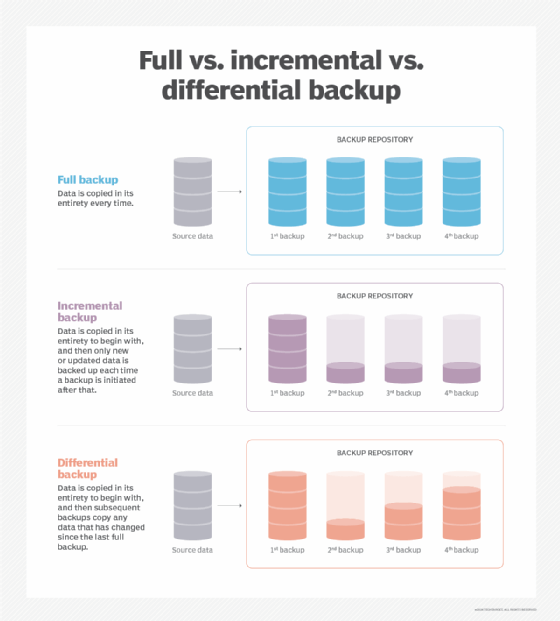
- Differential backup. This backup type copies data changed or added since the last full backup. If a business creates a full backup on a Monday, differential backups on each of the following days would include all the changes since then on a cumulative basis. Backup time is faster than for a full backup, but data recovery requires the original full backup and the latest differential backup.
- Incremental backup. Backups of this kind copy only the data that has changed since the previous backup. After a full backup, the first incremental backup captures the data that has changed since then. The second incremental backup copies the data that has changed since the first one, and so on. Such backups tend to take up less storage space than differential backups, which grow over time, and they also take less time to complete. Data recovery, however, takes longer because it requires the original full backup plus each incremental backup.
The following are variations on the primary data backup types that can also be used:
- Synthetic full backup. This method combines the original full backup with data gleaned from incremental copies. The synthetic full backup requires a shorter backup window than a conventional full backup, because only the changed data is copied.
- Incremental-forever backups. A variation on incremental backups, this method aims to minimize the backup window while providing faster data recovery. An incremental-forever backup captures the full data set and then supplements it with incremental backups from that point forward.
- Reverse-incremental backups. This method begins with a conventional full backup and then creates a series of synthetic full backups, each of which incorporates an incremental backup. When the next full backup is created, the reverse-incremental backups provide multiple data restore points an organization can roll back to if necessary.
Techniques and technologies to complement data backup
In addition, various data protection and storage techniques can be incorporated into the backup process, including the following:
- Continuous data protection (CDP) technology backs up data every time it changes, providing a series of point-in-time restore points after an initial full backup. This approach provides rapid recovery and eliminates backup windows, but the storage demands might prove expensive for smaller businesses. In addition, CDP requires redundancy to eliminate single-point-of-failure scenarios. Near-CDP is another option that performs backups at set intervals, typically in the range of 30 seconds to 15 minutes.
- Storage snapshots periodically capture and record data changes over time. CDP and near-CDP, for example, create high-frequency snapshots, while other methods might product a daily snapshot.
- Mirroring replicates data across two or more disks. The goal is to protect the data against disk drive failure.
- Data replication copies data from one location to another, using a storage area network, local area network, wide area network or the cloud. An organization could use it for disaster recovery (DR), replicating data between a primary storage location and an off-site facility. Both hardware and software replication technologies are available.
- Data reduction shrinks an organization's storage footprint. There are two primary methods: data compression and data deduplication. Reducing the size of data has implications for backup windows and restoration times.
What is a 3-2-1 backup strategy?
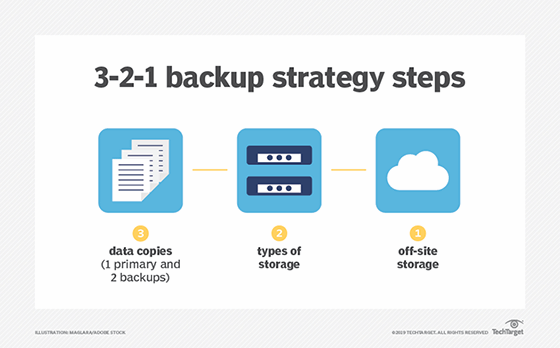
Under the 3-2-1 backup strategy, an organization makes three copies of the data it wants to protect. The copies are stored on two different types of storage media and at least one copy resides in a remote facility. The off-site backup copy provides a safeguard against on-site system outages and data loss.
The 3-2-1 method aims to ensure organizations have no single point of failure for data backups. While the strategy has become a de facto industry standard, IT managers might need to refine it for current circumstances. The capacity required to store multiple copies can prove expensive -- particularly amid tightening IT budgets -- so data reduction methods might become necessary to complement 3-2-1 backup.
Another tweak on the strategy is the 3-2-1-1-0 rule. In this variation, the second "1" calls for one copy to be maintained offline, providing an air-gapped backup as a defense against ransomware attacks and other incidents. The "0" refers to verifying that a backup contains zero errors to ensure proper restoration.
Data backup storage options
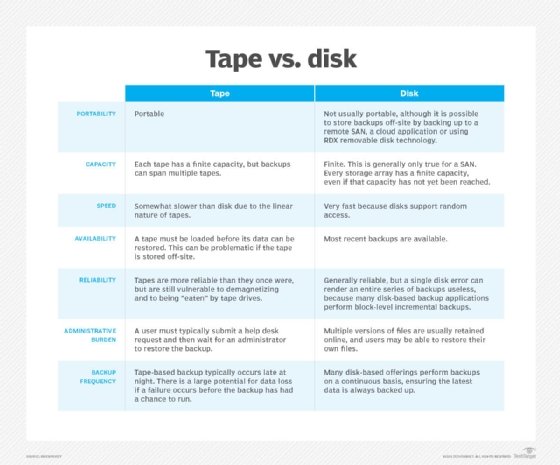
Different storage media options for backups include tape, disk and removable storage. In addition, cloud backup can serve as both a storage media alternative and an off-site storage resource. Each option has its advantages and disadvantages, as outlined below.
Tape
Tape, a computer storage medium since the 1950s, endures as a backup technology. Its advantages include security: Tape is inherently offline, so it provides air-gapped data protection. In addition, the latest tapes store a high volume of data. The LTO-9 format specification can store 18 TB in a single cartridge and hold up to 45 TB of compressed capacity.
On the other hand, tapes require maintenance and management to ensure they are safe and secure. Organizations must make sure the hardware used to read tapes still works, and tape backup media should ideally be shipped to an off-site storage center. As a result, tape is more often used for archival purposes now.
Disk
Disk has become a common backup technology, offering more attractive pricing than in the past and generally providing faster performance compared with tape. Hard disk drives trail solid-state drives regarding performance but maintain a cost advantage over that technology, which makes them more widely used for backups.
Disk storage, however, often physically resides in an organization's office and is thus more susceptible to damage in the event of a natural disaster. That highlights the importance of adopting the 3-2-1 backup approach to help avoid permanent data loss.
Cloud
Off-site data backup, as part of a 3-2-1 strategy, often equates to subscription-based cloud storage as a service. This option provides low-cost, scalable capacity and eliminates a customer's need to purchase and maintain backup hardware. Using the cloud can also ease remote backup processes. That cost edge, however, is subject to change when increasing volumes of data are backed up in the cloud.
Cloud, as an off-site storage tier, shields businesses from disasters affecting in-house data centers. But cloud's online nature makes it vulnerable to cyberattacks, and cloud service outages can temporarily leave organizations without access to backup data.
Cloud backup is divided into the following categories:
- Public cloud storage. Users ship data to a cloud service provider that charges them a monthly subscription fee based on consumed storage. There commonly are additional fees for data ingress and egress.
- Private cloud storage. Data is backed up to different servers inside a company's firewall, typically between an on-premises data center and a secondary disaster recovery site.
- Hybrid cloud storage. A company uses both local on-premises and off-site cloud storage. Enterprises customarily use public cloud storage selectively for data archiving and long-term retention. Private storage is used for faster access to backups of their most critical data.
In addition, the following backup-related services have emerged from the evolution of cloud storage:
- Backup as a service. BaaS involves purchasing backup and recovery services from an online data backup provider, typically through a subscription. The BaaS vendor manages the backup infrastructure, which resides in a private, public or hybrid cloud.
- Disaster recovery as a service. DRaaS also backs up data via a third-party cloud service provider, enabling failover in the event of a business disruption. DRaaS lets customers avoid the cost of maintaining secondary data centers.
- Cloud-to-cloud (C2C) backup. This practice copies data located on one cloud service to a second cloud service, which functions as an off-site backup. C2C backup can protect a range of cloud workloads, but it has become increasingly important for businesses that depend on SaaS applications such as Microsoft 365 and Salesforce.
Backup options for PCs and mobile devices
While the data protection options listed above are designed for enterprises, the rise in remote work has further expanded the scope of backup tasks for individual users.
PC users can consider local backup from a computer's internal hard disk to an attached external hard drive or removable media, such as a thumb drive. Another alternative for users is to back up data from smartphones and tablets to personal cloud storage.
How to create a data backup policy and plan
Businesses should create a backup policy to govern the methods and types of data protection they deploy and to ensure critical business data is backed up consistently and regularly. The backup policy also creates a checklist that the IT department can monitor and follow.
The steps for building such a document include the following:
- Conduct a risk assessment and business impact analysis (BIA). The risk assessment identifies issues that could negatively affect an organization's ability to conduct business, while the BIA determines the potential effects of a disruption.
- Define the scope of the backup plan. Here, IT managers incorporate the risk assessment and BIA findings to determine the data the organization must back up and how often. Some data might not need to be backed up at all, while mission-critical data might require CDP.
- Document the process of performing data backups: who is involved, what tools they should use and the planned storage location of backups. This section of the plan should also include the cost of the data backup strategy. The cost details, however, will need frequent updating to reflect changing prices and workload volumes.
- Identify the types of backups to be used. Typically, this will include an initial full data backup, with a series of differential or incremental backups occurring between additional full ones. This part of the policy can also codify such practices as the 3-2-1 backup strategy.
- Document the process of moving data to and from disk, cloud and tape, as it differs for each backup target.
- Set data retention rules to automate the deletion of data, or migration to different media, after it has been kept for a specific period. Consider setting rules for individual users, departments and file types.
How to build a data recovery plan
A backup strategy is only as good as its ability to restore critical data. As a result, an organization also needs a recovery plan. Here are some recommended steps for creating one:
- Outline how the organization plans to restore its backed up data. Data restoration techniques include restoring from traditional backups, as well as using CDP, data replication and instant recovery. The latter is a backup strategy for virtual machines that uses protected storage to enable applications to quickly resume running.
- Document how much data the organization must recover to function and how quickly that needs to happen, using the RTO and RPO metrics. It's important to be honest about these parameters -- organizations must take a close look at what data they need in a recovery situation and how fast they can get it. As such, a plan based on immediately recovering all your organization's data probably isn't feasible. Consider a tiered recovery plan, which could prove more practical.
- Align backup and recovery planning with the overarching disaster recovery plan. DR aims to get a business up and running following an emergency. Data recovery is key to that effort.
Data backup vendors and technology options
The scope of enterprise backup often encompasses a combination of on-premises environments, cloud-based infrastructure and SaaS applications. Use cases are wide-ranging as well: Requirements might include data protection, disaster recovery, cyberthreat defense, remote work, regulatory compliance and long-term archival storage.
Backup technology options in this varied market include software products, hardware offerings such as backup appliances and other backup storage devices, and cloud services such as BaaS and DRaaS. Enterprises might need to use a mix of software, hardware and cloud technologies to address complex, hybrid IT environments.
In this context, backup vendors are evolving to provide offerings that span a range of technologies and use cases. Market research companies group such vendors under different headings. Forrester Research, for example, defines them as data resilience solution suite providers, while Gartner uses the enterprise backup and recovery software label and IDC includes backup tools in data replication and protection (DR&P) software as a core market.
The most recent Forrester Wave report on data resilience suites, which was published in December 2022, identified Cohesity, Commvault, Dell Technologies, Druva, IBM, Rubrik, Veeam Software, Veritas and Hewlett Packard Enterprise's Zerto subsidiary as the "most significant" vendors in that market.
Gartner's 2023 Magic Quadrant report on enterprise backup and recovery software listed Acronis, Arcserve, Cohesity, Commvault, Dell Technologies, Druva, HYCU, IBM, Microsoft, OpenText, Rubrik, Kaseya's Unitrends subsidiary, Veeam and Veritas as top vendors.
As of March 2024, IDC's top DR&P software vendor list included Cohesity, Commvault, Dell Technologies, IBM, Kaseya, Microsoft, Quest Software, Rubrik, Veeam and Veritas. Products within the DR&P market include data protection, CDP, bare-metal restore, backup and recovery software, host-based replication and array-based replication, according to IDC.
Some specialized products, however, fall outside these broad backup vendor categories. In the long-term data retention market, for instance, options include tape and cloud archive technologies. Straits Research identified the following companies as "key players" in the North American tape storage market: Dell Technologies, HPE, IBM, Lenovo, Overland Tandberg, Qstar Technologies, Qualstar, Quantum and Spectra Logic.
In addition, cloud market share leaders AWS, Microsoft Azure and Google offer cloud archive products: Amazon S3 Glacier, Azure Blob Storage and Google Cloud Storage's archival service, respectively.
How to implement a data backup plan
With a backup plan and products in place, the next phase is implementation. The data backup policy offers guidance in that regard, detailing the process for executing and authenticating backups. It should also specify measures to ensure that data is backed up safely and securely.
Effective backup scheduling is also key to backing up the right data -- and the right amount of it -- in an organization. As mentioned above, it's likely unnecessary -- and impractical -- to schedule a full backup every day or more often than weekly in many cases. Not all data is mission-critical, and the required storage space and cost would get very hefty.
Other specific implementation measures are covered in the following sections.
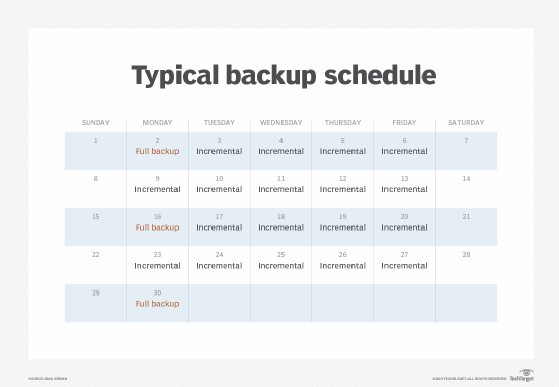
Training employees on backup processes and best practices
Training is essential to helping staff understand the data backup strategy, including the backup schedule, and what to expect in a data recovery situation.
A training program should extend beyond backup administrators to include IT generalists and remote employees. A backup administrator might be unavailable in the event of a business disruption. If that's the case, other IT employees will be assigned to backup work they won't be familiar with -- unless they have been cross-trained on the company's backup processes and technologies.
A well-documented backup process provides a starting point for employee training. In addition, a business's backup vendor, or vendors, might be able to provide training on its products. Third-party training providers with backup and recovery courses are another option.
Remote workers, meanwhile, should receive training on secure storage and backup. A suggested network compliance checklist for remote work includes documenting procedures for data backup and recovery. A company's remote site backup vendor can also provide documentation and guidance on its offerings.
Data backup testing and review
Organizations must regularly test their backup process and technologies to confirm that they are working properly.
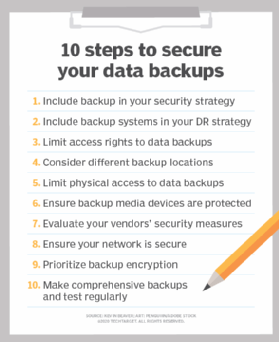
Testing doesn't need to be overwhelming, but it must be consistent. The core elements of backup testing include documenting a test plan, using automation and ensuring accuracy. Backups can fail, but it's better to have them fail in a test than in a live recovery situation.
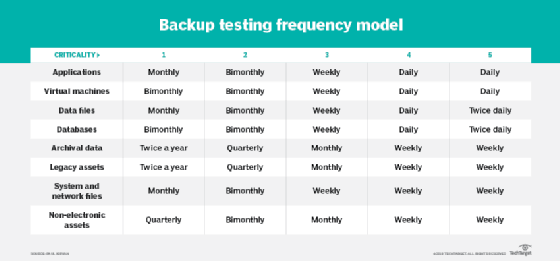
The frequency of backup testing should track with the frequency of data backups. Mission-critical data, for example, will get backed up the most, thus those backups should receive the most frequent testing. Assigning a criticality value to each backup data set will help determine testing frequency.
Testing results must be analyzed to determine whether any changes are needed. As an additional step, an organization can hire an outside agency for backup auditing to further detail backup effectiveness. This review can help administrators update backup plans and ensure backups are secure. Data protection strategies should also extend beyond the backup process to include various security measures, such as limiting access rights and prioritizing encryption, that safeguard the backups themselves.
Data backup plan template
This free template provides a documented outline for building a data backup plan.
Creating the plan should be a team effort: One person might document it, but the plan should be shared with other key stakeholders, such as IT and business executives, for their review and input.
Data backup planning is an essential business activity -- and one that's expanding in scale. Data sets are growing exponentially and increasingly large backup data sets, naturally, follow that trend. With so many threats and risks, an organization must have a ready copy of its critical data in the event of an unplanned incident so that it can continue business operations as expeditiously as possible.
John Moore is a writer for TechTarget Editorial covering the CIO role, economic trends and the IT services industry.
TechTarget executive editor Paul Crocetti and freelance technology writer Brien Posey contributed to this article.