scale-out storage

What is scale-out storage?
Scale-out storage is a network-attached storage (NAS) architecture in which the total amount of disk space can be expanded through the addition of devices in connected arrays with their own resources.
In a scale-out system, new hardware can be added and configured as the need arises. When a scale-out system reaches its storage limit, another array can be added to expand the system capacity. Scale-out storage can harness the extra storage added across arrays and use added devices to increase network storage capacity, adding performance and addressing the need for additional storage.
Before scale-out storage became popular, enterprises often bought storage arrays much larger than needed to ensure that plenty of disk space would be available for future expansion. If that expansion never occurred or the storage needs turned out to be less than anticipated, much of the originally purchased disk space went to waste.
With a scale-out architecture, an organization can make a smaller initial investment because it does not have to consider potential long-term needs. If the storage requirements increase beyond the original expectations, new arrays can be added as needed, essentially without limit.
This article is part of
What is network-attached storage (NAS)? A complete guide
Scale-out vs. scale-up storage: What's the difference?
Scalability is the capacity for some types of systems to continue to function properly when they change in size or volume to meet a specific user need. In some contexts, scalability refers to the ability to meet higher or lower demands of a storage platform. In a storage context, however, rescaling usually refers to responding to a demand for increased capacity.
There are two main approaches to rescaling storage.
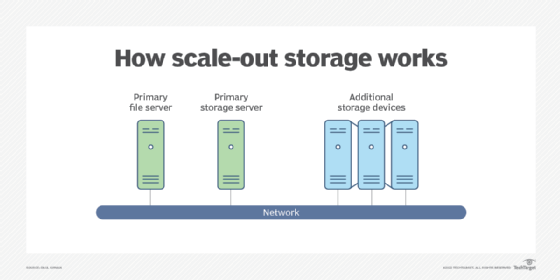
Scale-out storage
Scale-out storage, or horizontal scalability, is the ability to connect multiple storage elements, such as storage arrays, so that they work as a single logical unit. With scale-out storage, there can be many geographically separated nodes.
Scale-up storage
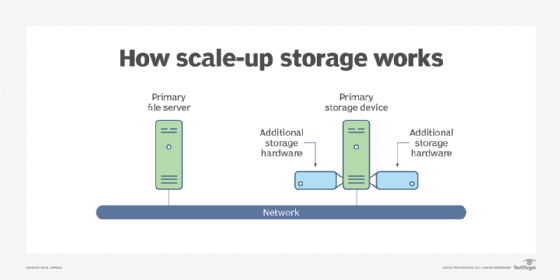
By contrast in the scale-up versus scale-out debate, the scale-up approach is an example of vertical scalability. This is the ability to increase the capacity of existing hardware or software by adding resources to a physical system.
An example of this is adding processing power or memory to a server to make it faster. In the case of storage systems, it means adding more devices, such as disk drives, to an existing storage array when more capacity is required.
Benefits of scale-out storage
The advantages of scale-out storage include the following:
- Easy to do. In a scale-out storage environment, additional storage is as easy as buying an additional device and connecting it to the supporting network.
- Adaptable. With scale-out storage, changes in storage activities, such as switching from block storage to file storage formatting, can be addressed with a storage array optimized to the new requirement. Whereas scale-up storage is likely to have the same operating parameters and may not meet the new needs.
- Flexible. Scale-out devices can be located virtually anywhere, so long as connectivity with the primary infrastructure can be established.
- Cost-effective. Costs for scale-out storage may be lower as newer technology can be used that provides more capacity per dollar spent.
Challenges of scale-out storage
Some of the more difficult parts of scale-out storage are the following:
- User requirements. User requirements must be understood and factored into the planning, selection and implementation of a storage infrastructure. Storage managers should monitor and analyze use to identify trends that may require more capacity in their data centers as part of storage capacity planning. Depending on the type of storage used when scaling out, the user requirements may mean a change in storage format, such as changing from block to file formats.
- Controller bottlenecks. Adding arrays may require a review of the storage controller limitations to ensure it can handle the additional hardware.
- Operating system (OS) and network resources. If NAS is used for scaling out, each device has its own OS and network connection. A new device must be compatible with these resources.
Scale-out storage architecture
With a scale-out system, adding capacity involves implementing a single cluster or as many clusters as requirements dictate. Each device, or node, includes storage capacity. It may be in the form of multiple drive spindles and may have its own processing power and input/output bandwidth. With these resources, as storage capacity increases, performance also increases.
Scale-out NAS grows when storage managers add clustered nodes. These are often X86 servers with a special OS and storage connected through an external network. Nodes may be connected for intercommunication through a high-speed backplane or a network such as Ethernet.
Users administer the single cluster as one system and manage the data through a global namespace or distributed file system, so they do not have to worry about the actual physical location of the data.
Applications for scale-out storage
Scale-out storage applications and workload types include the following:
- primary storage
- archival storage
- backup and recovery
Scale-out storage is appropriate for backup and recovery, because with those storage devices, mission-critical data and databases are often located on premises and remotely. This is important to minimize the likelihood of a loss of primary storage during a disruption.
Scale-out storage vs. object storage
The main difference between scale-out storage and object storage is that scale-out is an architecture, whereas object storage is a format, like block and file formatting.
Object storage is designed for large quantities of unstructured data. Pieces of data are formatted into objects and stored in a specific location with metadata as a bundling component for quick retrieval and storage.
Like block storage and file storage, object storage can use most types of storage platforms. It is used for applications such as the following:
- big data analytics
- data backup
- archival storage
- internet of things
User requirements must be understood when selecting the type of storage technology. In the case of unstructured data, such as emails, images and videos, object storage may simplify the storage and retrieval of large data quantities. As a result, the choice of storage device becomes an important consideration.
As the amount of data increases, storage pools using scale-out storage architectures may be suitable, so long as the devices are able to manage the data growth. If the nature of the data objects is unique, it may be better to use a scale-up approach.
Scale-out and cloud storage
Cloud storage can meet virtually any storage requirement and architecture. For example, scale-out storage using NAS and server-based devices can be implemented in public cloud and private cloud environments.
By using cloud storage, organizations don't need to buy additional floor space to house storage equipment. They use less power and cooling, minimize upfront investment and hand storage management to the cloud provider.
Cloud storage can serve the following applications:
- primary storage;
- secondary storage for specific operational requirements; and
- backup storage for disaster recovery (DR) planning.
Planning considerations
As with any storage technology upgrade, due diligence is needed. The following is a list of steps to perform when considering scale-out data storage solutions:
- Determine the business requirement for data protection, storage, access and security.
- Consider using the systems development lifecycle as the framework for planning and implementation.
- Examine existing technologies, policies, procedures, protocols and experience to determine which option fits into the existing and long-term storage infrastructure.
- Determine whether scale-out versus scale-up architectures makes the most sense;
- Evaluate storage products and services, including standalone scale-out storage systems and cloud offerings.
- Perform a cost-benefit analysis showing which architecture can control overall storage costs while expanding storage capabilities.
- Prepare an implementation plan.
- Consider using a multiphase approach, such as starting with a small set of storage devices and expanding to larger storage arrays.
- Update storage policies, procedure, protocols and administrative activities for the selected approach.
- Train IT and other staff.
- Review storage infrastructure periodically and assess if it's achieving high-performance and value goals.
- Include storage equipment during tests of technology DR capabilities.
Scale-out storage is an important part of storage and data management. Learn more about how to effectively manage data storage.