Free DownloadWhat is data backup? An in-depth guide
Data backup is constantly evolving, yet it endures as a necessity for organizations facing a host of potential disruptions. TechTarget's data backup guide discusses the importance of backup, outlines the benefits and challenges of providing this layer of data protection and provides an overview of different backup approaches, technologies and vendors. It also describes how to create and implement a data backup plan and includes a planning template. Throughout the guide, hyperlinks point to related articles that cover those topics in more depth.
10 steps to creating an effective data backup strategy
A common denominator in well-functioning backup infrastructures is effective process and control. This checklist highlights 10 areas to help build a better backup practice.
When it comes to backup, it's easy to focus on the bad news. There's simply so much of it: Nightly failures, security issues and unrecoverable data.
But the news isn't all bad. There are shops where backups complete successfully, where data is restored and backup operations run smoothly. The most evident common denominator in well-functioning backup infrastructures is effective process and control. Well-run environments have a clear understanding of the tasks to be performed and a consistent way to accomplish them.
How does your organization measure up in regard to the basics of backup operations? Here's a checklist of 10 areas you should focus on to build a more effective data backup strategy.
1. Plan ahead for your data backup strategy
Backup is one strategic component of data protection; others include security, snapshots, replication and disaster recovery. In most environments, traditional backup serves as the last resort for data recovery. But as a strategic element, backup planning should be a fundamental part of the overall storage plan.
Your backup infrastructure needs to be factored into the planning process for rolling out apps, servers and primary storage growth. Too often, changes in the environment aren't taken into account until the 11th hour. This causes disruptions and has a detrimental impact on the overall backup operation.
Proper planning enables the backup team to fully understand an application's business requirements and design characteristics with respect to data protection. The backup policies and approach necessary for a database application that employs disk-based backup is considerably different than those needed for a file-based environment with cloud-based protection. Similarly, a large enterprise application deployed across multiple servers may have complex data interdependencies that require proper backup synchronization to enable a usable recovery.
2. Establish a lifecycle operations calendar
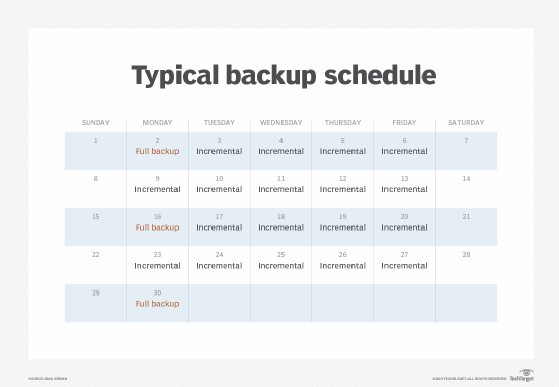
An effective data backup strategy requires certain tasks to be completed successfully every day. There are also weekly, monthly, quarterly and even annual tasks that are as important as daily tasks. While short-term tasks are highly tactical, long-term tasks tend to be more strategic. In an effective backup operations environment, all tasks should be documented and performed on schedule. In terms of the actual backups, a common practice is to take an incremental backup on a daily basis and a full backup each month or bi-monthly.
Daily tasks are the operational fundamentals that most backup administrators are familiar with and include items such as:
Job monitoring
Success/failure reporting
Problem analysis and resolution
Backup storage management
Scheduling
Weekly, monthly and long-term activities focus on:
Performance analysis
Capacity trending and planning
Policy review and analysis
Data backup and recovery testing and verification
Architecture planning and validation
Evaluate your daily/weekly/monthly/as-needed tasks. Document them and make sure they're performed and reported on schedule.
Keep in mind that time flies. Before you know it, a year will have gone by and a complete annual cycle will have passed. It may seem tedious at first, but eventually you'll come to realize the benefits of a more optimized environment.
A typical schedule includes both incremental backup and full backup procedures.
3. Review backup logs daily
A review of backup application error and activity logs is a key daily task -- but one that's often easier said than done. Analysis can be time-consuming, but it can pay extremely valuable dividends and is essential to a reliable data backup strategy. Some data protection products now offer analysis tools that can help do the work for you.
Backup problems tend to manifest themselves in a cascading effect. One event results in a series of subsequent problems that don't have an immediate, obvious linkage. It takes considerable skill and detective work to determine whether or not you are observing a root cause or a symptom of some other problem. You must also establish good communications and working relationships with system administrators, DBAs, network administrators and others to effectively troubleshoot complex problems.
4. Follow the 3-2-1 rule of backup
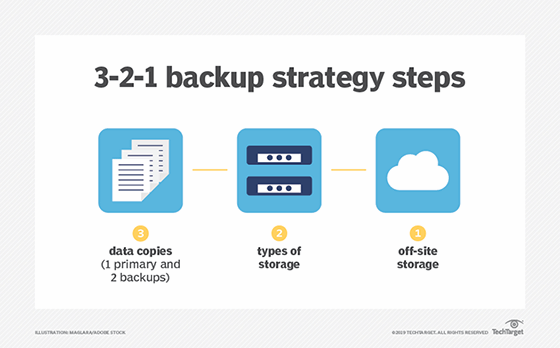
A comprehensive data backup strategy should follow the 3-2-1 rule. That's three copies of data, on at least two different media, with one copy off site. Off-site backup includes the cloud as well as tape backups that are in a different location from the primary site.
The 3-2-1 rule improves security of backups. For example, if a ransomware attack hits your primary data center, it has also likely corrupted backup storage at that same site. A tape backup off site -- and also offline, a doubly secure concept -- is safe from that attack, though.
The rule also protects against natural disasters and other weather events. In the event that a primary site goes down, backup data stored in a different geographical zone could save your business. Cloud-based backup is a good technology to use in this instance.
Essentially, the 3-2-1 rule ensures there is no single point of failure for your data.
Steps for the 3-2-1 backup strategy
5. Identify and resolve backup window failures daily
Backup window failures are successful backups that exceed the expected backup window. Because the backup job itself completes, no errors are reported in the error log, so this problem is often overlooked. In addition to affecting production environments and creating user dissatisfaction, jobs that approach or exceed the backup window may be warning signs of impending capacity limits or performance bottlenecks. Recognizing and addressing these issues as early as possible can prevent future failures and avoid user dissatisfaction.
In a similar way, it's important for IT to meet its recovery time objective (RTO), which is the maximum amount of time an organization can be down after an incident before normal operations must be online. RTOs vary dramatically, from zero for the most mission-critical applications, to days for less important data. Whatever the RTO, it's critical to hit it -- if it's taking too long to recover from your backup, you may need to speak with your data protection vendor about its service-level agreement.
6. Locate and back up orphan systems and volumes
Your backup software invariably provides you with some level of reporting information about daily backup success. If you depend on this as the authoritative source on backup, then you're likely still at risk.
The backup application reports only on the servers it knows about. Large environments often have orphan systems -- systems that have been brought into production but not incorporated into the backup plan. This can happen for a variety of reasons, but it's often the result of a business unit purchasing a system outside of IT's purview. The system may have been backed up independently at one time, but over time has fallen through the cracks. Usually these systems are discovered after it's too late: Data loss occurs and a restore request comes to IT for a system it knows nothing about.
Addressing this problem can be challenging and time-consuming. It entails regularly discovering and mapping new network addresses to nodes, filtering out unrelated addresses (e.g., additional NIC cards, network devices and printers), identifying the nodes' locations and owners, and establishing policies for managing the addition of storage volumes. Regular reporting to system and application owners of exactly what's being backed up and what's not being backed up (by choice) is also critical. Two-way communication is important: IT needs to be informed whenever a new system comes online.
7. Centralize and automate backup management
A key to successful data protection is consistency. This doesn't mean that all data must be treated in the same manner. What it does mean is that all data of equivalent value and importance to the organization should be managed in a similar fashion. The orphan problem is an excellent example of an inconsistency that can result from non-centralized backup administration.
Your organization may have different types of backup procedures for different types of storage, from virtual machines to SSDs to SaaS data. Geographic considerations and functions within backup operations can be delegated, but given communication capabilities and the management tools available today, there's little justification for decentralized backup.
As the complexities of the backup infrastructure grow, automation can help by providing tools to facilitate repetitious processes. As discussed earlier, tasks such as checking logs on a scheduled basis are key. Deploying automation to provide automated alerts for previously identified errors in logs can make life easier. Automation tools can successfully facilitate various activities if you identify the task to be performed and define the expected result.
8. Test your backups
You will not know for certain how well your data backup strategy is working unless you test your backups. And you should test regularly.
It helps logistically to have a documented plan for testing backups. Some of your backups might not need testing as frequently as others. In addition, a plan can make it clear to not just your staff but the whole business when you will be testing. You don't want the testing to cause problems for other people in the organization, and it shouldn't wreak havoc with production systems. So test often, but test carefully and unobtrusively.
9. Employ proper security
Security of backup data is just as important as security of primary storage. If your backup is corrupted, it's not worth anything.
Backup data should be encrypted in flight and at rest. For example, if you're using cloud backup, the vendor could offer encryption for the data when it's traveling to its final destination and when it reaches that site.
Make sure your applications are patched and updated. Anything that isn't is a potential target for hackers.
It's easy to improve your security if you choose the right vendor. Backup software has become smarter over the years as vendors have made security a focus. For example, Acronis has transformed into a "cyberprotection" provider and Asigra offers comprehensive ransomware protection.
10. Use your vendors effectively
Backup environments are complex and get more so with the introduction of new technologies. Hardware and software vendors are racing to add new features and functionality in the struggle to differentiate themselves from one another.
Backup environments are complex and get more so with the introduction of new technologies.
While much of this technology can be helpful, and it certainly all sounds good, there's a considerable challenge in understanding the nuances of functionality of one technology option vs. another. For example, there are a significant number of different approaches to disk-based backup. Which one is right for your environment and what precisely is the impact?
A fundamental question that you must be able to answer is: Does your vendor have the right skills to support your needs? All technical problems get resolved eventually. If your technical problem isn't being resolved in a reasonable amount of time, then you may not be working with the right vendor. This becomes extremely apparent when you integrate multiple products from multiple vendors.
Focus on the most critical
These 10 data backup strategy tasks may seem basic, but accomplishing them isn't always easy. They depend on a number of key elements: appropriate reporting and measurement capabilities, a high degree of staff competency within the backup organization and solid cross-functional communication. The impediments can be significant, including costs, resource availability, skill levels, organizational politics and a host of others.
If you can't accomplish all of these things, try to address the most critical. If time and resources are the issue, develop a plan to justify them. Against these hurdles you must consider the risk of unrecoverable data and major outages. After all, the news is full of those kinds of stories.