off-site backup
What is off-site backup?
Off-site backup is a method of backing up data to a remote server or to media that's transported off-site. The two most common forms of off-site backup are cloud backup and tape backup. During cloud backup, also referred to as online backup, a copy of the data is sent over a network to an off-site server. A third-party cloud service provider (CSP) typically hosts that server, but an enterprise can also own it.
Early off-site backup solutions used magnetic tape and hard disk drives (HDDs) for storage. In the former, magnetic tape was spooled onto different-sized tape reels. As a reel reached capacity, the operating system (OS) added various codes regarding the content contained on the tape. Once the tape was dismounted from the drive, another tape -- either blank or with data already present -- was mounted, and the drive resynchronized with the OS. Multiple drives were needed as data storage needs increased.
Early HDDs had multiple rotating platters, with each platter providing storage for important data; to move that data off-site, the platter(s) could be removed and placed into a secure carrying container. As rotating platters evolved into faster, fixed hard drives with vastly greater capacity, the storage media was less likely to be removed, so tape was most often used for off-site storage.
These early off-site storage techniques are still used, but the storage technology is significantly more powerful. Tape cartridges are now the norm, with capacities far beyond reel-to-reel magnetic tapes. HDD and solid-state drive technology today significantly boosts storage capacities.
How does off-site backup work?
The main goal of off-site data backup is to ensure data recovery and redundancy, similar to local on-site device or server backups but on a larger scale.
There are a variety of methods for creating off-site backups, each with its pros and cons:
- Cloud backup. This method involves backing up data directly to a public cloud, such as Amazon Web Services (AWS), Google Cloud or Microsoft Azure. This method is easy to implement and tends to be more cost-effective than more elaborate backup architectures, but it doesn't enable the creation of a local backup copy. To start the cloud backup process, an organization can either send its data over a network or use cloud seeding -- the process of pre-loading data into a cloud storage environment by sending drives or tape cartridges with data to a CSP. After the initial seeding process, the organization then schedules and runs regular backups, typically through a web browser.
- Private cloud backup. A similar method involves backing up data to a managed service provider's private cloud with online backup services in a managed data center. The advantage of using this method is that the service provider is typically a backup vendor that specializes in data recovery. The vendor usually has a dedicated data storage facility that has been specifically designed to meet its customers' backup needs.
- Cloud-to-cloud backup. Cloud-to-cloud backup uses one cloud to back up data that's stored in another cloud. The advantage of using this method is that, because backups reside in a different location from the primary copy of the data, they're insulated against cloud-level data loss events or data security issues.
- Tape backup. This method involves simply transporting physical media off-site. Tape is the most common option, but some disk drives can be used as well. During the tape backup process, data is copied from primary storage to a tape cartridge. For off-site data protection, an organization transports the tape cartridges to another location.
- Disk backup. Disk-based backup is a preferred medium for backup because of its faster speed and access compared with tape. But tapes are used more often for long-term archiving or disaster recovery (DR). Although disk is an option for off-site backup, it's much less durable than tape and more prone to damage during transport.
- Removable disk backup. It is now possible to buy 256 gigabytes (GB) of flash storage in a thumb USB drive for under $25. Such devices can also be used for off-site storage -- more so for small and medium-sized businesses (SMBs) -- as another way to safely and cost-effectively store data off-site. However, despite their storage capabilities and convenience, their size and portability mean they can easily be lost or stolen, and they can also be corrupted by viruses or other malware that can be embedded in the device.
The traditional 3-2-1 rule of backup states that an organization should have three copies of data on two different media with one copy of the media placed off-site. Off-site backup is important in the event of a disaster, malware, ransomware attack or other incident at the main data center. When such an incident occurs, an organization can recover by retrieving the backed-up data from the cloud or tape cartridges. Although local storage offers quicker access, off-site backup serves as a critical safety net.

The cloud is a prime target for SMBs to back up data in an easier, more cost-effective way. An SMB might also use an external HDD for its off-site backup. Although it's easier to back up data to an HDD, it's not as portable or durable as tape. Tape is typically favored by enterprises and industries such as media, entertainment and life sciences, which must store large amounts of data. In addition, while SMBs may have fewer resources than enterprises to move tapes off-site, with today's work-at-home business environment, remote work sites can now serve as off-site storage repositories.
Keys to implementing off-site backup
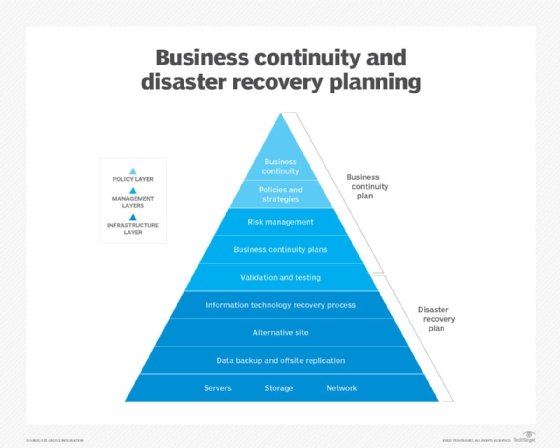
Off-site backup deployment ensures business continuity, DR, data security and uninterrupted operations in the event of outages and natural disasters.
Organizations should keep the following critical backup strategy tips in mind when implementing off-site backup:
- Understand current and longer-term storage requirements. Selecting an off-site backup method must be based on storage requirements so that the most cost-effective technology can be used. Data storage teams should regularly review storage performance data to assess if the current technology is performing as needed or if more storage or a different storage strategy is needed.
- Have a cost projection. In implementing off-site backup, an organization must be aware of the cost. Cloud-based backup costs, which typically involve capacity, frequency, bandwidth and the number of users, can escalate quickly. But tape backup costs can increase over time as well due to the price of additional media and off-site storage of tapes.
- Create a retention plan. A retention plan to delete backup data that's no longer needed should also be implemented. For example, pricing for Amazon Simple Storage Service Glacier Instant Retrieval, one of the least expensive cloud-based options and a common data archiving platform, starts at $0.004 per gigabyte, per month. Although that might sound inexpensive, it costs nearly $5,000 per year to store 100 terabytes of data off-site. Other costs associated with cloud backup, including data retrieval from the cloud, can also be significant.
- Consider the possibility of data repatriation. Considering the costs associated with cloud storage, as well as potential security risks and vendor lock-in, some organizations have been moving their data off the cloud and back to an internally managed storage model. That, of course, means that on-site data costs need to be compared to cloud costs to determine the best alternative. Organizations with multiple locations, for example, can create an off-site data storage arrangement with storage arrays at each location. As noted, remote workers can also be set up to act as part of an off-site storage scenario.
- Assess the data transfer costs. The cost to transfer data out of storage archives, such as Glacier, varies by region, data volume and where the data is being transferred. It generally costs less, for example, to transfer data to an Amazon cloud service than to another resource connected to the internet. Regardless, the data transfer costs can be substantial. As part of its free usage tier, Amazon allows 10 GB per month of free data transfers from Glacier to the internet. After that, the cost is $0.09 per GB for up to 10 TB of data; additional data transfers are billed at a reduced rate. But, with these data transfer rates, it costs more than $900 to transfer 10 TB of data from Glacier storage via the internet.
- Take security into account. For a cloud off-site backup, data moving across the public internet to a cloud provider's server should be encrypted at the originating location, in transit and at rest on the provider's server. Users must then verify that the data is in its original state, isn't corrupted and is available for DR.
- Ensure physical tape security. Tape security is mainly referred to in terms of safeguarding the physical tape cartridges. To limit the chance of tapes being stolen, an organization should ship tapes off-site as soon as writing to them is complete and should ensure that the off-site storage location is secure. A service-level agreement (SLA) with the off-site storage provider should state who has access to the tapes and how long the recovery time should take. As with the cloud, encryption is important with tape backups. Many LTO-9 -- Linear Tape Open 9, the standard released in 2021 -- offerings include capabilities such as write once, read many functionality and hardware-based encryption that supports multilayer security.
- Ensure consistent maintenance of tape equipment. Unlike with the cloud, drive maintenance is a challenge with tapes. An organization using tape for off-site backup must ensure the equipment undergoes proper, consistent maintenance or risk performance issues.
- Consider a disk-to-disk-to-tape backup. One common approach to off-site backup is disk-to-disk-to-tape, which writes a backup from the primary storage system to a secondary storage disk, copies it to tape and then ships the backup tape off-site. This process ensures a local backup with a quick restore time from the secondary disk, plus a less expensive off-site backup copy on tape.
- Evaluate distance. The distance from the primary data center to the off-site backup data center can vary by region. If an organization is in an area where hurricanes often hit, for example, the off-site storage -- on tape or in the cloud -- should reside outside the hurricane zone. If an organization isn't in an area where natural disasters often occur, the off-site backup location can be closer -- but still far enough away that any incident at the primary location doesn't affect the secondary site.
It's worth noting that the charges mentioned above aren't unique to Amazon. Although the rates vary from one cloud provider to the next, most cloud providers charge similar prices.
The importance of off-site backup
On-site backup doesn't provide adequate recovery in all scenarios. For example, a natural disaster that destroys a primary data center would likely also destroy the on-site backup. Similarly, a ransomware attack that spreads across a network might render local backups useless. Ransomware threat actors are increasingly targeting backups to force their victims to pay a ransom. In those cases, off-site backup becomes critical to an organization's recovery plan. However, in the case of a ransomware infection, the business must verify that the backup data is clean. Establishing an air gap between the off-site data and any systems and networks that could access the data is also important.
Backup software vendors are also increasingly integrating immutable backup capabilities into their software as a way of protecting against ransomware. Immutability ensures a ransomware attack isn't able to encrypt the data stored within the on-site backup. Off-site tape backups are the most secure retrieval option following a ransomware attack because they are offline and, therefore, are not likely to be infected. Some organizations also write backup copies to an external drive rather than using tape; external drives can be detached and stored similarly to tape.
There are also differences in the durability of the various backup mediums. Tape is more durable than disk and generally lasts longer than disk-based backups as long as the tape is properly stored. The cloud can last the longest of the three, as long as the service provider remains in business and doesn't suffer an outage during the recovery time.
Common features of off-site cloud backup
There are many cloud backup providers in the market. Feature sets vary, so it's important to carefully analyze products, set up a comprehensive SLA and understand the cost structure.
Features that are commonly offered include the following:
- Hybrid cloud backup, which includes cloud-based backup and local backup.
- DR as a service, which enables an organization to fail over into the cloud.
- Data lifecycle management, which can help to reduce backup storage costs by automatically expiring outdated backups.
- Enterprise file sync and share, which provides access to up-to-date files from any location.
- Cybersecurity measures, which can help counter a potential data breach and enhance the security of online backup copies.
- Data auditing, cleanup and preparatory backup services, which streamline the migration of company data to the off-site platform.
- Data compression and deduplication technologies, which can help reduce the amount of storage that must be transferred to the off-site location.
- Replication of backup copies to other regions or other clouds.
- Snapshots and mirror images, which provide timely backups of critical data.
Advantages and disadvantages of off-site backup
Both on-site and off-site backup provide peace of mind in terms of data security and reduction of system downtime, but neither option is perfect. The following are some pros and cons of on-site and off-site backup:
- Off-site backups keep data securely out of harm's way, but restoring data across the internet can be a prohibitively slow process.
- On-site backups are fast and convenient and provide quicker recovery times than off-site backups. For example, if an employee deletes important files, an organization can restore them in moments from a local disk backup. In addition to being on-site, disk also offers random access for quicker recovery. However, if the primary data center is completely disabled by a disaster, such as a fire or flood, on-site backups are likely to be destroyed as well.
- While off-site cloud backups can be affordable in the long run, vendor lock-in may be an issue, making it difficult for organizations to switch to a different cloud backup vendor.
- Most off-site backup options provide instant scalability, so backup storage can be increased as needed. However, end users have limited control over the physical infrastructure, which requires them to rely on off-site backup providers for various aspects.
- Off-site backups provide remote backup access, which is ideal for remote workers, as data can be accessed from any location. However, relying on the internet for accessing, uploading and retrieving data can pose some issues, especially in areas where there's poor internet connectivity.
- Retrieving data from cloud backups or getting tapes back from an off-site location usually takes a long time, and cloud recovery times can vary, depending on the organization's available internet bandwidth. In addition, if numerous organizations are trying to retrieve data from the same cloud service during a regional disaster and bandwidth is limited, the process slows down dramatically.
What is hybrid backup?
A hybrid backup approach seeks to capitalize on the advantages of both options, while maximizing data security and reducing risks. It works by creating an on-site backup and then replicating the backup to one or more off-site locations.
One of the most common ways of creating a hybrid backup is to use a disk-to-disk-to-cloud architecture. In this approach, backup data is written to an on-premises backup appliance or network attached storage (NAS). The appliance or NAS device not only stores the backup data for fast retrieval in an emergency, but also acts as a cloud storage gateway and handles the task of replicating backup data to the cloud.
Hybrid arrangements introduce multiple components for an off-site storage and backup arrangement. On-site physical systems may require floor space or rack space, plus power, cooling and security. When considering hybrid backup cost, evaluate scalability, data transfer and retrieval speeds, and space and infrastructure requirements.

Off-site backup providers
There are numerous vendors that act as off-site backup providers. Backup storage services generally fall into one of three categories:
- Hyperscalers. These are the large, general-purpose public cloud providers, such as AWS, Google and Microsoft. They provide cloud-based backup storage but offer many other storage and computing services as well.
- Traditional backup vendors. These vendors host their own private cloud environments that are solely dedicated to the task of accommodating backup data. Examples of traditional backup vendors include Dell EMC, Commvault, Veeam and Veritas.
- Removable media. The third category of off-site backup providers includes those that are dedicated to securely storing removable media, such as backup tapes and disks. These providers transport the media to and from a secure backup facility and ensure the tapes and disks are stored under the proper conditions, while also guaranteeing data security.
Besides the hyperscale providers mentioned above, the following are examples of off-site backup vendors and services:
- Acronis Cyber Protect Home Office. This online backup service includes built-in antivirus and ransomware protection. Users can back up to and recover files or entire systems from a preexisting backup archive that's generated through the Acronis software.
- Backblaze. This backup service offers unlimited storage and versioning control. It archives deleted files and older versions for up to one year.
- Carbonite. This service is available for both Windows and Mac users. Carbonite can back up single PCs or servers and is priced based on the number of systems being backed up.
- CrashPlan. CrashPlan exclusively caters to small businesses, providing various security and backup scheduling options, as well as unlimited storage.
- Dropbox. Similar to CrashPlan, Dropbox is a cloud-based service that supports SMBs by providing collaboration and productivity functions in addition to data storage.
- IDrive. This online backup service is available to Windows, Mac, Linux, iOS and Android users. When backing up data from multiple computers, IDrive lets users generate distinct folders for each device to prevent data overlap.
- Livedrive. Livedrive features unlimited storage and applications compatible with both desktop and mobile platforms. Based in the U.K., Livedrive is compliant with European Union privacy laws.
- SpiderOak. SpiderOak provides cloud-based backup for an unlimited number of devices, while prioritizing security. It also offers sharing and syncing features, which let users share and sync files with other people and devices.
While the cloud backup market is flourishing, traditional backup providers still present valuable options for businesses. Evaluate the pros and cons of each backup approach to determine the best fit for your needs. Also, check out tips for remote backup systems to strengthen your defense.