magnetic tape storage

What is magnetic tape storage?
Magnetic tape is one of the oldest technologies for electronic data storage. While tape has largely been displaced as a primary and backup storage medium, it remains well suited for archiving because of its high capacity, low cost and long durability.
If the tape is part of a library, robotic selection and loading the right cartridge into a tape drive can add latency. In an archive, latency is not an issue. With tape archiving, there is no online copy for quick retrieval, as everything is vaulted for the long term.
While tape can't compete with other storage media in terms of random access, there are still industries in which magnetic tape storage is a valuable storage technology.
- Many motion picture production companies record their footage on tape after experiencing costly failures with both hard disk and flash storage.
- Scientific experiments that produce mass quantities of data in a few microseconds leverage tape's capacity and write speeds.
- The oil and gas industry has used tape for years to capture, transport and store valuable data. Because oil exploration occurs outside the data center, tape is a good medium to transport data back from the field.
Tape is often paired with object storage to address the need for lower-latency file access. Sometimes, it is entirely replaced by object storage.
How magnetic tape works
Data bits -- magnetic states representing on and off -- are recorded to a particulate medium bonded to a substrate of Mylar plastic. Improvements in track-following technology and giant magnetoresistive read/write heads increased the number of tracks that can be recorded on a tape.
The industry has largely moved from oxides as a recording material to barium ferrite, which can deliver high recording data density because of its support for perpendicular magnetic recording. Barium ferrite is used in both enterprise tape from Oracle and IBM as well as Linear Tape-Open Ultrium format tape from the LTO Consortium.
Magnetic tape storage pros and cons
With data volumes on the rise, magnetic tape is a strong option for high-capacity, long-term backup storage and archiving at a cost comparatively cheaper than disk.
Tape capacity continues to grow. The LTO Program has a defined schedule for upcoming releases, and it typically launches a new version every two to three years. Customers can count on that reliable product roadmap.
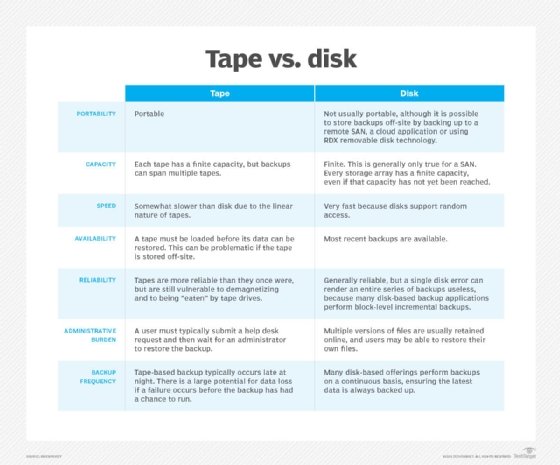
Magnetic tape storage is also well suited for archiving because of its durability, as it generally has a 30-year shelf life. Tapes are also easily movable, while disks are not as portable. In a disaster recovery scenario, as long as the tapes are far enough away from the affected data center, an organization can use them for restoration.
It's quicker, though, to restore data from disk. As a result, disk has replaced tape as the preferred medium for backup. Disk provides random access, so finding specific data on disks is a quick process.
Disk-based backup products typically perform backups throughout the day, while tape backs up data less frequently -- for example, on a daily basis. So an organization would not want to rely on tape for its most recent backup. In addition, an organization must make sure its tape library is compatible with the rest of its infrastructure.
With the rise of ransomware attacks, the offline nature of magnetic tape storage is a big selling point. A cyber attack cannot affect tapes in storage that aren't connected to a network, because they have what is called an air gap. In this case, tape even beats the cloud, which is an increasingly common platform for backup, but which is susceptible to cyberthreats because of its online nature.
History of magnetic tape storage
Modern magnetic tape storage traces its roots to the 1950s. When the first modern commercial computer, the UNIVAC I, was released in 1951, the inventors used magnetic tape to supplement the computer's storage, according to data storage vendor Iron Mountain.
Tape libraries had a boom in the mainframe era when large computer systems ran compute jobs in groups. Operators stored a program and its data on tape, moving the job off the computer for temporary storage and reloading it when it needed to be run again.
When disk and its random access hit the market, it largely replaced tape for primary storage. Some industries, though, such as media and entertainment, as well as sciences and video surveillance, heavily use magnetic tape for storage -- notably for its large capacity.
In the late 1990s, the LTO Ultrium format launched. Hewlett Packard -- now Hewlett Packard Enterprise -- IBM and Seagate collaborated on the tape storage technology.
LTO-1 launched in 2000, providing 100 gigabytes of native storage per cartridge. Every two to three years, a new LTO version hits the market with around double the capacity of the prior edition and higher throughput.
According to a 2023 report released by the LTO Program, a total of 148,300 exabytes of compressed tape capacity shipped in 2022 -- an increase of 0.5% over the capacity shipped in 2021.
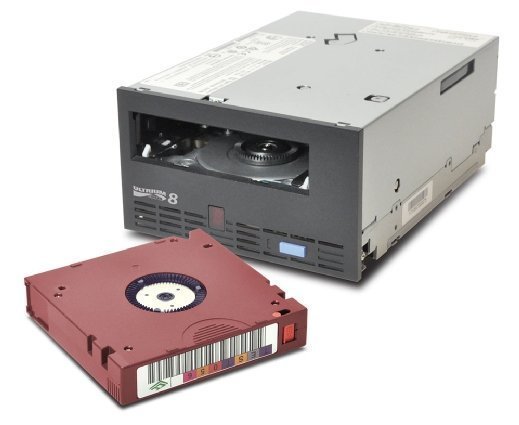
Top vendors and types of tape
LTO is the most popular tape format on the market, although enterprise tape supports greater capacity per cartridge. The most recent iteration, LTO-9, was released in 2020. It has a capacity of 18 terabytes and up to 45 TB compressed.
Hewlett Packard, IBM and Seagate -- which later sold its tape business to Quantum -- formed the LTO Consortium in the late 1990s as an alternative to Quantum's proprietary Digital Linear Tape format.
IBM and Oracle lead the pack of enterprise tape providers. Like LTO, their tape technologies are based on barium ferrite media, but they provide drive technology innovations, tape lengths and cartridge formats that work for their customers.
For example, the IBM 3592 Jaguar series tape system uses its TS1150 drive and claims an uncompressed storage capacity of up to 10 TB. Oracle, which bought Sun Microsystems and StorageTek, has been building on a tape technology line called T10000 since 2010, offering a T10000D drive and cartridge with a native uncompressed capacity of 8.5 TB.
Magnetic tape vs. disk vs. cloud storage
Disk surpassed tape as a preferred backup storage media in the late 1990s. Later innovations in the tape world, including IBM's Linear Tape File System (LTFS), made it easier to access data on tape. Files and objects can be copied directly to a tape repository running LTFS technology, so they retain their native structure and metadata.
Tape is faster than disk when performing streaming read/write operations, but content on magnetic tape can only be read or written in a sequential format by spooling it to the appropriate position.
In contrast to disk, where access times are measured in milliseconds, tape access times can be seconds or minutes long. As a result, tape's serial access might be good -- uncompressed transfer speed for LTO-9 is approximately 400 megabytes per second -- but timely random access is almost impossible to achieve.
Cloud providers have embraced tape for long-term data retention. For example, Amazon Glacier has a strong tape component. Google has long incorporated tape for disaster recovery; when Gmail went down for three days in 2011, the company rescued the system using tape backup.
Advances in tape technology and future outlook
Tape has added features over the years.
LTO-3, launched in 2004, added the write-once, read-many feature, which writes data to a tape one time and prevents its erasure. LTO-4 in 2007 provided data encryption. In 2010, LTO-5 added LTFS, which provides for indexing and partitioning. All later LTO releases also include these features.
The newest versions, LTO-8 and LTO-9, use tunnel magnetoresistance (TMR) for tape heads, which enables bits to be written to smaller areas of LTO storage media. The technology marks a switch from the previous giant magnetoresistance. These newer iterations also use barium ferrite magnetic particles for increased tape storage capacity.
However, with the inclusion of TMR and barium ferrite, LTO-8 and LTO-9 are only backward-compatible to one generation. LTO could previously read back two generations and write back to one generation.
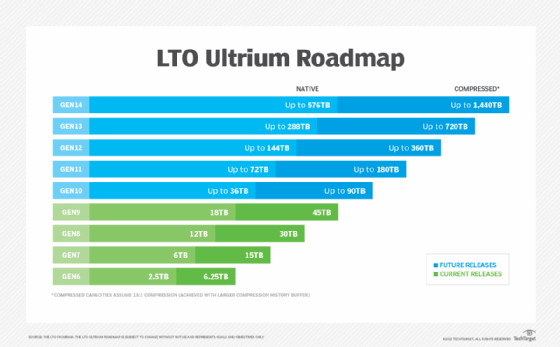
As of 2023, the LTO roadmap projects out to the 14th generation. The projected capacity specifications are as follows:
- LTO-10: up to 36 TB capacity; up to 90 TB compressed.
- LTO-11: up to 72 TB capacity; up to 180 TB compressed.
- LTO-12: up to 144 TB capacity; up to 360 TB compressed.
- LTO-13: up to 288 TB capacity; up to 720 TB compressed.
- LTO-14: up to 576 TB capacity; up to 1,440 TB compressed.
In 2020, IBM and Fujifilm said they had developed technology for the highest recording areal density for magnetic tape storage, resulting in about 580 TB uncompressed capacity per cartridge. This was an increase from the 330 TB uncompressed capacity per cartridge achieved by IBM and Sony in 2017.
In 2018, Quantum and Veeam launched what they called a converged tape appliance that integrated Veeam's data protection software with Quantum's backup.
In addition, top cloud storage providers Amazon Web Services, Microsoft Azure and Google Cloud Platform use LTFS-attached tape libraries as part of their storage architectures, according to Iron Mountain.
Magnetic tape storage best practices
Magnetic tape cartridges are resilient, but they still require proper care. Although the life span of a tape is expressed in years, careless handling can cut that to weeks or destroy a tape completely.
Dust, dirt and oils are harmful to tape. Users should keep tapes in their plastic cases when they are not in use. In addition, users should avoid doing the following:
- Handling the tape directly.
- Touching the tape surface.
- Opening the drive doors manually.