logical unit number (LUN)

A logical unit number (LUN) is a unique identifier for designating an individual or collection of physical or virtual storage devices that execute input/output (I/O) commands with a host computer, as defined by the Small System Computer Interface (SCSI) standard.
SCSI is a widely implemented I/O interconnect that can facilitate data exchange between servers and storage devices through transport protocols. Examples of transport protocols include Internet SCSI and Fibre Channel. An SCSI initiator in the host originates the I/O command sequence, which is then transmitted to a target endpoint or recipient storage device. A logical unit is an entity within the SCSI target that responds to the SCSI I/O command.
LUNs are used to identify subsets of data in a disk so that the computing devices using them can execute operations.
How LUNs work
LUN setup varies by system. A logical unit number is assigned when a host scans an SCSI device and discovers a logical unit. The LUN identifies the specific logical unit to the SCSI initiator when combined with information such as the target port identifier.
The logical unit may be a part of a storage drive, an entire storage drive or all parts of several storage drives such as a hard disk drive, solid-state drive or tapes, in one or more storage systems. A LUN can reference an entire RAID set, a single drive or partition, or multiple storage drives or partitions. In any case, the logical unit is treated as if it is a single device and is identified by the logical unit number. The capacity limit of a LUN varies by system.
A LUN is central to the management of a block storage array in a storage-area network (SAN). Using a LUN can simplify the management of storage resources because access and control privileges can be assigned through the logical identifiers.
Types of LUNs
The underlying storage structure and logical unit type play a role in performance and reliability. Some examples include:
- Mirrored LUN: Fault-tolerant LUN with identical copies on two physical drives for data redundancy and backup.
- Concatenated LUN: Consolidates several LUNs into a single logical unit or volume.
- Striped LUN: Writes data across multiple physical drives, potentially enhancing performance by distributing I/O requests across the drives.
- Striped LUN with parity: Spreads data and parity information across three or more physical drives. If a physical drive fails, the data can be reconstructed from the information on the remaining drives. The parity calculation may have an impact on write performance.
LUN uses
The primary use case of a LUN is to act as an identifier for designating a storage device; however, the use case may be different per type of LUN. For example, a simple LUN is used as a designator for one portion of or one whole physical disk. Spanned LUNs are designators that signify a LUN that spans over two or more physical disks. Mirrored LUNs are used to indicate data that is held on one disk is copied in a second disk -- this is used in case one disk fails.
LUNs can be used for zoning and masking in SANs or they can be virtualized to map multiple physical LUNs.
Although the term LUN is only the identifying number of the logical unit, it is common to hear it used as shorthand to refer to the logical unit itself.
LUN zoning and masking
Storage area networks will control host access to LUNs in order to enforce data security and integrity. LUN masking and switch-based zoning manage the SAN resources accessible to the attached hosts.
LUN zoning provides isolated paths for I/O through an FC SAN fabric between end ports to ensure deterministic behavior. A host is restricted to the zone in which it is assigned. LUN zoning is generally set up at the switch layer. It can help improve security and eliminate hot spots in the network.
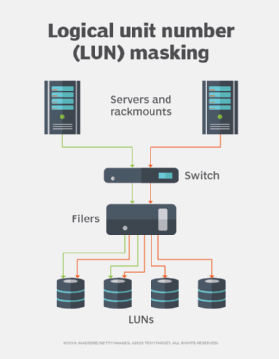
LUN masking restricts host access to designated SCSI targets and their LUNs. LUN masking is typically done at the storage controller, but it can also be enforced at the host bus adapter (HBA) or switch layer. With LUN masking, several hosts and zones can use the same port on a storage device; however, they can only see the specific SCSI targets and LUNs they have been assigned.
LUNS and virtualization
A LUN constitutes a form of virtualization in the sense that it abstracts the hardware devices behind it with a standard SCSI method of identification and communication. The storage object represented by the LUN can be provisioned, compressed or deduplicated as long as the representation to the host does not change. A LUN can be migrated within and between storage devices, as well as copied, replicated, snapshotted and tiered.
A virtual LUN can be created to map to multiple physical LUNs as well as to virtualize capacity, which can be created in excess of the physical space available. Virtual LUNs created in excess of the available physical capacity are used to help optimize storage use, since the physical storage is not allocated until data is written. This is sometimes referred to as a thin LUN.
A virtual LUN can be set up at the server operating system (OS), hypervisor or storage controller levels. Because the virtual machine (VM) does not see the physical LUN on the storage system, there is no need for LUN zoning.
A software application can present a LUN to a VM running on a guest OS. Proprietary technology, such as VMware's Virtual Volumes, can provide the virtualization layer and the storage devices to support them.
Managing LUNs
After LUN creation, the LUN can be managed through a software program that specifies the path between LUNs and hosts. LUNs can be managed by controlling LUN availability, increasing LUN size, and by deleting or securing the LUN. Management best practices will differ depending on the environment.
Users can increase the LUN size; there is no limit to how much space a LUN can take up. However, users should be careful not to allocate more storage space than is needed.
Deleting typically refers to writing over the used space in a volume, not unmounting or detaching the LUN. Admins should be the only users allowed to delete a LUN.
Zoning and masking are other ways of saying a LUN is secured.
LUN challenges
Common challenges related to LUNs often involve the use of the term as the logical unit/storage device itself. When referring to LUN in this sense, common challenges that appear tend to be related to resource management, multipath I/O and provisioning. For example, oversizing LUNs can quickly lead to wasted disk resources. Even if the assigned LUN never uses those resources, other LUNs will not be able to use them. Thin provisioning of LUNs will enable admins to create larger LUNs, but this can also lead to overcommitted storage resources. Overcommitting storage resources will, by proxy, make it easier to deplete physical storage space.
Traditionally handling a large number of LUNs has been difficult on Windows servers; however, Cluster Shared Volumes (CSV) can help manage this. Initially starting with Windows Server 2012, CSV allows admins to use a temporary resource exhaustion notification to ensure the storage device can allocate additional space to the LUN if needed.