database replication

What is database replication?
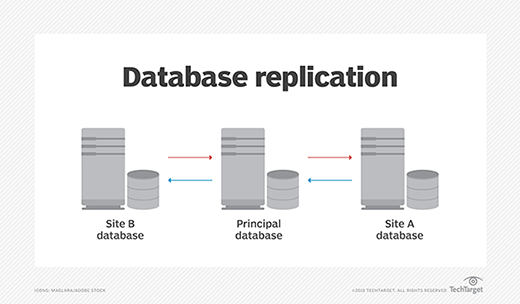
Database replication is the frequent electronic copying of data from a database in one computer or server to a database in another -- so that all users share the same level of information. The result is a distributed database in which users can quickly access data relevant to their tasks without interfering with the work of others. Numerous elements contribute to the overall process of creating and managing database replication.
How database replication works
Database replication can either be a single occurrence or an ongoing process. It involves all data sources in an organization's distributed infrastructure. The organization's distributed management system is used to replicate and properly distribute the data amongst all the sources.
Overall, distributed database management systems (DDBMS) work to ensure that changes, additions and deletions performed on the data at any given location are automatically reflected in the data stored at all the other locations. DDBMS is essentially the name of the infrastructure that allows or carries out database replication -- the system that manages the distributed database, which is the product of database replication.
The classic case of database replication involves one or more applications that connect a primary storage location with a secondary location that is often off site. Today, those primary and secondary storage locations are most often individual source databases -- such as Oracle, MySQL, Microsoft SQL and MongoDB -- as well as data warehouses that amalgamate data from these sources, offering storage and analytics services on larger quantities of data. Data warehouses are often hosted in the cloud.
Database replication techniques
There are several ways to replicate a database. Different techniques offer different advantages, as they vary in thoroughness, simplicity and speed. The ideal choice of technique depends on how companies store data and what purpose the replicated information will serve.
Regarding the timing of data transfer, there are two types of data replication:
- Asynchronous replication is when the data is sent to the model server -- the server that the replicas take data from -- from the client. Then, the model server pings the client with confirmation saying the data has been received. From there, it goes about copying data to the replicas at an unspecified or monitored pace.
- Synchronous replication is when data is copied from the client server to the model server and then replicated to all the replica servers before the client is notified that data has been replicated. This takes longer to verify than the asynchronous method, but it presents the advantage of knowing that all data was copied before proceeding.
Asynchronous database replication offers flexibility and ease of use, as replications happen in the background. However, there is a greater risk that data will be lost without the client's knowledge because confirmation comes before the main replication process. Synchronous replication is more rigid and time-consuming, but more likely to ensure that data will be successfully replicated. The client will be alerted if it hasn't, since confirmation comes after the entire process has finished.
There are also several types of database replication based on the type of server architecture. The term leader will be used in these types to mean the same thing as model in the previous asynchronous vs. synchronous examples:
- Single-leader architecture is one server that receives writes from clients, and replicas draw data from there. This is the most common and classic method. It's a synchronized method, but somewhat inflexible.
- Multi-leader architecture is multiple servers that can receive writes and serve as a model for replicas. It is beneficial for when replicas are spread out and leaders must be near all of them to prevent latency.
- No-leader architecture is every server that can receive writes and serve as a model for replicas. This was pioneered by Amazon's DynamoDB. While it offers maximum flexibility, it poses challenges for synchronization.
Advantages and disadvantages
Database replication is often overseen by a database or replication administrator. A properly implemented replication system can offer several advantages, including the following:
- Load reduction. Because replicated data can be spread over several servers, it eliminates the likelihood that any one server will be overwhelmed with user queries for data.
- Efficiency. Servers that are less burdened with queries can offer improved performance to fewer users.
- High availability. Employing multiple servers with the same data ensures high availability, meaning that if one server goes down, the entire system can still provide acceptable performance.
Many disadvantages of database replication stem from poor general data governance practices. These disadvantages include the following:
- Data loss. Data loss can occur during replication when incorrect data or iterations or updates of a database are copied and, consequently, important data is deleted or unaccounted for. This can happen if the primary key used to verify the quality of data in the replica is malfunctioning or incorrect. It can also occur if database objects are incorrectly configured within the source database.
- Data inconsistency. Similarly, incorrect or out-of-date replicas can cause different sources to be out of sync with each other. This may lead to wasted data warehouse costs that are spent needlessly analyzing and storing irrelevant data.
- Multiple servers. Running multiple servers has an inherent maintenance and energy cost associated. It requires either the organization or a third party to address these costs. If a third party handles them, the organization runs the risk of vendor lock-in or service issues beyond the organization's control.
Evolution of database replication
Early instances of database replication were typically described as master-slave configurations, but comparable descriptions today tend to incorporate terminology such as master-replica, leader-follower, primary-secondary and server-client.
Replication techniques centered on relational database management systems have expanded with the advent of the virtual machine and distributed cloud computing, to include nonrelational database types. Again, replication methods vary among such nonrelational databases as Redis, MongoDB and the like.
While remote office database replication may have been the canonical example of replication for many years, fail-safe and fault-tolerant database backup schemes have also arisen as drivers of replication activity -- as have horizontally scaling distributed database configurations, both on premises and on cloud computing platforms. Replication details vary between such relational systems as IBM Db2, Microsoft SQL Server, Sybase, MySQL and PostgreSQL.
In all cases, data replication design becomes a balancing act between system performance and data consistency. Database replication can be done in at least three different ways. In snapshot replication, data on one server is simply copied to another server or to another database on the same server. In merging replication, data from two or more databases is combined into a single database. And, in transactional replication, user systems receive full initial copies of the database and then receive periodic updates as data changes.
Database replication vs. mirroring
While data mirroring is sometimes positioned as an alternative approach to data replication, it is actually a form of data replication. In relational database mirroring, complete backups of databases are maintained for use in the case that the primary database fails. Mirrors, in effect, serve as hot standby databases. Data mirroring has found considerable use within the Microsoft SQL Server community.
With database replication, the focus is usually on database scale out for queries -- requests for data. Database mirroring, in which log extracts form the basis for incremental database updates from the principal server, is typically implemented to provide hot standby or disaster recovery capabilities. Simply put, mirroring focuses on backing up what's there, and replication focuses on improving operational efficiency as a whole -- which involves maintaining secure data backups using mirroring.
Database replication tools
Companies can either use the database replication tool available offered by their database software provider or invest in third-party replication tools to execute and manage database replication processes. The latter option allows flexibility: Third-party tools are typically vendor-agnostic and can be used to create data replicas across multiple types of databases in an organization.
Database replication software
Third-party database replication tools that work with various databases include the following:
- Qlik Replicate. A software package that focuses on being easy to learn and implement, Replicate uses automation and log-based capture to minimize IT operations workload. This involves capturing streams of continuous data, which is ideal for companies that need ways to process big data efficiently.
- Informatica Data Replication. Informatica can target a wide range of database and data warehouse appliances. It offers the Data Engineering product series for streaming, integration, quality and masking enterprise data. Its website features a how-to library and list of guides to help customers.
- Talend Open Studio for Data Integration. One of the most prominent open source data integration products, it includes a large repertoire of resources for those just getting started with the software. Talend offers tutorials, demos and blog posts on topics like the use of metadata and best practices for data model design best practices. There is also a community of experienced users that new users can reach out to for tips on using Talend's data integration solution.
- Quest SharePlex. This offering focuses mainly on Oracle database replication. It offers both on-premises and cloud solutions for Oracle database replication. Shareplex promises high availability, 24/7 customer support and a simple user experience that allows for quick replication and scaling.
Examples of database vendor replication tools include the following:
- Microsoft's SQL integration features. Including SQL Server Integration Services (SSIS) for Azure, these tools specialize in cleaning, aggregating, merging and copying data, as well as extracting and loading data.
- Oracle GoldenGate. This tool offers log-based capture for Oracle databases. It promises simple configuration, extreme performance and comprehensive security. It features a visual management and monitoring feature called the Management Pack as well.
- IBM'S Db2 SQL replication tool. This tool has two main replication options: Q and SQL. It is one of IBM's most popular replication tools. It is useful for distributing source data to multiple targets, but may not be ideal for all replication scenarios because it has high latency.