failover

What is failover?
Failover is a backup operational mode in which the functions of a system component are assumed by a secondary component when the primary becomes unavailable. An organization can fail over either after failure or during scheduled down time.
Failover is an integral part of mission-critical systems and often a key component of disaster recovery.
What does failover do?
The purpose of failover is to make a system more fault tolerant. Failover can apply to any aspect of a system.
Within a personal computer, for example, failover might be a mechanism to protect against a failed processor. Within a network, failover can apply to any network component or system of components, such as a connection path, storage device or Web server. For example, with a failover server, a backup server takes over when the primary server fails.
How does failover work?
Failover involves automatically offloading tasks to a standby system component. The procedure should be as seamless as possible to the end user.
The capacity for automatic failover means that normal functions can be maintained despite the inevitable interruptions caused by problems with equipment.
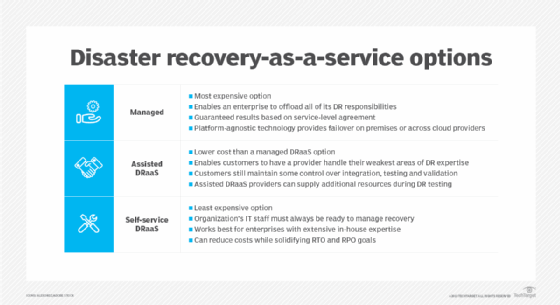
Failover can occur in another data center or in the cloud through disaster recovery as a service.
Why is failover important in the data center?
Originally, stored data was connected to servers in very basic configurations: either point to point or cross coupled. In such an environment, the failure -- or even maintenance -- of a single server frequently made data access impossible for many users until the server was back online.
The emergence of storage area networks made any-to-any connectivity possible among servers and data storage systems. In general, storage networks use many paths -- each consisting of complete sets of all the components involved -- between the server and the system. A failed path can result from the failure of any individual component of a path. Multiple connection paths, each with redundant components, ensure that the connection is still viable even if one or more paths fail.






