What is the difference between memory and storage?
Storage and memory, while connected, fulfill separate roles in a computer. Memory meets temporary data access needs and storage retains data and other files over the long term.
The terms memory and storage both refer to a computer's internal storage space. Memory is where an application puts the data it uses during processing. A storage drive is where data is placed for long- or short-term retention.
The storage drive was traditionally an HDD, but SSDs with flash memory modules are now commonly used for primary storage. System memory, often referred to as random-access memory (RAM), is faster than disk or flash storage, but it's also usually more expensive on a per-gigabyte basis.
A key difference between memory and storage is what happens to the data when the system is turned off. RAM is generally volatile, meaning data is retained only as long as the OS runs. Storage devices are usually non-volatile, so they retain data when the system is off.
The line between memory and storage blurs with techniques such as paging, also known as swap space. Swap space is part of the storage drive that is turned into memory for the OS to swap out applications and data from active memory to the drive. In this way, the storage drive functions as active memory that's slower than the system's RAM but can be used to create larger virtual memory spaces. Most OSes will create a swap or paging space that is equal to two times the RAM space on a computer.
What is memory?
RAM is the memory hardware in a computer where the OS, applications and data are kept for processing. When a computer boots, it loads these files into RAM, usually from the storage media. When the computer is turned off or loses power, the files return to storage.
RAM functions as the computer's short-term memory. It's much faster to read from and write to than the HDDs, SSDs and other types of drives used for storage. The computer's CPU relies on memory to quickly get the data and applications it needs to function.
The line between active memory and storage is getting closer to not just blurring, but disappearing altogether.
RAM consists of microchips combined into memory modules. These modules plug into a computer's motherboard and connect to the CPU via a bus. The amount of RAM on a computer is usually small compared with the amount of storage. When a computer uses all its free memory, the processor must copy old data from RAM back to storage and replace it with new data. This process slows the computer's operation, but most computers have extra slots to add more RAM to address this issue.
A computer's primary memory is usually made up of dynamic RAM (DRAM) modules. Computers also have cache memory for high-speed data processing that consist of higher performance static RAM (SRAM) modules that are faster than DRAM. Frequently used instructions and data for high-performance operations are moved to cache memory, which is physically closer to the CPU than DRAM. The processor can then access instruction and data files faster from the SRAM than if they were on primary memory. Cache memory is 10 to 100 times faster than RAM. It requires only a few nanoseconds to respond to a CPU request.
A computer system also includes read-only memory, which keeps files such as system firmware or BIOS programs that are only read in ROM. You can update the information in this kind of memory in a process called flashing, but otherwise, it can only be read, not written to, by the computer system. Other types of memory function as storage drives for everything from MP3 and picture files to presentations and other data. These formats include USB flash drives, CompactFlash cards or memory sticks.
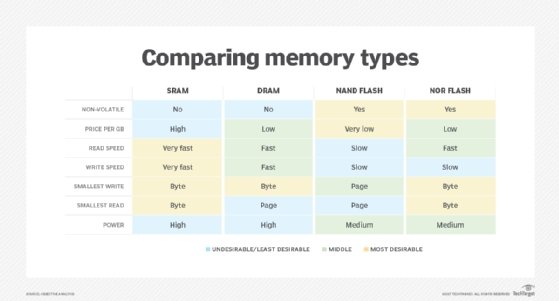
Comparing memory types used in active memory and storage.
What is storage?
If a computer only had RAM, users would need to reenter all the data and applications they wanted to use each time they logged in. Storage allows computers to hold onto the data, applications, documents and other material needed to run the computer and enable applications indefinitely, and it's retained when power is lost or the computer is reset. Computer storage refers to the data stored and the hardware and software used to capture, manage and prioritize the data.
Storage on a computer commonly consists of a storage device, such as an SSD or HDD. HDDs store data on magnetic spinning disks and SSDs store data on flash memory chips. Storage devices provide non-volatile memory, enabling them to retain data even without power and when the computer is turned off.
Storage in general is slower than RAM, and HDDs are slower than flash-based SSDs. Unlike RAM, storage is not directly connected to the CPU. The interface that connects storage to the CPU also affects the speed of storage. The SATA interface has been the standard interface for SSDs and HDDs for years. That began to change in the last decade with the advent of NVMe technology. NVMe is optimized for NAND flash, using a PCIe interface to connect flash storage and the CPU. NVMe drives reduce latency and deliver higher IOPS. Drives using a PCIe 3.0 connection have write speeds that are more then seven times faster than SATA drives. Besides speed, NVMe-based SSDs offer other advantages, including scalable performance and energy efficiency.
As the price of the flash memory used in SSDs has fallen, solid-state drives have become the top choice for primary storage. However, HDDs still boast price advantages and will remain strong for secondary storage. High-capacity hard drives based on shingled magnetic recording, heat-assisted magnetic recording and microwave-assisted magnetic recording technologies are expected to hit the market in 2020 or 2021, with a speed boost from multiactuator drives that will help keep HDDs relevant.
Other types of external storage include optical storage, which writes and reads data with a laser, and tape storage. These serve mostly for long-term data storage. Optical storage includes Blu-ray, CD-ROM and DVD discs.
Tape is a form of magnetic storage that was once the most common type of storage used for backup. HDDs and even SSDs have become the main choices for backup because of their performance and ease of use compared to tape, but tape remains popular for archiving because of its low cost, high capacity and long-term durability.
The future of memory and storage is fuzzy
The line between active memory and storage is getting closer to not just blurring, as in paging, but disappearing altogether. Manufacturers are working on technologies that promise to combine the speed of RAM with the ability of flash to be non-volatile memory.
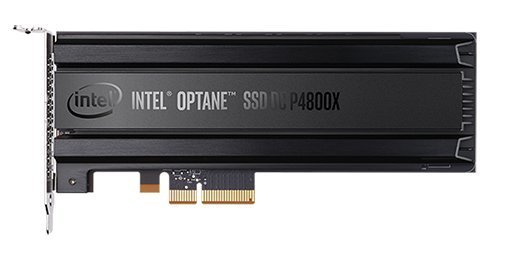
Intel's SSD DC P4800X is based on 3D XPoint technology.
Among these technologies are ferroelectric RAM and magnetoresistive RAM, but the one closest to achieving the goal of being both active memory and storage is phase-change memory (PCM). Intel and Micron Technology Inc. developed 3D XPoint technology to fill the performance gap between DRAM and NAND flash. 3D XPoint is based on PCM, with a transistor-less, cross-point architecture that puts selectors and memory cells at the intersection of perpendicular wires.
Intel has 3D XPoint-based SSDs, memory and dual in-line memory module cards on the market under its Optane brand. Intel has said that early testing of its upcoming second-generation SSDs would sustain an average read I/O latency of about 10 microseconds up to a load of at least 800,000 IOPS. In 2019, Micron rolled out its first 3D XPoint SSD that it claimed is three times faster than NAND with 11 times lower latency and supports up to 2.5 million IOPS and 9 GBps read/write bandwidth.