SAN switch (storage area network switch)
What is a SAN switch (storage area network switch)?
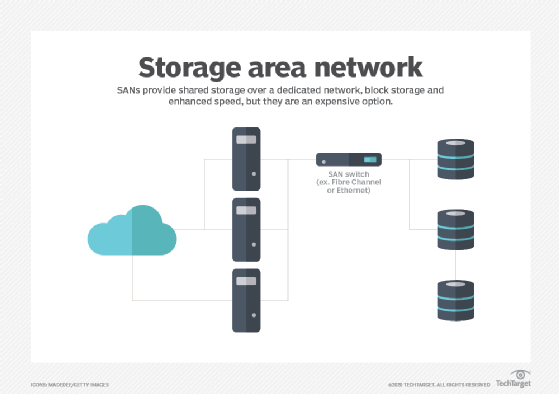
A SAN switch (storage area network switch) is a device that connects servers and shared pools of storage devices and is dedicated to moving storage traffic.
SAN switches let administrators build vast high-speed storage networks that interconnect thousands of servers accessing petabyte-scale data. Organizations that use SANs for their storage network system use SAN switches to decouple storage and hosts, enabling the transmission of data between different storage devices and servers. Administrators might also use SAN switches to provide redundancy in the case of path failure.
At its most basic, a SAN switch manages traffic flow between the servers and storage devices, examining data packets and forwarding them to their intended destinations. Over the years, however, SAN switches have become more sophisticated, adding features such as path redundancy, network diagnostics and bandwidth autosensing.
Fibre Channel vs. Ethernet
SAN switches fall into two main categories: Fibre Channel (FC) and Ethernet. FC switches are the most common. They're compatible with FC technologies and are either modular or fixed. A modular switch is typically a director-class FC switch that's expandable and offers a high port count. A fixed switch is one with a fixed configuration that can't be expanded. Director-class FC switches often support features such as encryption and zoning for load balancing and data access control.
Although FC switches represent the most common type, Ethernet-based SAN has been growing in popularity, especially with the proliferation of 10 Gigabit Ethernet (GbE). Ethernet switches and other Ethernet equipment are less expensive and easier to deploy and maintain because they don't require specialized hardware or administrative skills, as is the case with Fibre Channel. In addition, 1 GbE switch ports can be aggregated to deliver higher throughput, providing more deployment flexibility.
Ethernet networks also support Internet Small Computer System Interface (iSCSI), a common storage protocol built on top of TCP/IP. Comparisons between FC SAN and Ethernet SAN typically come down to Fibre Channel versus iSCSI, as it's implemented on an Ethernet network.
Fibre Channel has a reputation for delivering much better performance than Ethernet, especially if the Ethernet SAN is being shared with non-storage traffic. On dedicated networks, however, Ethernet still competes with Fibre Channel, especially as 25 GbE, 40 GbE and 100 GbE grow more widespread. That said, Fibre Channel is still considered a reliable and secure storage Fabric and it provides more advanced management capabilities than Ethernet.
How a SAN switch works
Both Ethernet and FC switches manage traffic flow, but they can only support the specific technologies behind them. An Ethernet switch, for example, shares in the same benefits and limitations as Ethernet itself. The same goes for FC switches. For example, an FC switch might incorporate the Registered State Change Notification service, which informs hosts about changes in the fabric. Because the service is specific to Fibre Channel, only an FC switch can support it; an Ethernet switch cannot.
Switches based on the same protocol can also vary. They might include a different number of ports or support different maximum port speeds. They might also provide different management and security features, with some features tied to specific server architectures.
For example, Brocade offers a 16 Gb FC switch for Hewlett Packard Enterprise (HPE) BladeSystem c-Class enclosures. The switch includes 28 ports with up to 16 Gbps connection port speeds, providing an aggregate bandwidth of 448 Gbps. The switch can also use inter-switch link trunking to improve performance and reliability, and it supports Access Gateway mode, which enables interoperability with other SAN fabrics running supported firmware. The switch also supports HPE Power Pack+ software to manage data flow, and it can integrate with HPE BladeSystem Onboard Administrator, HPE Systems Insight Manager and HPE Storage Essentials.
Ethernet switches also provide an assortment of features. Dell EMC, for example, offers a stackable Ethernet switch that includes 32 ports with 100 GbE connection speeds. Like many Ethernet switches, the Dell EMC switch supports iSCSI deployments, including data center bridging, which enables converged lossless transactions. The switch also provides enhanced mirroring capabilities, standards-based switching abstraction and Integrated Routing and Bridging in either asymmetric or symmetric mode.
Both switches, as well as other data center switches, also offer several additional features. For example, many include redundant power supplies with at least one hot-swappable power supply. They might also provide quality of service (QoS) features, management ports, and management and monitoring tools, as well as various switch configuration capabilities. In addition, SAN switches typically conform to industry standards such as the Simple Network Time Protocol or Simple Network Management Protocol (SNMP).
While SANs offer high-performance storage, they're still vulnerable to data breaches and other threats unless properly secured.
SAN switch vs. other network switches
Network switches are categorized and subcategorized differently from one source to another, making it difficult to understand their differences. Even so, most switches can be grouped into the following broad categories:
- Managed. These switches provide the most comprehensive set of features and deliver the highest levels of security and control over the network. They're typically used in large networks and data centers, although they're sometimes deployed in smaller networks. They provide such features as QoS, support industry standards such as SNMP, and offer advanced management and switch configuration capabilities. They're also the most expensive of the five types. SAN switches typically fall into this category.
- Unmanaged. These switches are usually used in home networks, small organizations or other settings that require only basic connectivity and relatively few ports. They're simple to deploy -- mostly plug and play -- and require no configuration. They're also much cheaper than managed systems, providing only the most basic networking functionality.
- Smart. These partially managed switches fall somewhere between managed and unmanaged switches. They include basic management and security capabilities, along with features such as QoS or network segmentation. They can also support virtual local area networks (VLANs), something unmanaged switches can't do. Smart switches provide a more affordable alternative to managed switches and can be useful for organizations that want to implement VLANs or segmentation. They can also be used in conjunction with managed switches to extend a network to the edge.
- Power over Ethernet (POE). PoE switches send data and power through a network to different devices. Both power and data transmission are completed on a single line. A PoE switch makes it possible to extend a network to an area without a nearby power outlet. PoE networks can support both Ethernet and PoE-enabled devices.
- Keyboard, video and mouse (KVM). KVM switches are used to connect a keyboard, mouse or monitor to multiple servers. Typically, these switches are used to control groups of servers. This is useful if a single user needs to control the functions of multiple computers from one device.
SAN switch vs. LAN switch
Another common category of switch is the LAN switch, which is typically based on Ethernet technologies. Ethernet provides a common standard that describes how network devices should format and transmit data so other networked devices can communicate with each other. The terms LAN and Ethernet are commonly used interchangeably, as are the terms LAN switch and Ethernet switch. LAN switches include those used for Ethernet SANs.
A LAN is like a SAN in that they both provide a data communication path. A LAN, however, can be used to connect file servers, printers, storage arrays, desktops and other networked devices -- meaning that a LAN switch can direct traffic between an assortment of endpoints. Ideally, a SAN switch is dedicated to storage traffic only -- whether based on Ethernet or Fibre Channel technologies -- and the switch is optimized for that specific purpose. Likewise, while SAN switches are connected in a fabric topology, LAN switches use a bus or star topology.
Even if Ethernet and FC switches are based on different fabrics, they still share the same principle: to connect servers and shared storage pools together as efficiently and securely as possible.
SAN switches make the transmission of data between different storage devices and servers in a SAN fast and accessible. Learn more about the advantages and disadvantages that come with SANs.