Free DownloadWhat is data backup? An in-depth guide
Data backup is constantly evolving, yet it endures as a necessity for organizations facing a host of potential disruptions. TechTarget's data backup guide discusses the importance of backup, outlines the benefits and challenges of providing this layer of data protection and provides an overview of different backup approaches, technologies and vendors. It also describes how to create and implement a data backup plan and includes a planning template. Throughout the guide, hyperlinks point to related articles that cover those topics in more depth.
Data is your organization's most important digital asset. Here are some tips on how to ensure physical data backups are stored at a safe and secure location.
Creating regular data backups is necessary to protect essential data from both natural disasters and human destruction. It's equally important for organizations to decide on the location of physical backup media storage, an approach that provides a degree of long-term, secure data protection that cloud services can't match.
If backups aren't placed in a safe and secure -- yet easily accessible -- location, their value is greatly diminished, said Bob Duhainy, a core faculty member in the Doctor of Information Technology program at Walden University in Minnesota. "As cybercriminals and hackers get smarter about stealing digital data ... off-site backup of physical backup media, as an add-on or alternative to cloud backup, makes more sense."
The safest place for backup media storage, Duhainy suggested, is a secure, physically remote data storage facility dedicated primarily to data backup and recovery services.
"Some attributes of a good off-site storage location include climate-controlled units, 24-hour physical and non-physical security, and flexible leasing options," he said.
For most organizations, storing data for the long term on physical media means taking a step back in time to the pre-cloud era.
"Although this method might seem archaic, the safest way to physically back up data is on a piece of physical media," said Darren Deslatte, cybersecurity expert and vulnerability operations leader at IT provider Entrust Solutions based in New Orleans.
What to look for in secure backup media storage
The ideal off-site storage center is located discretely in a remote area and guarded 24/7 by security personnel and extensive video surveillance systems, according to Attila Tomaschek, a digital privacy expert with England-based privacy clearinghouse ProPrivacy.
"Other security measures that should be taken into consideration include physical barriers, metal detectors, multiple security checkpoints, single entry and exit points, and biometric locks and scales to weigh visitors upon entry and exit," Tomaschek said. Additionally, a good backup media storage center should protect against natural disasters and come equipped with sprinkler systems, backup generators, battery banks and climate control and cooling systems, he added.
As cybercriminals and hackers get smarter about stealing digital data ... off-site backup of physical backup media, as an add-on or alternative to cloud backup, makes more sense.
Bob DuhainyWalden University
Many document storage companies, such as Iron Mountain, offer secure and climate-controlled off-site locations, said Mathew Sobkowicz, growth manager at MASV, a large file transfer service provider based in Ottawa. Such facilities are generally ideal for long-term media storage, although potentially expensive.
Evaluating the downsides vs. benefits
The pros of remote storage generally outweigh the cons, according to Mark Houpt, chief information security officer at data center operator DataBank in Dallas.
"One factor is that files will be geographically distant from your main office, which could be a pro in the case of a natural disaster," Houpt said. But you may not have instant access to your data. "It depends on the provider's protocols and processes."
Perhaps the biggest mistake organizations make with off-site backup media storage is underestimating how frequently they must update backups. Transactional data is particularly vulnerable to loss.
"In today's modern technology, most backups occur in the cloud and can happen daily, which ensures the backup data is as recent as possible," MASV's Sobkowicz said. "Off-site backups, depending on the frequency of backup, may be out of date."
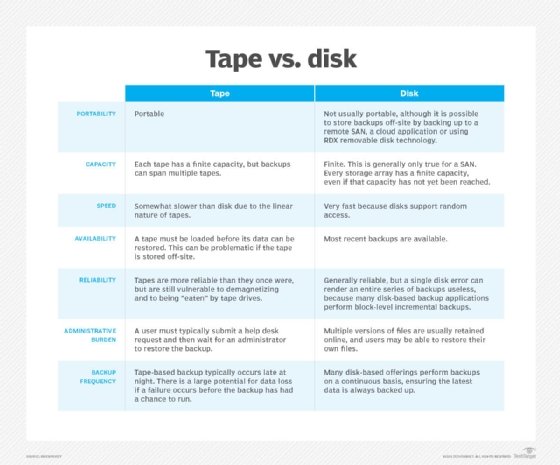
Another important consideration when managing off-site backups is ensuring that the media itself stays current and functional.
"Hard drives should never be stored longer than six months without being powered on, as they have a tendency to fail," Sobkowicz said. "When using LTO tape, you'll need to ensure that the hardware to read the media works and is available."
While you should always consider the cloud as a primary method to back up critical data, off-site physical media storage can provide an extra layer of security. In addition, in the case of rarely accessed legacy media, it presents potential financial savings as well, given cloud storage costs.